How to Automate Legal Discovery in 2026 (Using AI)
How to Automate Legal Discovery Responses
Automating legal discovery responses involves choosing appropriate software from the many options available on the market. The solution you select will determine how much you can reduce labor and increase your billable hours.
The following is a step-by-step guide to how the most advanced AI-powered software automates legal discovery responses.
These products balance the need to speed up work against the requirement for legal accuracy and compliance. The strongest AI-powered solutions give attorneys useful automation while leaving final legal decisions in the hands of human reviewers.
1. Analyze the Discovery Request
Discovery automation tools start by reading the request you received from opposing counsel.
Using artificial intelligence, the system scans the document, separates each interrogatory or request, and pulls out the important details. Modern AI systems can process language in context, which gives them capabilities that go well beyond simple keyword searches.
Then, the software organizes everything into a clean structure to give you a quick overview of the issues in play. That can support early case assessment because you can identify patterns, pressure points, or themes and start isolating key evidence sooner.
For example, Briefpoint uses machine learning and natural language processing to turn dense discovery requests into simple, organized lists. You can review each item clearly, think through discovery objections, and decide how it connects to your broader strategy or a potential motion.
AI-powered legal discovery can become even more useful when a matter involves substantial electronic data. Depending on the platform, legal technology can help organize electronically stored information and other relevant documents so attorneys have a clearer view of the material surrounding each request.
In short, you get clarity fast. The platform also recognizes formats used in all 50 states, so the structure aligns with local rules from the beginning.
2. Respond
Legal AI tools can help you respond faster to discovery requests using templates, objection libraries, and AI-generated suggestions.
Briefpoint gives you two main options. You can select relevant objections from a menu and insert them directly into your response, or let the software suggest objections and explain why they may apply. You can then review the AI outputs and edit them based on the facts of the legal case and applicable legal standards.
You can also add a substantive response to provide more context.
Briefpoint’s Bridge feature handles client data collection. It turns selected interrogatories into easy-to-understand questions, sends them to the client, and adds their answers to the discovery document.
Reducing repeated copying and manual entry can limit human error while making data collection easier to manage.
3. Download And Review
Finally, you will need to download and review the response document. Solutions vary in their usability. Some require using their integrated word-processing software, while others force you to use PDFs.
In contrast, Briefpoint lets you download your document into Microsoft Word, which probably integrates better into your workflow than a separate review platform.
You can see the edited document at any production stage and add or subtract from it whenever you want. Attorney review gives you a chance to confirm that the response is complete, accurate, and appropriate before producing documents or serving the final response.
How to Automate Legal Discovery
AI tools can also automate the creation of legal discovery documents, such as requests for admission, requests for production, and interrogatories.
These capabilities mean you can automate the initiation aspect of legal discovery work, not just the response. The same technology can support parts of the broader e-discovery workflow when firms need to organize electronic evidence or connect requests with responsive material.
1. Design Your Document
The first step is to draft your propounding discovery document. Solutions begin by collecting essential information to populate the request.
For instance, Briefpoint asks for information about the case name, request type (request for admission, request for production, or interrogatory), and the responding party.
You can also link it to an existing case or client or a new one.
A structured starting point reduces repetitive setup and gives the software the information needed for document generation and data processing.
2. Add Requests
The next step is to add your requests. Document automation software accelerates this process by including pre-built requests grouped by case type and theories of law.
Briefpoint lets you select interrogatories related to “auto torts” with a click and add them to your request.
More broadly, AI-powered tools can help lawyers find useful language faster and organize requests around the issues involved in a matter. The attorney can then adjust the language based on the facts, jurisdiction, and litigation strategy.
3. Document Review
The final step is to download and review your newly generated request document. Again, Briefpoint lets you edit it in Word, which is ready to attach to an email or print after the review process.
Review is particularly important when leveraging AI for legal work. Automation can prepare a strong starting point, but lawyers remain responsible for checking the final document and confirming that it meets the requirements of the matter.
If you want to learn more about Briefpoint’s process, book your demo today!
The Benefits of Automating Legal Discovery
Automating legal discovery work can save a significant amount of time and money.
The key benefits extend into the quality of the workflow itself. AI-driven discovery tools can help law firms reduce repetitive work, organize information more consistently, and create more room for the strategic aspects of handling a case.
Here’s a deeper look into how AI legal discovery can change the way you manage cases.
Reducing Errors in Discovery Responses
One of the biggest advantages of automation in legal discovery is reducing avoidable mistakes. A missed objection, incomplete response, or inconsistent language can create problems during legal proceedings.
AI technology can help by reviewing large volumes of requests, flagging relevant information, and applying consistent formatting.
More advanced e-discovery tools may use machine learning algorithms, predictive coding, or technology-assisted review to prioritize material based on likely relevance.
That added consistency can be useful when several matters have tight deadlines or regulatory compliance requirements.
For example, automation can:
- Flag duplicate or overlapping requests
- Suggest standard objections
- Highlight missing responses
- Keep formatting consistent with court rules
Picture a 30-question discovery set. Manual drafting makes it easier to miss a subpart or reuse the wrong objection. An automated system can build from a structured template, check for gaps, and give you a cleaner first draft to review.
Finding Relevant Evidence in Large Data Sets
Discovery can involve far more than written files. Emails, messages, PDFs, databases, electronic records, and other forms of digital evidence may all become part of the review process. Certain matters can involve audio and video evidence as well.
Advanced tools can help organize this information and extract meaningful insights from larger collections of material. Some platforms allow natural language queries, giving reviewers another way to search for concepts or events that may be difficult to capture with exact search terms.
Depending on the capabilities of the software, generative AI may help summarize material or identify connections within a collection. Other systems can identify patterns based on document characteristics and reviewer decisions.
Audio-based evidence and other nontraditional formats may require specialized tools, so firms should check what file types a platform actually supports before relying on it for a particular matter.
The purpose of the technology is to help attorneys reach potentially important information sooner while keeping lawyers involved in decisions about relevance and use.
Protecting Privileged Information
Handling large volumes of documents manually increases the risk of accidentally revealing privileged information.
Automation tools are designed to offer permissible tools to help you carefully craft responses while protecting sensitive data.
Some AI-powered systems can help flag material for privilege review or make it easier to isolate sensitive records before producing relevant documents. Firms still need review procedures that account for confidentiality, privilege, and their own obligations around data security.
When considering new software, look at how the provider stores information, who can access it, and what safeguards apply to client data. Those questions are increasingly important as legal AI becomes part of the wider legal landscape.
Improving Client Relationships
Discovery can quietly pull you away from your clients. Hours go to reviewing files, organizing responses, and tracking details. That leaves less time for real conversations about what the case means and where it’s heading.
When legal automation handles the repetitive parts, legal teams have more room to focus on the relationship itself. You can spend that time walking a client through risks, refining case strategy, or preparing them for a deposition.
Those conversations build confidence and show that you’re thinking ahead instead of reacting to paperwork.
For example:
- Instead of emailing repeatedly to clarify interrogatory answers, you review organized responses and discuss strategy in one focused call
- Instead of scrambling to finalize a production, you meet with the client to explain what the other side is likely to do next
- Instead of spending hours formatting objections, you use that time to gain insight into facts that could shape a motion or negotiation
Clients notice quality. They notice when their attorney is present, prepared, and proactive. Automating discovery gives you more time to work with them on the substance of the matter.
Shifting Focus to Higher-Value Tasks
When automation handles repetitive steps, legal teams can put their energy somewhere more useful. You spend less time managing documents and more time thinking through strategy, preparing for hearings, or working through negotiations.
In a busy legal practice, focus matters. When your attention is tied up making sure every response is complete and formatted correctly, it becomes harder to step back and consider the bigger picture.
Automation clears some of that space. The draft is already structured, and the supporting details are easier to review.
Attorneys can spend the recovered time on more strategic aspects of a matter, including evaluating evidence, shaping arguments, and deciding how the case should move forward.
Improving Efficiency and Workflow
Discovery often slows down in small, avoidable ways. Someone is waiting for a document map. A draft needs formatting fixes. Bates numbers have to be double-checked. Each step may look minor on its own, but together they stretch the timeline.
Automation can smooth those pressure points. Requests are organized at the start, responsive files can be connected with the corresponding requests, and drafts come out structured and ready for review. Producing relevant documents becomes easier to coordinate when information is organized within the same workflow.
Some AI tools can support document review on a much larger scale, which is one reason they have become increasingly relevant to modern litigation. However, the quality of the result still depends on good inputs, clear review procedures, and appropriate attorney oversight.
Allowing legal teams to move through discovery with a clearer structure makes the work feel more controlled. You can discover gaps or inconsistencies earlier and keep matters progressing with fewer avoidable corrections.
What to Consider Before Implementing AI in Discovery
Adding automation to discovery requires more than choosing software and uploading a file. Your firm should understand where the technology fits into the existing workflow and where lawyer review remains necessary.
Start by considering the types of information you typically handle. A matter centered on written requests may require different capabilities from one involving massive collections of electronically stored records or other forms of electronic evidence.
You should also look at:
- Accuracy and review controls: AI results should be easy for attorneys to verify before anything is served or produced.
- Security: Review how the provider handles client information, permissions, retention, and storage.
- Workflow fit: The platform should reduce work rather than create extra steps around uploading, exporting, or review.
- Training resources: Lawyers and staff need to understand how the system works and where its limitations lie.
- Compliance: Your process still has to satisfy applicable discovery obligations, court requirements, and professional duties.
AI can help with routine discovery work, but lawyers remain responsible for the legal judgment behind the final result.
Overhaul Your Discovery Workflow With Briefpoint
Discovery has a way of taking over your calendar.
One set turns into thousands of pages. Those pages can lead to hours of manual review, document mapping, drafting, formatting, Bates numbering, and assembling a production that still needs one more pass before it goes out the door.
Briefpoint was built to cut down that workload.
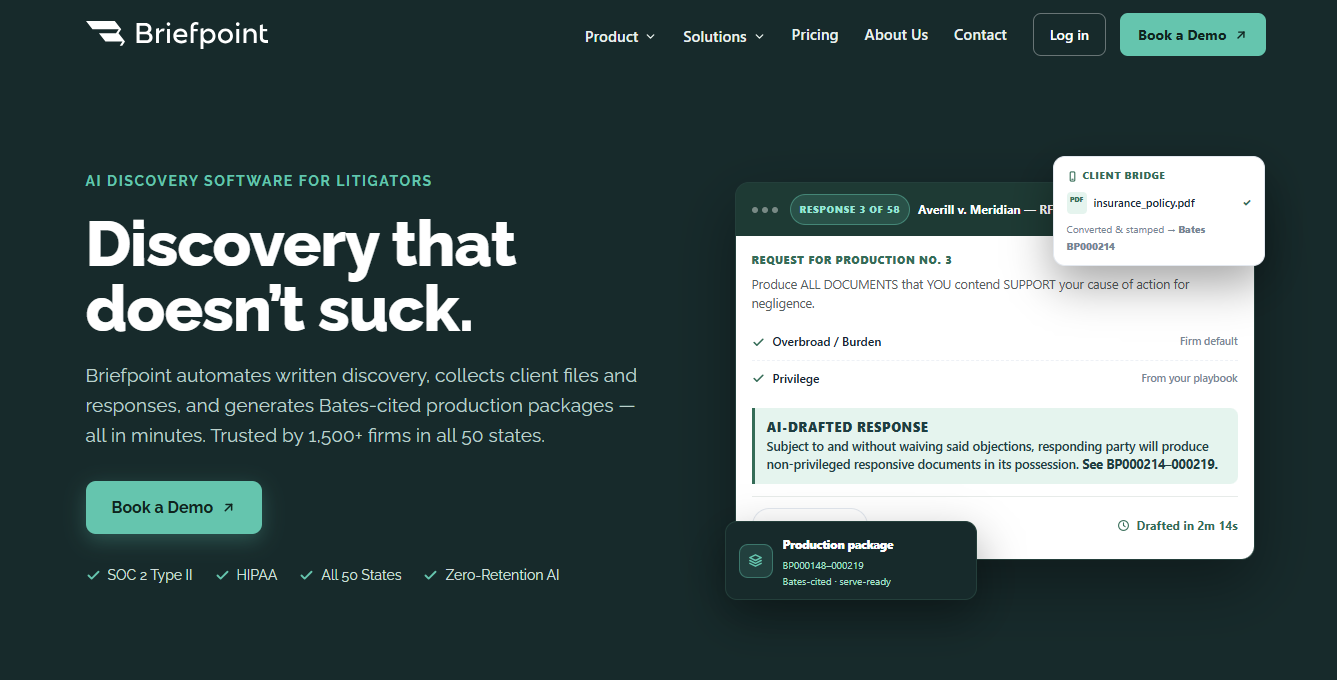
With Autodoc, you upload the complaint, RFPs, and production files. The system surfaces responsive documents for each request, generates a Word response with page-level Bates citations, and packages a production set that’s ready to serve.
What used to take up to 30–40 hours can move in minutes.
You still have control over the result. You can see where the system searched, confirm or remove files, tag privileged material, and edit everything in Word before anything leaves your office. That oversight is important whenever you’re using AI-powered legal tools on real case material.
AI can handle more of the underlying discovery work, leaving you with more time for strategy and the parts of legal practice that require your judgment.
If discovery has started to feel like a recurring time sink, it’s worth seeing what a different process looks like.
Schedule a demo and walk through your next set with Briefpoint.
