How to Implement Legal Workflow Automation
What Is Legal Workflow Automation?
Legal workflow automation is a broad concept, and it can look a little different depending on how your team works.
For some legal teams, it starts with document creation. For others, it shows up in things like task routing, approvals, deadline tracking, or the way matters move from one person to the next. The common thread is using legal tools to handle work that follows a predictable pattern.
At a basic level, legal workflow automation means automating repetitive tasks that would otherwise require the same manual steps every time.
For instance, drafting standard documents, moving discovery requests through review, assigning internal follow-ups, and pulling matter details can all become part of a structured process.
For law firms and in-house teams, this changes how legal operations run day to day. Legal professionals still review the work and make judgment calls, but they spend less time on tasks that don’t bring much value in the big picture.
Some teams rely on a broader legal workflow management system, while others use a mix of legal technology platforms for different parts of the process. Either way, they can modify workflows as their needs change instead of rebuilding everything from the ground up.
In other words, legal workflow automation is a practical way to organize legal work so the predictable parts move faster and people can stay focused on the decisions that need legal expertise and institutional knowledge.
Legal Tasks That Are Best to Automate First
If you’re getting started with legal workflow automation, the smartest move is to focus on work that already follows a clear pattern.
These are the tasks that show up often, take time, and rarely need to be reinvented:
Discovery Drafting and Response Preparation
Discovery drafting is often the first place legal teams feel the drag of manual processes. Requests come in, documents pile up, and hours disappear into copying language, tracking citations, and double-checking references. The work is familiar, but the effort adds up fast.
This is why discovery drafting tends to be the first win for document automation. The structure rarely changes. What changes are the facts, the productions, and the references tied to each request.
Automation handles those routine tasks so you are not rebuilding the same response from scratch every time.
Tools like Briefpoint are designed specifically for this stage of litigation. Briefpoint uses your productions and case materials to generate documents that are already mapped to discovery requests, complete with citations and formatting aligned to how discovery actually gets served.
Common discovery tasks that benefit from automation include:
- Drafting responses to interrogatories, requests for production, and requests for admission
- Pulling facts and references directly from productions
- Applying consistent language to objections and responses
- Reducing repetitive manual edits across documents
To see how this works in practice, learn more about Briefpoint and how it supports automated discovery workflows.
Intake Forms and Matter Setup
Intake and matter setup may feel routine, but they shape how smoothly the work runs later.
Information often arrives through emails, calls, or shared documents. Someone then has to collect it, enter it into the right system, and check that nothing is missing. That repeated handling creates extra work before the legal team can move forward.
In contrast, legal workflow management software gives intake a cleaner starting point. A legal intake form collects the necessary details upfront and feeds them into the team’s matter management process. For law firms and in-house legal teams, this can streamline repetitive tasks and reduce double entry.
An automated intake workflow may include:
- Matter details: Client information, matter type, and key facts are captured in one place.
- Task assignments: Follow-ups are sent to the right team members automatically.
- Deadline creation: Important dates stay connected to the matter from the start.
- Document collection: Supporting files are uploaded and stored with the correct record.
- Centralized dashboards: Teams can view new requests, open matters, and pending actions in one place.
Standard Legal Document Drafting
Thanks to modern legal tech, you don’t need to reinvent routine documents. Most standard drafts rely on the same clauses, the same structure, and the same information, and automation can take care of those repetitive details.
Artificial intelligence can handle document handling without turning your work into a black box. You enter the details once, the system generates the draft, and you step in to review and adjust.
So, the focus shifts away from tedious tasks and back to legal judgment, which is where your time actually matters.
Documents that are commonly automated include:
- Engagement letters
- NDAs
- Fee agreements
- Settlement agreements
- Employment agreements
- Demand letters
- Basic contracts and amendments
Internal Reviews and Approvals
Automated review and approval workflows help documents move through the right people in the right order. Once a draft enters review, the system tracks who needs to see it next and what must happen before it can move forward.
Comments, approvals, and version history stay connected to the same document, so reviewers are less likely to work from an outdated draft. Manual review still happens, but the coordination around it becomes much easier to manage.
For legal leaders, this can reduce administrative burden and make review status easier to see without repeated emails or check-ins.
A contract update, for example, might move from legal review to compliance sign-off and then to final approval. The workflow manages those handoffs while each reviewer focuses on the substance of the document.
This is particularly useful in contract review and other complex workflows where several people need to weigh in. Contract lifecycle management tools often support this process by keeping review stages, comments, and approvals tied to the same contract from start to finish.
Deadline Tracking and Reminders
Automated deadline tracking keeps due dates connected to the work itself rather than scattered across separate systems. Tasks, filings, and reviews carry their own deadlines, and reminders can trigger based on the schedule your team sets.
Legal workflow tools make it easier to see what is coming up and where timelines overlap. This is useful for legal ops teams managing several active matters or workflow solutions at the same time.
Legal automation can help track:
- Filing deadlines
- Review dates
- Client follow-ups
- Internal approvals
- Discovery due dates
- Task reminders
Status Updates and Task Assignments
Status updates and task assignments can change automatically as work moves through a workflow. Once one step is completed, the system can assign tasks to the next person and update the matter status at the same time.
For example, when a discovery draft is ready for review, the workflow can notify the assigned attorney, mark the draft as pending review, and create the next deadline. No one has to update a separate tracker or send another message.
Automating processes like these helps many legal professionals stay on top of overlapping work. Information remains current as matters develop, which reduces the administrative effort tied to monitoring progress and reporting on it.
AI-powered legal tools may add another layer by suggesting task assignments, flagging delays, or identifying the next likely step. The result is better workflow efficiency because the system reflects the work as it happens.
Types of Legal Workflow Automation Tools
There isn’t really a single product called a “legal workflow automation tool.” In reality, legal workflows get automated through a mix of tools that handle different parts of the work. Each one covers a piece of the process, and together they shape how work moves through a legal team.
Here are the main categories you’ll see most often:
- Legal practice management software: Handles matter tracking, task management, deadlines, and high-level organization for day-to-day legal work.
- Document generation tools: Support document automation by turning structured inputs into drafts, which reduces manual legal drafting and repetitive edits.
- Case management systems: Keep matter information, timelines, communications, and filings connected in one place throughout a case.
- Document management platforms: Store, organize, and version legal documents so files stay searchable and current as work evolves.
- Document review tools: Assist with reviewing large volumes of documents, flagging patterns, and managing review workflows.
- Legal research tools: Help legal professionals find relevant authority and reference materials more efficiently during active matters.
- Legal workflow automation software: Connects tasks, documents, and reviews into structured workflows that move work forward automatically.
How to Automate Legal Workflows
Now that you’ve seen which legal tasks tend to automate well, the next move is turning one of those tasks into a workflow your team can actually use.
Keep it simple at first, then build from there as the process starts to feel familiar:
Step 1: Pick One Workflow With Clear Steps
Pick something you already know well. If you can explain the steps without thinking too hard, that’s a good place to start. Early legal process automation works best when the process feels familiar.
Discovery response drafting is a solid example. Requests arrive, productions get reviewed, responses take shape, citations get added, and the draft goes through review before it’s served.
The details change, but the flow generally stays the same.
Step 2: Write Down the Exact Inputs You Need
Before automating anything, get specific about the information the workflow depends on. Walk through the entire process and note what needs to be available at each stage. This keeps the setup practical and avoids gaps later.
Typical inputs include:
- Client or matter details
- Key dates and deadlines
- Document or request types
- Source files or productions
- Review or routing preferences
Remember: Clear inputs matter even more when workflows support broader strategic initiatives.
Step 3: Standardize Templates and Rules
Automation works best when the process follows clear, repeatable standards. Templates and rules shape how documents look, how decisions are made, and how work moves from one step to the next.
This can apply to client intake, discovery responses, contracts, and other legal documents. It also helps reduce administrative tasks because team members are not recreating the same language or structure every time.
Most legal workflow solutions rely on standards such as:
- Document templates and formatting
- Standard response language
- Review and approval sequences
- File naming and organization rules
- Required fields for client intake
The more consistent these elements are, the easier it becomes to build a workflow that runs smoothly and produces reliable results.
Step 4: Choose the Tools That Fit Your Process
Now it comes down to choosing tools that fit the way your team already works. A long feature list may look impressive, but it matters less if the software adds friction or forces people to change familiar processes.
Look at factors such as:
- Integration depth: Check how well the platform connects with your existing tools, including document systems, email, billing, and project management software.
- Workflow fit: Make sure the tool supports the steps your team already follows rather than pushing everyone into a rigid setup.
- Ease of use: Legal technology should reduce effort and not create another complicated system to manage.
- No-code flexibility: No-code tools and a no-code workflow builder can make it easier to adjust forms, routing rules, and approval steps without relying on developers.
- Access controls: Review how the platform limits sensitive information based on roles, teams, or matter assignments.
- Compliance tracking: Look for tools that record approvals, changes, and required steps so the team can see how work moved through the process.
- Scalability: Consider whether the tool can support more matters, users, or workflows as your needs grow.
- Business tool compatibility: Review how easily information can move between legal systems and the broader business tools used by other departments.
Step 5: Build the Workflow and Test It on Real Matters
Once the pieces are in place, it’s time to build the workflow and see how it holds up in real work.
Start with existing workflows rather than hypothetical ones. Real matters reveal gaps and edge cases much faster than test data ever will.
As you test, keep the focus on how the workflow supports the people using it. Team members should understand what the workflow does, what it does not do, and where they step in.
Keep in mind that proper training matters here, even if the workflow feels simple on paper.
Testing usually includes:
- Running the workflow on a small number of live matters
- Watching where manual steps still show up
- Adjusting rules, templates, or inputs as needed
- Gathering feedback from each team member involved
Step 6: Add Review Checks and Approval Points
Automation still needs human eyes at the right moments. Review checks and approval points give you natural pause spots before work moves forward, especially when client information or sensitive details are involved.
A discovery response, for example, might be drafted automatically, but wait for attorney review before it’s finalized.
A contract can move through its workflow but stop for approval before it goes out the door. Those moments matter, and building them in helps with error reduction without breaking the flow.
Most teams rely on existing systems for these checks, which keeps the process familiar. Reviews happen in the same way each time, ensuring consistency while leaving room for judgment when it counts.
Step 7: Connect Systems and Reduce Double Entry
You should not have to enter the same information several times just to keep work moving. When systems are connected, details can pass from one step to the next with far less manual data entry.
Information collected during intake can flow into matter records, documents, follow-up tasks, and the document management system your team already uses. That keeps the process moving while reducing the chance of errors when names, dates, or case details change.
For in-house counsel, connected systems can be particularly useful when legal work touches several departments. The same information stays consistent as it moves through intake, review, approval, and reporting.
Better connections also make compliance easier to manage because teams are working from the same source data rather than separate versions stored in different places.
Step 8: Roll It Out, Track Results, and Refine
Once the workflow is working, it’s time to roll it out more broadly and see how it performs in day-to-day use.
Start with one practice area or team before expanding further, especially if the workflow touches multiple roles.
As it runs, pay attention to how it’s actually used:
- Where people pause or work around the workflow
- Which steps save time and which still feel manual
- How the workflow fits into existing routines
- Feedback from team members using it daily
For law firms and corporate legal departments, this stage helps surface real impact. Over time, small adjustments can improve fit, reduce friction, and bring down operational costs without reworking the entire process.
Why Discovery Drafting Is the Smartest Place to Start
The legal workflow automation market covers everything from intake and billing to contract analysis. Still, discovery drafting is often one of the easiest places to see meaningful results.
The volume can be heavy, but the steps are predictable enough for automation to take on much of the repetitive work.
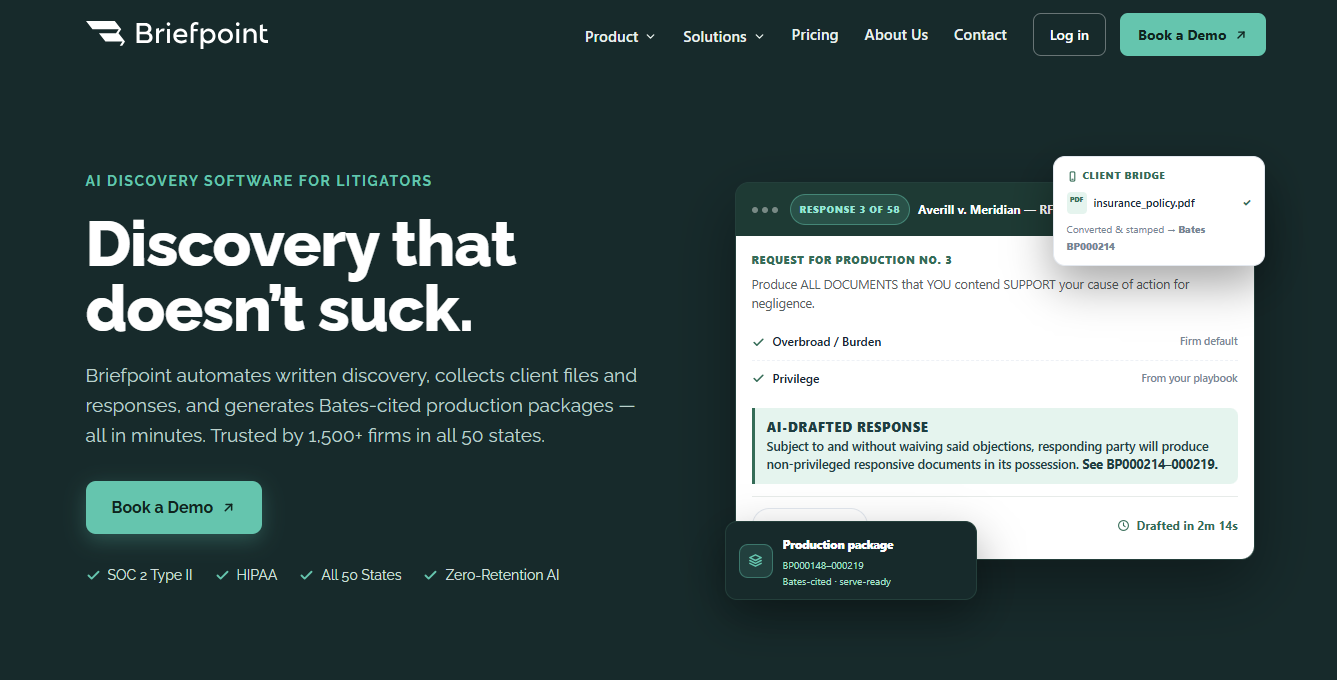
Briefpoint was built around that workflow. It can generate objection-aware discovery documents, collect client responses, translate interrogatories into plain language, prepare Bates-cited production packages in minutes, and much more.
Plus, its integration capabilities with tools like Clio, MyCase, and Smokeball help keep the process connected to systems firms already use.
Starting here gives your team a clear, practical win. Once drafting takes less time, it becomes easier to apply the same approach to intake, reviews, deadlines, and other routine handoffs.
Ready to take discovery drafting off your plate? Book a demo with Briefpoint today.
