A Comprehensive Guide to Legal Document Automation
What Is Legal Document Automation?
Legal document automation refers to using software to create legal documents with far less manual drafting.
You usually answer a set of questions, pull in existing matter or client data, and the document builds itself based on rules you’ve already defined. That means no starting from scratch or copying language from old files and hoping it still applies.
For legal professionals, this usually shows up in routine work. Engagement letters, discovery responses, court filings, and contracts all follow familiar patterns. Legal document automation software takes those patterns and applies them consistently.
Still, automated legal documents require review. The difference is how you get there. Legal document creation moves faster because the base draft is already complete and organized, which leaves more time for judgment calls and less time on mechanical edits.
Legal Document Automation vs. Traditional Drafting
Traditional legal drafting usually means starting with a prior document and working forward from there. You copy language, update the facts, adjust clauses, and read through everything to confirm it still fits the situation.
That approach has worked for a long time, but it relies on manual processes at every step. When documents go through multiple revisions, small details can be overlooked, and older language can carry over without anyone noticing right away.
On the other hand, legal document automation works differently. Document templates are set up in advance, with rules that control how the language changes. When you create automated legal documents, the software pulls in client or matter information and builds the draft for you.
For instance, a discovery response can reflect the case type, or a contract can apply the right terms based on jurisdiction or deal structure. The framework stays consistent, and the details adjust as needed.
At the end of the day, automation tools don’t replace review or decision-making. They reduce the time spent assembling documents so the focus stays on substance, accuracy, and legal judgment rather than repetitive drafting work.
How Legal Document Automation Works
The process behind legal document automation is fairly simple: the software manages the routine steps, and legal teams keep control over wording and review.
Here’s how it usually comes together.
Document Templates
Templates are the foundation of legal document automation. You create them once inside legal document software, then reuse them whenever you need to prepare documents with the same general structure. The wording stays consistent, while the details change based on the matter and the data input provided.
Some platforms use smart templates with rules that insert relevant clauses or adjust sections automatically. This makes template creation more flexible than relying on basic, standardized templates that require extensive manual edits.
A single set of predefined templates can support multiple customized documents, which reduces repetitive work and helps keep drafts consistent.
Templates are commonly used for:
- Contracts and agreements
- Discovery responses
- Court filings
- Client letters
- Estate planning documents
- Real estate leases
- Internal legal forms
- Corporate filings
These are all common legal documents with predictable structures, which makes them strong candidates for automation.
Rules and Logic
Rules and logic control how a document changes as information is added. This is the part that allows document assembly software to handle complex legal documents without locking you into a single version of the text.
Conditional logic sits behind the scenes and decides which sections appear, which clauses change, and which language gets left out.
For example, a document can include different legal language based on jurisdiction, party type, or claim category.
A discovery response might apply one set of discovery objections for a product case and a different set for an employment matter. Or a contract might adjust indemnity or termination terms based on deal size.
You don’t rewrite the document each time. The rules handle those variations automatically, and the structure stays intact. That keeps the draft consistent while still allowing it to reflect the facts of the matter.
Data Collection and Intake
Data collection and intake cover how information enters the document workflow.
In a law firm automation setup, this step reduces scattered emails, separate notes, and repeated follow-ups. Key details are gathered once, then used throughout the drafting process. That means less manual entry and fewer opportunities for inconsistencies.
Most teams rely on client intake forms, internal questionnaires, or existing legal CRM systems. The questions stay focused on the document being prepared, so legal professionals collect only the information they need.
Details such as names, parties, dates, claims, and jurisdiction can then flow directly into the draft. This helps legal operations teams spot missing information earlier and keeps the document moving with less cleanup later.
Common collection methods include:
- Client intake forms that capture matter details upfront
- Internal questionnaires completed during case setup
- Matter management or CRM systems that store client information
- Uploaded files used as drafting references
A cleaner intake process can also improve client interactions by reducing repetitive requests and giving clients a clearer way to provide information.
Automated Document Assembly
Automated document assembly is simply the point where the draft gets built for you. Once the information is collected and the rules are applied, legal automation software uses automated templates to generate documents as a complete first draft, without anyone piecing it together manually.
Take an RFP response as an example. Party details come from intake, objections adjust based on the matter, and citations fall into place automatically.
For a contract, the right clauses appear based on jurisdiction or deal terms, and the draft is ready to review. The document drafting process still includes edits and judgment. However, the setup work is already handled.
Legal tech and automation workflows make the biggest difference here. You move straight into reviewing the document and not building it from the ground up.
For litigation teams, tools like Briefpoint apply this approach directly to high-volume document work, helping generate documents faster while keeping review and control firmly in your hands.
Review and Final Edits
Review and final edits remain a critical part of the process, particularly for complex documents. Automation handles the setup, but accuracy, legal judgment, and final approval still rest with the reviewer.
Because the draft is already structured and populated, review time can focus on substance rather than cleanup. You’re checking arguments, legal language, context, and factual accuracy rather than fixing formatting or retyping basic details.
For example, an automated discovery response may already include the correct party names, request numbers, and consistent language. The attorney can then focus on whether each objection fits the request and whether the response accurately reflects the available information.
A clear approval workflow can make this stage more predictable. Drafts move through the right reviewers, requested changes are tracked, and finalized documents are approved before they are sent or filed.
Types of Legal Documents You Can Automate
Legal document automation is a good fit for documents that follow a familiar pattern but change depending on the matter.
If your team relies on reusable templates or regularly updates older files, automation can support drafting documents without forcing everything into a one-size format.
Common document types include:
- Legal agreements: Contracts, NDAs, and other legal agreements that adjust terms based on parties, jurisdiction, or deal structure while keeping language consistent.
- Court documents: Pleadings, motions, and discovery responses that pull in case details and apply the correct formatting and legal language.
- Internal legal documents: Forms, approvals, and policy documents used by in-house legal departments to keep work organized and consistent.
- Customized legal documents: Documents built from a shared structure that change based on inputs like claim type, matter status, or jurisdiction.
- Legacy documents: Older templates and files that can be converted into automated formats, making them easier to update and reuse.
These documents all benefit from legal automation when the structure stays stable, but the facts change from one matter to the next.
What Are the Benefits of Legal Document Automation?
Legal document automation affects daily drafting work more than anything else. Once the repetitive steps are taken out of the process, these benefits tend to show up pretty quickly:
Improved Drafting Speed
Improved drafting speed is one of the most noticeable benefits of legal document automation. When the software handles setup, data entry, and document assembly, you no longer have to build each draft piece by piece.
Automated templates give you a complete starting point. Matter details fill in, sections adjust based on predefined rules, and the document reaches review much earlier.
For example, when drafting contracts, the software can insert party information, apply relevant clauses, and update defined terms based on the deal details. The reviewer can focus on negotiation points and legal accuracy rather than assembling the first draft manually.
Faster document turnaround times are among the key benefits because they help teams move work forward sooner while preserving time for careful review.
Greater Consistency in Legal Language
This benefit comes from taking the drafting decisions out of the moment and locking them into the document generation process. When the same templates and rules are used every time, the language stays aligned from one document to the next.
For example, a firm might use one approved set of definitions or standard clauses for a specific type of matter. With document automation in place, those sections appear the same way every time instead of being copied from different versions of old files.
That helps keep compliant documents aligned with internal standards and current requirements, but without relying on memory or last-minute checks.
Reduced Manual Data Entry
Reduced manual data entry comes from removing repetitive steps that add little value. When workflow automation pulls information from intake forms, matter systems, or existing records, the document no longer depends on repeated typing.
Details like names, dates, case numbers, and references are entered once, then carried into the relevant sections automatically. That keeps information aligned and reduces the cleanup needed during review.
It also makes it easier to manage legal documents at scale, since teams are working from the same source rather than updating separate copies by hand.
While review is still necessary, automation can support more accurate, error-free documents by limiting the small inconsistencies that often come with manual edits.
Lower Risk of Human Error
Lower risk of human error comes from taking routine edits out of the drafting stage. Automated document drafting handles the parts of the process that usually lead to small but costly mistakes, which helps keep accurate legal documents on track.
Common drafting errors include:
- Misspelled party names carried over from prior files
- Incorrect dates copied from older documents
- Inconsistently defined terms used throughout a draft
- Missing or duplicated sections after multiple revisions
When those details are handled automatically, review time can focus on substance rather than catching avoidable errors.
More Predictable Document Workflows
A familiar drafting task can still become difficult to plan when key details arrive late, or the review process changes from one matter to the next.
Document automation creates a more consistent path. Information is collected early, drafts follow an approved structure, and each document moves through a defined review stage. Repetitive drafting tasks happen in the same order, which makes workloads and turnaround times easier to anticipate.
For example, a team that uses automation to manage contracts can collect deal details through an intake form, generate the correct draft, and route it to the appropriate reviewer based on the contract terms. Everyone knows what happens next and who needs to act.
This structure helps teams produce accurate documents while leaving attorneys more time to focus on legal strategy and issues that require closer judgment.
What to Look for in Legal Document Automation Software
Choosing the right legal document automation software comes down to how well it fits into real legal work. The best legal document automation tools support how documents are already drafted, reviewed, and managed, rather than forcing teams to change everything at once.
Key things to look for include:
- Template flexibility: The software should support complex templates that reflect how your documents actually work, not just basic forms.
- Rules and logic support: Strong automation software for law allows conditional logic, so the language adjusts based on the matter details.
- Seamless integration with existing tools: Look for systems that work alongside existing tools like case management or legal document management platforms.
- Version control: Clear tracking of edits and updates helps teams avoid confusion, especially in large law firms.
- Collaboration and review controls: Drafts should move easily between contributors without losing structure or context.
- Support for different team types: The software should work equally well for large law firms and in-house legal teams.
- Document management compatibility: Generated files should fit cleanly into your document management system without extra cleanup.
Legal Document Automation That Fits How Litigation Actually Works
Legal document automation sounds broad until you see it applied to a specific problem. For litigation teams, that problem is discovery. Volume is high, deadlines are fixed, and the margin for error is small.
Briefpoint focuses on that reality rather than trying to cover every document under the sun.

Briefpoint supports the full discovery workflow, from propounding RFAs, RFPs, and interrogatories to responding with consistent objections, client-collected answers, and properly formatted outputs.
Autodoc is part of that system. It handles the most time-consuming step by turning productions and case files into Word-ready discovery responses with Bates citations and a service-ready production package.
Nothing about the process removes judgment or review. It shortens the path to a usable draft and keeps everything in a format attorneys already trust.
If discovery drafting keeps eating up hours that should go elsewhere, book a demo now.
Top 7 RFP Response Automation Software in 2026
What Is RFP Response Automation Software?
RFP response automation software helps you manage incoming questions, find relevant source material, and prepare answers with less manual drafting.
Most platforms focus on requests for proposal, where sales and proposal teams need to respond to detailed requirements from potential customers.
This is still a fairly specialized corner of business software. The market has fewer well-known platforms than broader categories like CRM or project management, though there are now several established RFP response tools built for specifics like proposal teams, enterprise bids, and security reviews.
The term can cover another use case too. In litigation, an RFP usually means a request for production. Legal teams use purpose-built software to review requests, locate responsive documents, draft objections and answers, and prepare production materials.
Because those workflows are so different, there is no single type of RFP software that fits every organization. The best option depends on what the abbreviation means in your work and which parts of the RFP response process take the most time.
What Types of RFPs Can Be Automated?
RFP automation covers a few different workflows, and the right software depends on what you are responding to. Some tools are built for sales proposals, while others support legal discovery or risk reviews:
Requests for Proposal
Requests for proposal are common in sales, procurement, and vendor selection. If your team handles these regularly, automation can help you review requirements, assign questions, pull approved content, and draft answers from an existing knowledge base.
It can also track progress through the RFP process and flag sections that still need input. This is useful when several people contribute to one bid or the submission has strict formatting rules.
Requests for Production
In the litigation process, RFP usually means a request for production. These requests ask a party to identify and produce documents relevant to a case.
Legal RFP automation can read the requests, locate responsive files, and draft objections or substantive responses.
In some cases, the software can connect written answers to supporting documents and prepare Bates-numbered production materials. Since the workflow involves procedural rules, privilege, and case evidence, you need software built specifically for legal discovery.
Security Questionnaires
Security questionnaires ask vendors to explain how they protect data and respond to risk. You will often see the same questions appear in slightly different forms from one customer to the next.
RFP response tools can match new questions with approved language from earlier submissions, internal policies, and security documentation. Your team can then review the suggested answers and update anything that has changed.
This can save a great deal of time on long questionnaires, though technical and legal reviewers should confirm every claim before the entire response goes out.
Due Diligence Questionnaires
Due diligence questionnaires (DDQs) help organizations evaluate a company before a transaction or business relationship moves forward. The questions may cover company records and compliance practices, along with financial or operational information.
Automation can organize due diligence inquiries, send them to the right contributors, and reuse approved answers from previous reviews. It can also keep supporting RFP documents linked to each response, which makes later follow-up easier.
7 Best RFP Response Automation Software
The best RFP response automation software depends on the type of request your team handles and how much of the response process you want to automate.
We’ve compiled the tools below to cover legal discovery, sales proposals, security reviews, and other common RFP workflows:
1. Briefpoint for Legal Requests for Production
Briefpoint is built for litigation teams responding to requests for production, so its version of RFP automation looks very different from proposal software.
You upload the requests along with the complaint and case files, then Autodoc identifies responsive documents and prepares a Word response with objections, substantive answers, and page-level Bates citations. It also assembles a Bates-numbered production package for review and service.
These capabilities make Briefpoint a strong choice if document review, response drafting, and production assembly are slowing your team down. You can confirm responsive files, remove irrelevant documents, flag privileged material, and edit the final language in Word.
All this keeps attorneys in control while reducing manual data entry and improving response accuracy. Typical drafting takes around 3 to 10 seconds per request.
Briefpoint can also collect files from clients through a secure, mobile-friendly link, then convert uploads to PDF, apply Bates numbers, and cite them in the response.
For later updates, supplemental responses preserve the original answers so your team can maintain consistency throughout the case.
Best Features
- Autodoc: Finds responsive documents for each RFP and drafts Bates-cited answers.
- Production assembly: Creates a Bates-numbered package that is ready for attorney review.
- Trust-and-verify controls: Lets you approve files, exclude irrelevant material, and flag privileged documents.
- Client Bridge: Collects client files through a secure link that works in English or Spanish.
- Supplemental responses: Builds updated responses from the original set while preserving earlier answers.
- Jurisdiction-ready formatting: Supports written discovery in all 50 states and 98 federal district courts.
Pros
- Built specifically for legal requests for production
- Cuts response time for document-heavy discovery
- Produces editable Word drafts with page-level citations
- Reduces repetitive review and production work
- Gives attorneys control over what gets produced
- Includes SOC 2 Type II security and zero-retention AI protections
2. Loopio for Sales and Proposal Teams
Loopio is an AI-powered RFP software platform built for proposal professionals, sales teams, and security teams handling recurring questionnaires and competitive bids.
It brings proposal creation into one workspace, where your team can import an RFP, assign questions, track progress, and prepare a first draft using approved company content.

Source: G2
Its centralized content library is a major part of the platform. Teams can organize vetted answers, product information, and supporting material, then use automated matching to find relevant content for new questions.
Loopio can generate tailored responses from trusted sources and show citations, which gives reviewers more context when checking AI-generated responses.
Plus, Loopio supports several response formats, including traditional RFPs, security questionnaires, and due diligence questionnaires. It’s a practical fit for established teams that want proposal generation, content governance, and contributor workflows in the same system.
Best Features
- Centralized content library: Stores approved answers in a searchable, structured knowledge base.
- Automated Answers: Matches incoming questions with relevant content and prepares draft responses.
- Response Intelligence: Generates answers from connected sources and provides citations for review.
- Project workflows: Assigns questions, tracks progress, and coordinates input from internal contributors.
- Content connectors: Pulls current information from sources like Google Drive, SharePoint, and company websites.
- Copilot Agent: Surfaces approved Loopio content inside supported Microsoft 365 workflows.
Pros
- Supports several sales and risk response formats
- Keeps reusable proposal content organized
- Helps teams maintain consistency between submissions
- Gives reviewers visibility into answer sources
- Combines proposal drafting with workflow management
- Works well for mature, collaborative response teams
3. Responsive for Enterprise RFP Management
Responsive is designed for companies where RFP work involves large teams, formal review steps, and a steady flow of complex requests.
Rather than centering the experience on proposal creation alone, the platform gives response leaders a clearer view of workloads, deadlines, ownership, and project status.
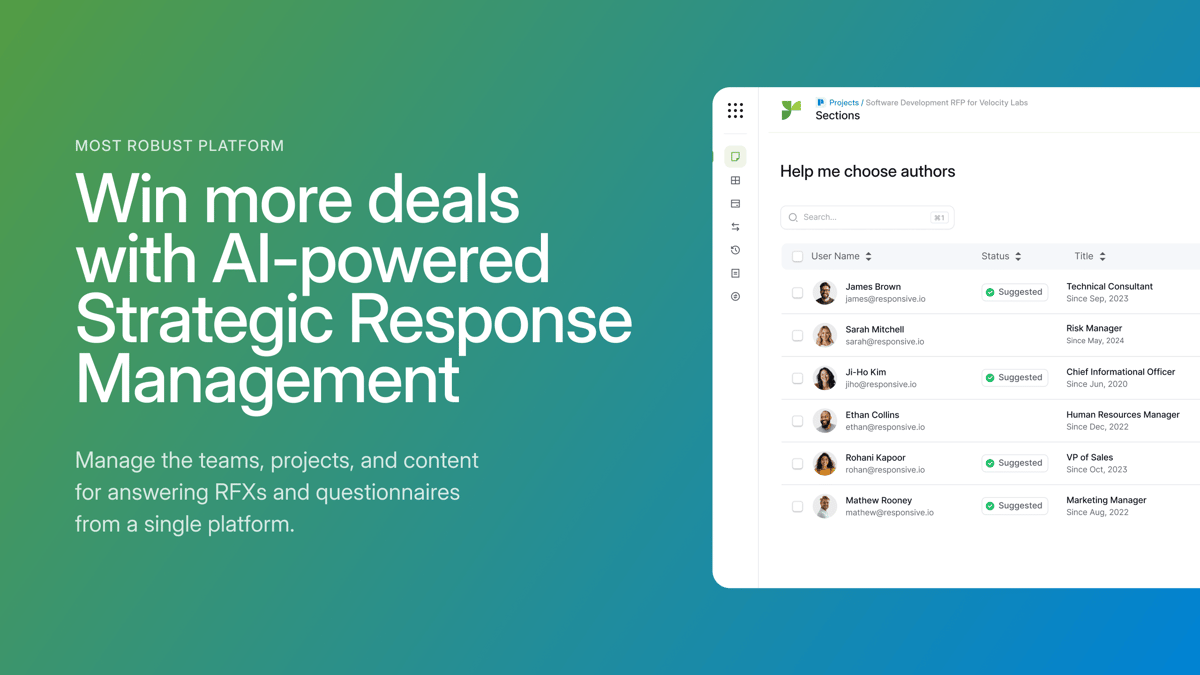
Source: G2
You can break an RFP into sections, route questions to the right contributors, and monitor the full project from a shared dashboard. Built-in controls support version control, approvals, and permission settings, which can be useful when legal, security, finance, and product teams all need to contribute.
Responsive also uses generative AI to produce draft answers and recommend relevant material from approved content libraries. Teams can review the source behind each suggestion and measure performance over time.
This makes the platform a good fit for enterprise organizations that want stronger oversight of the response process while still improving proposal quality.
Best Features
- Project dashboards: Show deadlines, assignments, completion rates, and outstanding work.
- Automated workflows: Route questions and approvals based on team roles.
- Responsive AI: Generates drafts from approved company information.
- Reporting tools: Track turnaround times, contributor activity, and project performance.
- Governance controls: Manage permissions, reviews, and content ownership.
- Integrations: Connect RFP projects with common CRM, storage, and collaboration tools.
Pros
- Built for high-volume enterprise response programs
- Gives managers clear visibility into active projects
- Supports detailed permissions and approval processes
- Helps reduce version control problems
- Makes cross-department contributions easier to manage
- Provides reporting beyond basic proposal writing
4. Conveyor for Security Questionnaires
Conveyor is an RFP response automation platform built around security questionnaires and customer compliance reviews. It fits companies whose sales process regularly includes detailed questions about security controls, data handling, and internal policies.
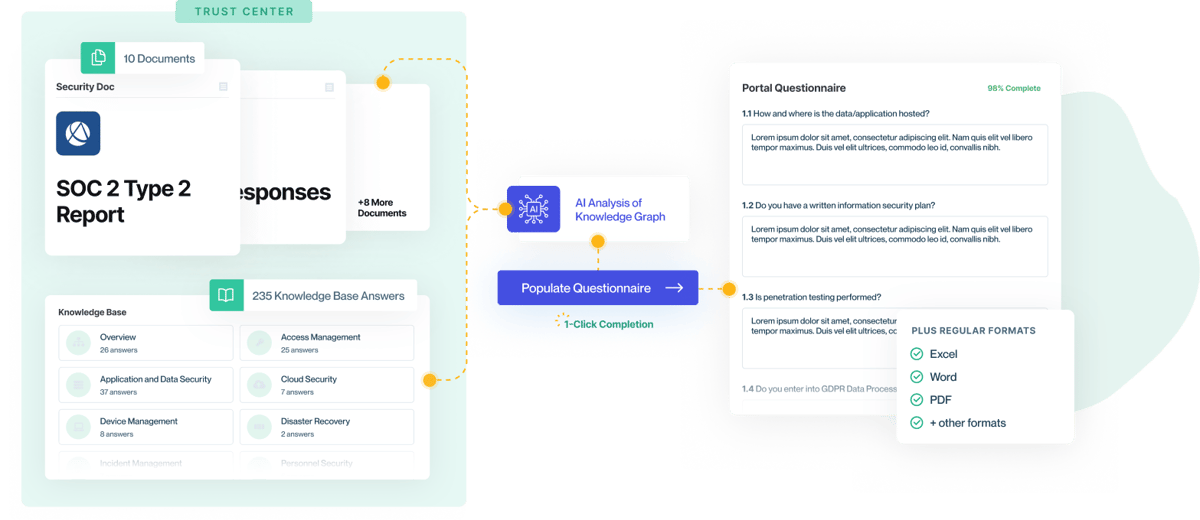
Source: G2
The platform reads incoming questionnaires, drafts answers from approved company sources, and returns the completed file in its original format. Each proposed response includes a citation, which helps reviewers check response accuracy before anything is sent to a prospective customer.
Conveyor also uses AI agents to manage parts of the response workflow, such as sorting incoming requests and routing questions to the right expert. This makes it a strong option when security questionnaires form a major part of your broader RFP process.
Best Features
- Questionnaire automation: Reads incoming files and drafts answers from approved sources.
- Source citations: Shows the policy or document supporting each answer.
- AI agents: Help manage intake, assignments, and review steps.
- Original-format export: Returns completed questionnaires in the submitted file format.
- Review workflows: Routes uncertain questions to internal experts.
- Trust Center: Shares approved security information with potential customers.
Pros
- Designed specifically for security questionnaires
- Connects security reviews to the wider RFP response process
- Gives reviewers traceable answer sources
- Supports detailed compliance requirements
- Reduces repetitive copying between questionnaires
- Creates a clearer audit trail for completed responses
5. AutogenAI for Narrative Proposal Drafting
AutogenAI is built for proposal teams that need to turn detailed RFP requirements into a structured, persuasive response.
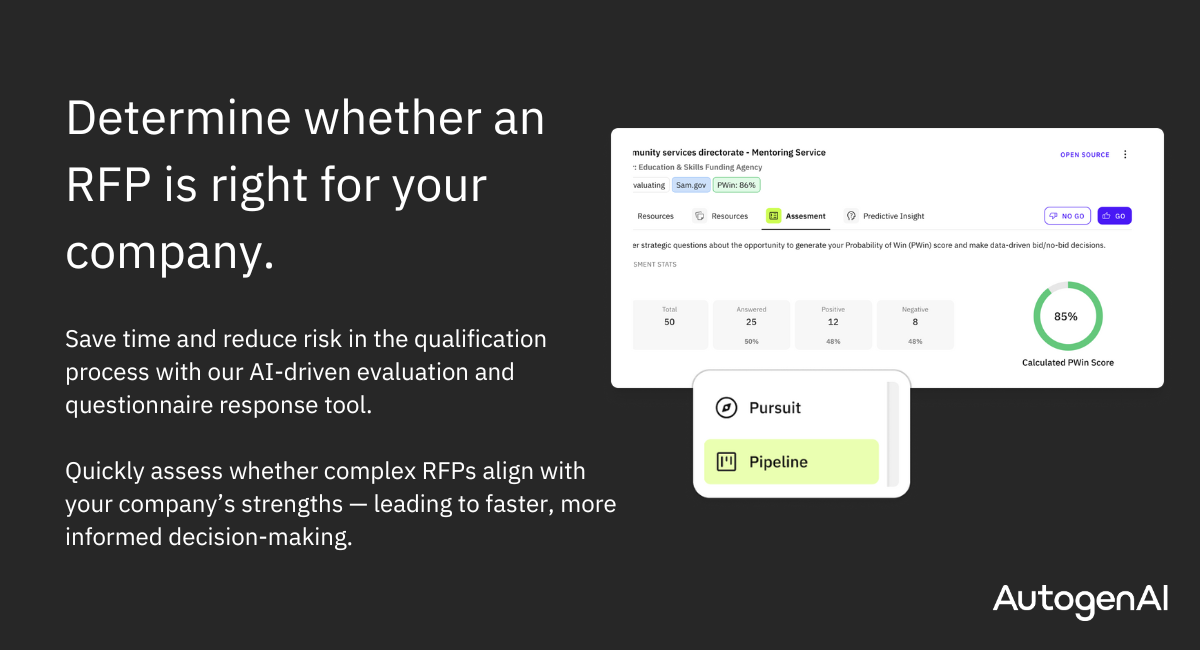
Its strongest use case is narrative-heavy work, where the team needs more than short answers pulled from a library. The platform can analyze an RFP, extract deadlines and evaluation criteria, build an outline, and generate a review-ready first draft from approved company content.
Source: G2
This makes it a practical fit for complex bids and government contracts, where the writing has to follow a clear story while still addressing every requirement.
AutogenAI can create compliance matrices, track the proposal lifecycle, and help teams see how well each section maps to the buyer’s scoring criteria. Its federal platform is designed for regulated proposal work and operates in a FedRAMP High-authorized environment.
If your team wants to scale bid volume, the platform can reduce the time spent building outlines and drafting long sections. However, writers must still refine the language, strengthen the argument, and confirm that each approved response reflects the current offer.
Best Features
- RFP extraction: Pulls requirements, deadlines, and evaluation criteria from uploaded solicitations.
- Narrative drafting: Creates tailored proposal sections from your company’s trusted sources.
- Compliance matrices: Maps requirements to the relevant response sections.
- Project Hub: Tracks milestones, document status, and time remaining before submission.
- Collaborative workflows: Keeps writers and reviewers working within the same proposal project.
- AutogenAI Federal: Supports government contractors with secure tools for compliant proposal development.
Pros
- Strong fit for long, narrative-based proposals
- Helps teams move from RFP analysis to first draft faster
- Supports regulated and government contracting workflows
- Keeps proposal content aligned with evaluation criteria
- Gives writers a structured starting point for complex bids
- Can help teams pursue more opportunities with the same staffing level
6. Thalamus AI for Agent-Based RFP Automation
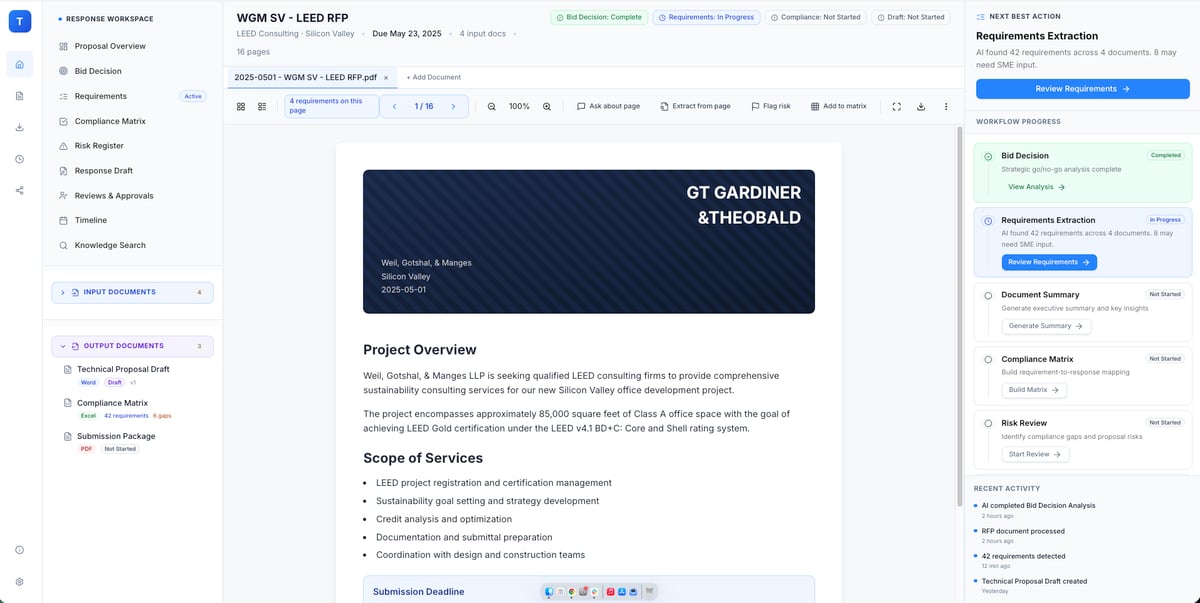
Thalamus AI is an AI-native platform for proposal teams that want support throughout the full bid lifecycle.
Its agent-based approach separates the RFP process into focused tasks, such as bid qualification, requirement extraction, SME coordination, compliance checks, and response drafting. This gives teams a broader form of AI automation than a basic answer-retrieval tool.
Source: G2
The platform can work with past responses, reviewer feedback, win themes, and approved company knowledge to create more relevant drafts over time.
It also tracks changes, roles, deadlines, and compliance requirements in one workspace. As each bid progresses, proposal leaders can see who owns each section and which responses still need attention.
Thalamus AI may suit enterprise teams handling complex RFPs, RFIs, due diligence questionnaires, or long-form proposals. Its AI-powered response engine helps produce compliant responses while keeping source material and reviewer decisions connected to the project.
Best Features
- Specialized AI agents: Handle focused stages of the response process, from qualification through compliance review.
- Requirement mapping: Extracts RFP requirements and connects them to response sections.
- Institutional memory: Learns from past responses, reviewer edits, and bid outcomes.
- SME coordination: Assigns authors and reviewers at the section or subsection level.
- Version tracking: Records edits and lets teams accept, reject, or restore changes.
- Lifecycle management: Supports planning, drafting, review, submission, and post-bid learning.
Pros
- Covers more of the RFP lifecycle than drafting alone
- Gives proposal teams clear ownership and review roles
- Uses prior bid knowledge to improve future responses
- Supports detailed compliance tracking
- Works with several RFx formats
- Includes enterprise access controls and secure audit trails
7. 1Up for Rapid Knowledge-Based Responses
1Up is RFP response software built for teams that want quick answers from trusted internal sources.
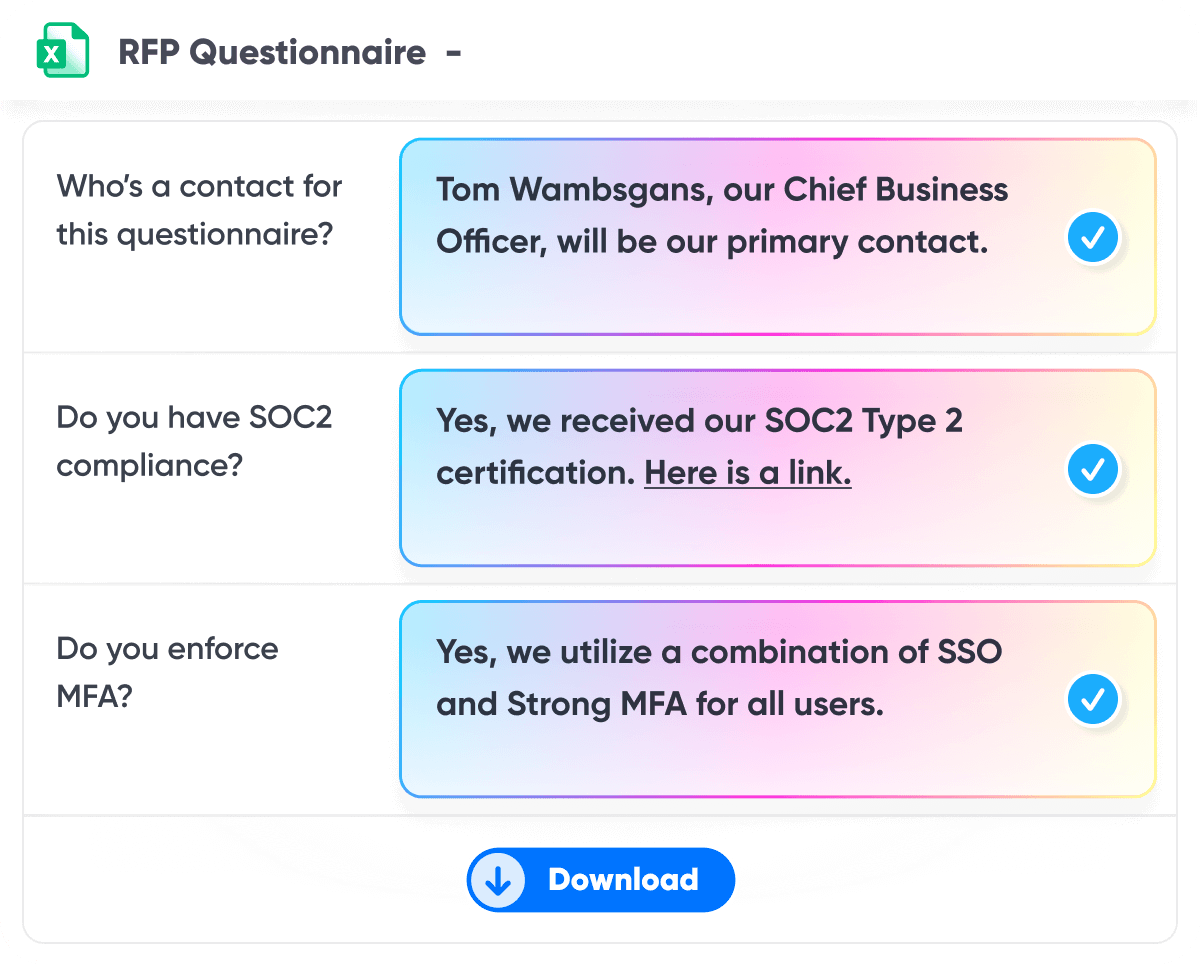
You connect the platform to company documents and knowledge systems, upload an RFP, and let the AI tool draft responses in minutes. It can handle common formats such as Word, Excel, PDF, and browser-based questionnaires.
Source: G2
The platform keeps its focus fairly narrow. It is less concerned with heavy project administration and more focused on automating responses accurately and quickly.
That can work well for lean proposal teams or sales engineering groups that already have strong source material but spend too much time searching for it.
1Up also supports real-time collaboration, task assignments, and progress tracking when a question needs extra input. Since answers come from connected company knowledge, reviewers can work from a stronger first draft rather than sorting through old document versions.
Best Features
- RFP automation: Generates large batches of responses from trusted company sources.
- Multi-format support: Works with Word, Excel, PDF, and online questionnaires.
- Browser extension: Helps teams answer questions directly inside web portals.
- Knowledge connections: Pulls current information from internal documents and business systems.
- Collaboration tools: Lets users assign questions and monitor completion.
- Answer Hub: Gives teams a central place to review and manage company knowledge.
Pros
- Quick to set up compared with heavier response management platforms
- Strong fit for lean proposal teams
- Useful for RFPs and security questionnaires
- Reduces time spent searching past responses
- Supports browser-based submissions
- Keeps generated answers tied to approved internal sources
Benefits of RFP Response Automation Software
The biggest advantage of AI RFP automation software is that it gives your team a stronger starting point and a clearer way to move each response forward.
Here are the main benefits you can expect:
- Faster first drafts: An AI-generated answer gives your team something useful to review, so writers can focus on improving the response rather than building it from scratch.
- Easier content reuse: The software can pull from approved libraries and past submissions, helping teams adapt proven material for the current opportunity.
- Better proposal management: Assignments, deadlines, reviews, and project status stay in one place, which makes it easier to see what still needs attention.
- More consistent responses: AI platforms can apply approved terminology and current company information throughout a submission, even when several people contribute.
- Quicker expert input: Questions can be routed directly to the right reviewer, reducing delays when a response needs specialized knowledge.
- Safer generative AI adoption: Purpose-built tools often ground drafts in private company sources rather than public AI models alone, giving reviewers more context and control.
How to Choose RFP Response Automation Software
Start with the type of RFPs you manage most often, then compare the features that will have the biggest impact on your day-to-day workflow:
- Match the tool to your use case: Some AI RFP software is built for proposal teams, while other platforms focus on legal discovery or security reviews. Choose one that understands your documents and review requirements.
- Check the source controls: Look for software that drafts from approved company material and shows where each answer came from. Compliance checking is easier when reviewers can trace the source.
- Review collaboration features: Subject matter experts should be able to answer questions, approve drafts, and track assignments without a steep learning curve.
- Look at workflow automation: Strong tools can route questions, trigger reviews, and flag missing responses before submission.
- Test compatibility: Confirm that the platform works with Microsoft Office and the other systems your team already uses.
- Compare security settings: Role-based AI permissions can limit who accesses sensitive content and who approves final responses.
- Ask for a realistic trial: Test the software with one of your own RFPs so you can judge response quality, setup effort, and editing time.
Choose the RFP Software That Fits the Work
Where does your RFP process lose the most time?
The answer will usually point you toward the right software. Proposal teams may care most about reusable content and collaboration, while litigation teams need help with discovery requests, case documents, and production work.
Briefpoint is specifically built for that legal workflow. It helps you review requests for production, find responsive documents, draft objections and answers, add Bates citations, and prepare the production package for attorney review.
All these features mean litigation teams can save 30 or more hours per case while keeping attorneys in control of the final response.
Book a demo to see how Briefpoint can make legal RFP responses easier to manage.
7 Best Clio Workflow Automations for Law Firms
What Is Clio Workflow Automation?
Clio workflow automation helps you move routine work forward without handling every step manually. You set a trigger, such as opening a new matter or updating a case status, and either Clio or a connected tool carries out the next action.
You might use automated workflows to assign a task, send a reminder, create a document, or update a matter record. The setup depends on how your firm already works and which parts of the process take up the most time.
For example, once a client signs an intake form, the system could open a matter and alert the assigned attorney.
These small changes make a noticeable difference when your team repeats the same process every day. When you do it correctly, task automation helps you automate repetitive tasks while still keeping control over work that needs legal judgment or a personal response.
7 Clio Workflow Automations Worth Using
Clio can handle a surprising amount of routine work once you connect the right tools and set clear triggers. The following Clio workflow automations can help you cut down on repetitive steps and keep each matter moving:
1. Automate New Client Intake
Client intake can be time-consuming when your team has to do every step of the process manually. A Clio intake workflow can handle much of that setup as soon as a prospective client completes a form or signs an engagement agreement.
You still decide which details need review, but the routine steps can happen automatically. That cuts down on manual data entry and helps new matters start with cleaner, more complete records.
A typical flow might look like this:
- A prospective client submits an intake form
- Their contact details are added to Clio
- A new matter is created using the appropriate template
- The assigned lawyer or staff member receives a task
- The client gets a confirmation or next-step message
Once the workflow is in place, you can automate routine tasks while giving your team more time to focus on case review and speak with the client.
2. Create Tasks From Matter Updates
Matter updates often lead to another piece of work, but someone still has to remember to assign it. Clio workflow automation can turn those updates into tasks automatically, which helps lawyers and staff respond sooner without adding another manual step.
For example, your legal practice management software could create a task when a matter enters a new stage or when a document is uploaded. The task can include a due date, instructions, and the person responsible for completing it.
Common task triggers include:
- Matter stage changes: Create a follow-up task when a case moves from intake to active.
- New document uploads: Assign a review task when a pleading or client file is added.
- Calendar updates: Prompt the assigned legal professionals to prepare before a scheduled event.
- Status changes: Create a closing checklist when a matter is marked resolved.
This setup supports better efficiency because the next action appears at the right point in the workflow, without relying on someone to create it from memory.
3. Generate Routine Legal Documents
Document generation can give your team a strong first draft without rebuilding the same file from scratch. Clio Draft pulls information from the matter and places it into approved document templates, which cuts down on manual effort and keeps the process moving.
Legal teams may use it for documents such as:
- Engagement letters
- Fee agreements
- Client intake forms
- Demand letters
- Discovery documents
- Closing letters
Integrations can expand what this workflow covers. For example, a tool like Briefpoint can connect discovery drafting with the matter information you already manage in Clio, so your team can prepare interrogatories, RFAs, and RFPs without moving between disconnected systems.
The draft still needs a careful review, of course, especially when the language depends on the facts of the case. Even so, having the basic information and formatting already in place can save a meaningful amount of time.
4. Send Appointment and Deadline Reminders
Clio can send reminders based on events already added to your calendar or matter schedule. When a consultation, hearing, filing deadline, or client meeting is entered, the system can trigger a message at a set time before the event.
You control when each reminder goes out and who receives it. A client might get a confirmation several days before an appointment, followed by a shorter reminder the day before. Your team can also receive internal alerts tied to court dates or filing deadlines.
This gives client communication a more reliable rhythm without requiring someone to send every message manually. Plus, it helps your staff stay ahead of the schedule while keeping conflict checks and calendar updates in the same general workflow.
5. Streamline Time Tracking and Billing
Clio can connect time tracking directly to legal billing, which makes it easier to turn completed work into accurate invoices.
Lawyers and staff can record time from a matter or calendar event, then use those entries during the billing process without re-entering the same details.
A few useful billing automations include:
- Time entry reminders: Notify team members when billable work has not been recorded.
- Invoice creation: Build draft invoices from approved time and expense entries.
- Recurring billing: Schedule regular invoices for clients on fixed payment arrangements.
- Payment follow-ups: Send automatic reminders when an invoice is past due.
- Matter-based rules: Apply rates or payment terms based on a client’s specific needs.
Most firms will still review invoices before sending them, but much of the setup can happen automatically. These features reduce manual effort and help your team streamline operations while keeping billing records current.
6. Automate Client Follow-Ups
Client follow-ups can be tied to specific events in Clio, so messages go out when a matter reaches a certain stage or when your team needs information. You decide what triggers the message and how much time should pass before it is sent.
For example, if a client has not returned a requested document after five days, Clio can send a reminder with clear instructions on what to submit. A separate follow-up might go out after a consultation to confirm next steps or request a signature.
These messages help keep clients engaged without asking staff to track every response manually. They can also improve client satisfaction because people receive more consistent communication while their matter is active.
Additionally, automated case updates can let clients know when a filing has been completed or when the next milestone is approaching.
7. Simplify Discovery Drafting
Legal discovery can involve a large volume of similar drafting work, particularly when your team has to move case information between Clio and separate document tools.
A discovery automation integration can connect the matter record to the drafting process, helping your team prepare documents more efficiently.
Common discovery documents include:
- Interrogatories
- Requests for admission
- Requests for production
- Responses and objections
- Production cover documents
For example, Briefpoint integrates with Clio to pull relevant matter details into its document automation workflow. Your team can draft or respond to written discovery, review the language, and return the finished files to the appropriate matter for document management.
Implementation works best when you begin with a familiar discovery process and clearly define who reviews each draft. This gives staff a smooth transition into the new workflow while attorneys retain control over the final document.
Connecting the two platforms also reduces unnecessary file transfers and keeps discovery work closer to the rest of the case record.
How to Build a Clio Workflow Automation
Start with one process your team repeats often and map out what should happen from beginning to end. A new workflow is easier to test when it has a clear trigger and only a few actions.
- Choose the trigger: Pick the event that starts the workflow, such as a lead submitting a form in Clio Grow or a matter changing status in Clio Manage.
- Define the next action: Decide what the system should do, like creating a task, sending a message, or generating a document.
- Assign responsibility: Set who receives the task or reviews the result before the case moves forward.
- Connect the right tools: Use built-in features or add-ons that support your case management process.
- Test with one matter: Run the workflow on a sample file and check that dates, assignments, and messages appear correctly.
- Refine the setup: Remove steps that add little benefit and adjust the timing where needed.
Remember to keep the first version simple. After your team becomes comfortable with it, you can expand the automation to cover more of the process.
Make Clio Work Harder for Your Firm
Clio workflow automation can take routine work off your team’s plate and make everyday processes easier to manage while improving productivity.
The best place to begin is with one workflow that already follows a clear pattern, then expand as your team gets comfortable with the setup.
Discovery is a strong candidate because it often involves repetitive drafting and document handling.
Briefpoint integrates with Clio to help you propound and respond to interrogatories, RFAs, and RFPs while keeping matter information connected to the rest of your case workflow.
You can also collect client answers through a secure link, prepare Bates-cited responses, and return completed documents to Clio for review.
Book a demo to see how Briefpoint can bring discovery automation into your Clio workflow.
How to Implement Legal Workflow Automation
What Is Legal Workflow Automation?
Legal workflow automation is a broad concept, and it can look a little different depending on how your team works.
For some legal teams, it starts with document creation. For others, it shows up in things like task routing, approvals, deadline tracking, or the way matters move from one person to the next. The common thread is using legal tools to handle work that follows a predictable pattern.
At a basic level, legal workflow automation means automating repetitive tasks that would otherwise require the same manual steps every time.
For instance, drafting standard documents, moving discovery requests through review, assigning internal follow-ups, and pulling matter details can all become part of a structured process.
For law firms and in-house teams, this changes how legal operations run day to day. Legal professionals still review the work and make judgment calls, but they spend less time on tasks that don’t bring much value in the big picture.
Some teams rely on a broader legal workflow management system, while others use a mix of legal technology platforms for different parts of the process. Either way, they can modify workflows as their needs change instead of rebuilding everything from the ground up.
In other words, legal workflow automation is a practical way to organize legal work so the predictable parts move faster and people can stay focused on the decisions that need legal expertise and institutional knowledge.
Legal Tasks That Are Best to Automate First
If you’re getting started with legal workflow automation, the smartest move is to focus on work that already follows a clear pattern.
These are the tasks that show up often, take time, and rarely need to be reinvented:
Discovery Drafting and Response Preparation
Discovery drafting is often the first place legal teams feel the drag of manual processes. Requests come in, documents pile up, and hours disappear into copying language, tracking citations, and double-checking references. The work is familiar, but the effort adds up fast.
This is why discovery drafting tends to be the first win for document automation. The structure rarely changes. What changes are the facts, the productions, and the references tied to each request.
Automation handles those routine tasks so you are not rebuilding the same response from scratch every time.
Tools like Briefpoint are designed specifically for this stage of litigation. Briefpoint uses your productions and case materials to generate documents that are already mapped to discovery requests, complete with citations and formatting aligned to how discovery actually gets served.
Common discovery tasks that benefit from automation include:
- Drafting responses to interrogatories, requests for production, and requests for admission
- Pulling facts and references directly from productions
- Applying consistent language to objections and responses
- Reducing repetitive manual edits across documents
To see how this works in practice, learn more about Briefpoint and how it supports automated discovery workflows.
Intake Forms and Matter Setup
Intake and matter setup may feel routine, but they shape how smoothly the work runs later.
Information often arrives through emails, calls, or shared documents. Someone then has to collect it, enter it into the right system, and check that nothing is missing. That repeated handling creates extra work before the legal team can move forward.
In contrast, legal workflow management software gives intake a cleaner starting point. A legal intake form collects the necessary details upfront and feeds them into the team’s matter management process. For law firms and in-house legal teams, this can streamline repetitive tasks and reduce double entry.
An automated intake workflow may include:
- Matter details: Client information, matter type, and key facts are captured in one place.
- Task assignments: Follow-ups are sent to the right team members automatically.
- Deadline creation: Important dates stay connected to the matter from the start.
- Document collection: Supporting files are uploaded and stored with the correct record.
- Centralized dashboards: Teams can view new requests, open matters, and pending actions in one place.
Standard Legal Document Drafting
Thanks to modern legal tech, you don’t need to reinvent routine documents. Most standard drafts rely on the same clauses, the same structure, and the same information, and automation can take care of those repetitive details.
Artificial intelligence can handle document handling without turning your work into a black box. You enter the details once, the system generates the draft, and you step in to review and adjust.
So, the focus shifts away from tedious tasks and back to legal judgment, which is where your time actually matters.
Documents that are commonly automated include:
- Engagement letters
- NDAs
- Fee agreements
- Settlement agreements
- Employment agreements
- Demand letters
- Basic contracts and amendments
Internal Reviews and Approvals
Automated review and approval workflows help documents move through the right people in the right order. Once a draft enters review, the system tracks who needs to see it next and what must happen before it can move forward.
Comments, approvals, and version history stay connected to the same document, so reviewers are less likely to work from an outdated draft. Manual review still happens, but the coordination around it becomes much easier to manage.
For legal leaders, this can reduce administrative burden and make review status easier to see without repeated emails or check-ins.
A contract update, for example, might move from legal review to compliance sign-off and then to final approval. The workflow manages those handoffs while each reviewer focuses on the substance of the document.
This is particularly useful in contract review and other complex workflows where several people need to weigh in. Contract lifecycle management tools often support this process by keeping review stages, comments, and approvals tied to the same contract from start to finish.
Deadline Tracking and Reminders
Automated deadline tracking keeps due dates connected to the work itself rather than scattered across separate systems. Tasks, filings, and reviews carry their own deadlines, and reminders can trigger based on the schedule your team sets.
Legal workflow tools make it easier to see what is coming up and where timelines overlap. This is useful for legal ops teams managing several active matters or workflow solutions at the same time.
Legal automation can help track:
- Filing deadlines
- Review dates
- Client follow-ups
- Internal approvals
- Discovery due dates
- Task reminders
Status Updates and Task Assignments
Status updates and task assignments can change automatically as work moves through a workflow. Once one step is completed, the system can assign tasks to the next person and update the matter status at the same time.
For example, when a discovery draft is ready for review, the workflow can notify the assigned attorney, mark the draft as pending review, and create the next deadline. No one has to update a separate tracker or send another message.
Automating processes like these helps many legal professionals stay on top of overlapping work. Information remains current as matters develop, which reduces the administrative effort tied to monitoring progress and reporting on it.
AI-powered legal tools may add another layer by suggesting task assignments, flagging delays, or identifying the next likely step. The result is better workflow efficiency because the system reflects the work as it happens.
Types of Legal Workflow Automation Tools
There isn’t really a single product called a “legal workflow automation tool.” In reality, legal workflows get automated through a mix of tools that handle different parts of the work. Each one covers a piece of the process, and together they shape how work moves through a legal team.
Here are the main categories you’ll see most often:
- Legal practice management software: Handles matter tracking, task management, deadlines, and high-level organization for day-to-day legal work.
- Document generation tools: Support document automation by turning structured inputs into drafts, which reduces manual legal drafting and repetitive edits.
- Case management systems: Keep matter information, timelines, communications, and filings connected in one place throughout a case.
- Document management platforms: Store, organize, and version legal documents so files stay searchable and current as work evolves.
- Document review tools: Assist with reviewing large volumes of documents, flagging patterns, and managing review workflows.
- Legal research tools: Help legal professionals find relevant authority and reference materials more efficiently during active matters.
- Legal workflow automation software: Connects tasks, documents, and reviews into structured workflows that move work forward automatically.
How to Automate Legal Workflows
Now that you’ve seen which legal tasks tend to automate well, the next move is turning one of those tasks into a workflow your team can actually use.
Keep it simple at first, then build from there as the process starts to feel familiar:
Step 1: Pick One Workflow With Clear Steps
Pick something you already know well. If you can explain the steps without thinking too hard, that’s a good place to start. Early legal process automation works best when the process feels familiar.
Discovery response drafting is a solid example. Requests arrive, productions get reviewed, responses take shape, citations get added, and the draft goes through review before it’s served.
The details change, but the flow generally stays the same.
Step 2: Write Down the Exact Inputs You Need
Before automating anything, get specific about the information the workflow depends on. Walk through the entire process and note what needs to be available at each stage. This keeps the setup practical and avoids gaps later.
Typical inputs include:
- Client or matter details
- Key dates and deadlines
- Document or request types
- Source files or productions
- Review or routing preferences
Remember: Clear inputs matter even more when workflows support broader strategic initiatives.
Step 3: Standardize Templates and Rules
Automation works best when the process follows clear, repeatable standards. Templates and rules shape how documents look, how decisions are made, and how work moves from one step to the next.
This can apply to client intake, discovery responses, contracts, and other legal documents. It also helps reduce administrative tasks because team members are not recreating the same language or structure every time.
Most legal workflow solutions rely on standards such as:
- Document templates and formatting
- Standard response language
- Review and approval sequences
- File naming and organization rules
- Required fields for client intake
The more consistent these elements are, the easier it becomes to build a workflow that runs smoothly and produces reliable results.
Step 4: Choose the Tools That Fit Your Process
Now it comes down to choosing tools that fit the way your team already works. A long feature list may look impressive, but it matters less if the software adds friction or forces people to change familiar processes.
Look at factors such as:
- Integration depth: Check how well the platform connects with your existing tools, including document systems, email, billing, and project management software.
- Workflow fit: Make sure the tool supports the steps your team already follows rather than pushing everyone into a rigid setup.
- Ease of use: Legal technology should reduce effort and not create another complicated system to manage.
- No-code flexibility: No-code tools and a no-code workflow builder can make it easier to adjust forms, routing rules, and approval steps without relying on developers.
- Access controls: Review how the platform limits sensitive information based on roles, teams, or matter assignments.
- Compliance tracking: Look for tools that record approvals, changes, and required steps so the team can see how work moved through the process.
- Scalability: Consider whether the tool can support more matters, users, or workflows as your needs grow.
- Business tool compatibility: Review how easily information can move between legal systems and the broader business tools used by other departments.
Step 5: Build the Workflow and Test It on Real Matters
Once the pieces are in place, it’s time to build the workflow and see how it holds up in real work.
Start with existing workflows rather than hypothetical ones. Real matters reveal gaps and edge cases much faster than test data ever will.
As you test, keep the focus on how the workflow supports the people using it. Team members should understand what the workflow does, what it does not do, and where they step in.
Keep in mind that proper training matters here, even if the workflow feels simple on paper.
Testing usually includes:
- Running the workflow on a small number of live matters
- Watching where manual steps still show up
- Adjusting rules, templates, or inputs as needed
- Gathering feedback from each team member involved
Step 6: Add Review Checks and Approval Points
Automation still needs human eyes at the right moments. Review checks and approval points give you natural pause spots before work moves forward, especially when client information or sensitive details are involved.
A discovery response, for example, might be drafted automatically, but wait for attorney review before it’s finalized.
A contract can move through its workflow but stop for approval before it goes out the door. Those moments matter, and building them in helps with error reduction without breaking the flow.
Most teams rely on existing systems for these checks, which keeps the process familiar. Reviews happen in the same way each time, ensuring consistency while leaving room for judgment when it counts.
Step 7: Connect Systems and Reduce Double Entry
You should not have to enter the same information several times just to keep work moving. When systems are connected, details can pass from one step to the next with far less manual data entry.
Information collected during intake can flow into matter records, documents, follow-up tasks, and the document management system your team already uses. That keeps the process moving while reducing the chance of errors when names, dates, or case details change.
For in-house counsel, connected systems can be particularly useful when legal work touches several departments. The same information stays consistent as it moves through intake, review, approval, and reporting.
Better connections also make compliance easier to manage because teams are working from the same source data rather than separate versions stored in different places.
Step 8: Roll It Out, Track Results, and Refine
Once the workflow is working, it’s time to roll it out more broadly and see how it performs in day-to-day use.
Start with one practice area or team before expanding further, especially if the workflow touches multiple roles.
As it runs, pay attention to how it’s actually used:
- Where people pause or work around the workflow
- Which steps save time and which still feel manual
- How the workflow fits into existing routines
- Feedback from team members using it daily
For law firms and corporate legal departments, this stage helps surface real impact. Over time, small adjustments can improve fit, reduce friction, and bring down operational costs without reworking the entire process.
Why Discovery Drafting Is the Smartest Place to Start
The legal workflow automation market covers everything from intake and billing to contract analysis. Still, discovery drafting is often one of the easiest places to see meaningful results.
The volume can be heavy, but the steps are predictable enough for automation to take on much of the repetitive work.
Briefpoint was built around that workflow. It can generate objection-aware discovery documents, collect client responses, translate interrogatories into plain language, prepare Bates-cited production packages in minutes, and much more.
Plus, its integration capabilities with tools like Clio, MyCase, and Smokeball help keep the process connected to systems firms already use.
Starting here gives your team a clear, practical win. Once drafting takes less time, it becomes easier to apply the same approach to intake, reviews, deadlines, and other routine handoffs.
Ready to take discovery drafting off your plate? Book a demo with Briefpoint today.
How to Adopt Legal Automation In 2026 (With AI)
What Does Legal Automation Mean?
The simple definition of automation is the use of technology or machines to perform tasks without much human intervention.
In the legal industry, legal automation or legal workflow automation means using technology and software to tackle the repetitive, everyday tasks that lawyers traditionally spend hours on.
In the past, law firms and in-house legal teams used manual, isolated processes to handle daily workflows. This often meant staff were bogged down with tedious administrative duties.
Legal automation changes this by increasing efficiency, reducing errors, and freeing up time for legal professionals to focus on more complex, valuable work. Let’s dive deeper into that.
What Legal Processes Can You Automate?
Contrary to popular belief (among legal professionals, at least), many legal tasks are subject to automation. Some might argue that legal workflows are too complex to simplify with machines, but today’s legal tech begs to differ.
Here’s a closer look at key legal processes that can be automated:
Contract Review and Management
Contracts are crucial, but managing them can be incredibly time-consuming.
Automation tools and contract lifecycle platforms help legal departments by using natural language processing (NLP) and machine learning (ML) to scan contracts for key clauses, compliance gaps, and potential risks.
These systems can recognize legal language patterns, flag anomalies, and even suggest redlines based on pre-trained legal models or custom clause libraries. Some tools can also help you generate contracts and save you from manually drafting all your important agreements.
Version control is another major benefit. These tools maintain audit trails and track every edit across stakeholders, which helps make sure everyone is reviewing the same draft.
On top of that, workflow automation accelerates the approval process. Tools integrate with collaboration platforms and document management systems. This allows for automated routing, deadline tracking, and role-based approvals.
All this reduces the endless back-and-forth with different teams, shortens review cycles, and improves turnaround time for each contract.
Legal Document Drafting
Historically, drafting legal documents is a tedious process that requires keen attention to detail and at least a few hours spent creating, editing, and reviewing each document.
This is now changing thanks to legal document automation tools that create documents with the same accuracy and consistency as manually created ones, if not better.
Most legal document automation software platforms use a combination of artificial intelligence (AI) and templates to speed up the drafting process.
For example, Briefpoint is a generative AI and machine learning tool that drafts discovery responses by analyzing a request document, generating a draft that is mostly complete, and letting you finish up by adding pre-loaded objections or responses.
Book a demo to see it in action!
Billing Management
Automated systems in legal billing software can track billable hours and generate invoices based on those hours and predefined rates.
More specifically, they reduce manual effort by logging time entries automatically, applying correct billing codes, and cutting down the need for repetitive, time-consuming billing tasks.
These systems also monitor payments and send reminders for overdue invoices, which helps simplify the entire billing workflow and make sure you don’t miss out on any billable time.
For law firms and in-house teams, implementing legal automation in billing can make financial tracking more accurate and less stressful. The right legal technology gives you a clearer view of how time is spent, which matters generate the most value, and where billing delays tend to happen.
This leads to better cash flow for your legal team and fewer administrative headaches. It also plays a useful role in enabling legal teams to spend less time chasing invoices and more time on higher-value work.
Routine Tasks
Administrative tasks, though necessary, can take up a lot of your time. Luckily, modern tech now allows you to create automated workflows for manual processes that otherwise take too much time, money, and brain power.
For example, you can easily automate the following routine or manual tasks:
- Data entry
- Scheduling
- Sending appointment reminders
- Client intake forms
- Populating client databases
- Data entry
- Email management
- Organizing and filing documents
- Task management
- Sending task reminders and notifications
- Tracking billable hours
- Generating and sending invoices
- Monitoring payments and sending reminders
- Sharing documents securely
- Automatic time tracking
- Sending follow-up emails and updates
- Creating regular reports
Legal Research
Legal research can slow down a legal department because it often requires reviewing complex legal texts, cases, statutes, and legal data with close attention to detail.
Skipping this step isn’t an option, especially in complex litigation where one missed case or outdated rule can affect strategy.
Powered by natural language processing and AI-driven knowledge management systems, legal automation tools can search through massive databases of statutes, case law, and legal commentary in seconds.
They identify relevant passages, extract key legal principles, and surface valuable data far faster than manual review.
Many legal tech platforms also work like intelligent legal assistants. They can summarize cases, highlight jurisdiction-specific issues, and suggest similar precedents based on your matter.
Some tools also connect with internal document management systems, which helps legal teams link prior research, work product, and outcomes to new matters.
The result is a faster, more organized research process that helps your team work from current information while spending less time sorting through large volumes of legal data.
Matter Management
Matter management is another area where legal automation can make daily work easier to control. Law firms and corporate legal departments often handle dozens of active matters at once, each with its own deadlines, documents, tasks, updates, and approvals.
Legal workflow automation helps teams organize that work in one place. Rather than relying on different tools, matter management workflow tools help streamline manual processes and give legal operations teams a clearer view of what needs attention.
Key features often include:
- Centralized matter tracking: Teams can keep matter details, documents, notes, deadlines, and status updates in one organized system.
- Task and deadline management: Automated reminders help legal teams stay on top of filings, reviews, client updates, and internal requests.
- Document and communication history: Files, emails, and notes can stay tied to the right matter for easier reference.
- Reporting and analytics: Legal operations teams can track workloads, matter progress, costs, and team performance without building reports manually.
- Approval workflows: Automated routing moves requests, documents, and decisions to the right people faster.
Why Is Legal Automation Important For Law Firms?
Automation is a hotly debated topic in the legal field, and not without reason. There are many concerns about the validity of AI-generated work, and many lawyers are hesitant to automate something they can already do themselves.
There’s also a notion that the law is too complex to throw technology into the mix, but legal automation technology is proving otherwise.
If you’re still on the fence about automating, here are some benefits that might convince you to make the switch:
Increased Efficiency in Task Management
The legal profession runs on precision, but too often, time is lost on tasks that don’t need legal judgment.
Legal automation tools help reduce time-consuming tasks like assigning work, updating calendars, sending reminders, and generating automated legal documents from structured templates.
For example, a legal team handling vendor contracts can use automation to populate agreements with pre-approved language based on contract type and jurisdiction.
One of the key benefits is that teams can move low-risk tasks out of their daily manual workload. This helps reduce low-value work, keep matters organized, and optimize workflow across routine legal processes.
With more consistent workflows, your team has more room to focus on work that actually requires legal expertise, like strategy, negotiation, risk review, and client guidance.
Cost Savings in Daily Operations
Automation can lower operational costs by cutting down the time your team spends on manual processes and low-value tasks.
Fewer administrative hours are billed, which gives you more room to put resources toward client-related work, business growth, and higher-value legal functions. It also helps your team use time more wisely across the day.
For example, document assembly tools can generate standard agreements and discovery responses from approved templates. Rather than having someone copy the same details from one document to another, the system pulls the right information into the right fields and creates a draft for review.
One of the benefits of legal automation is that small time savings can add up quickly across hundreds of documents, matters, and billing cycles. With successful implementation, you can reduce repeat admin work, cut avoidable costs, and give legal professionals more time for higher-value tasks.
Improved Accuracy and Reduced Errors
Repetitive tasks increase the chance of manual errors like missed deadlines, incorrect clauses, and outdated language. These aren’t minor issues. They can easily stall deals or create compliance risks.
Legal automation helps reduce that risk by completing routine steps with more consistency. When you automate document creation using up-to-date templates, for example, you remove much of the variability that comes with manual editing.
Every contract, NDA, or policy document can follow a vetted structure, which helps lower the chance of inconsistencies or outdated language slipping through.
Take clause insertion. Rather than copying text from older documents, automated systems can pull approved language based on contract type, jurisdiction, and client preferences. This helps create a cleaner draft while improving the quality of the final work.
However, always remember that human expertise still matters. Automation handles the repetitive parts, but your team reviews the substance, checks the context, and makes the final call before anything goes out.
Ensuring Compliance with Legal Standards
Automation tools help maintain compliance with industry standards, internal policies, and regulatory requirements. Automated checks and audits make sure processes follow the latest rules, which cuts down on the risk of non-compliance.
Compliance automation is especially useful for law firms, in-house teams, and business clients that need to track deadlines, reporting duties, contract terms, and policy updates across many matters.
Common compliance-related features include:
- Compliance tracking: Tracks key rules, deadlines, approvals, and audit steps so your team can spot issues before they become bigger problems.
- Obligation tracking: Monitors contract duties, renewal dates, notice periods, payment terms, and reporting requirements tied to specific matters or agreements.
- Automated alerts: Send reminders for upcoming deadlines, required reviews, policy changes, or missing information.
- Audit trails: Records actions, edits, approvals, and document history so teams can show how a decision or process was handled.
Better Client Service
Automating admin-heavy tasks not only speeds things up but also improves the overall client experience by making your team more responsive and reliable.
Service delivery becomes more consistent, and clients notice the difference. You’re not scrambling to send updates or manually schedule meetings. Those things are handled in the background while you stay focused on the work that matters.
Client-specific tasks you can automate include:
- Client intake
- Scheduling meetings
- Billing and invoicing
- Document sharing
- Client updates and follow-ups
Simplified and Organized Workflows
How much time do you lose trying to figure out what needs to happen next?
Automation creates a more organized workflow for legal matters, so deadlines are easier to track and the next step is clearer. Rather than digging through emails or checking a spreadsheet for updates, you can rely on automation workflows to keep routine work moving through a set process.
For example, a new client intake form can automatically create a matter and assign the first task, while reminder settings help keep follow-up from slipping through the cracks.
This helps streamline processes that would otherwise depend on memory or constant manual check-ins. It also gives you a clearer view of what needs attention next, which makes daily work easier to manage.
Scalability for Growing Practices
As your practice grows, automation allows you to handle more cases and clients without needing to hire a lot more staff. This means you can expand without compromising on quality or efficiency.
Increased Job Satisfaction
Repetitive tasks can often detract from the more fulfilling aspects of legal work. Automation helps by handling these routine responsibilities, which allows legal professionals to dedicate their time to more meaningful and intellectually stimulating tasks.
This shift not only improves job satisfaction but also helps reduce burnout and turnover, which can help foster a more motivated and productive team.
Data-Driven Insights
Many automation tools come with analytics and reporting features that offer valuable insights into your legal operations. These insights can help you make informed decisions, optimize processes, and save time on research.
Good data capture also gives your team a clearer view of how work moves through the legal department. You can track matter volume, turnaround times, contract status, billing trends, workload distribution, and recurring bottlenecks.
Automation tools can also help turn unstructured data into more useful information. For example, details buried in emails, contracts, discovery documents, intake forms, and matter notes can be organized into reports your team can actually use.
With access to relevant data, you can see which tasks take the most time, where delays happen, and which processes need improvement. This makes it easier to plan staffing, manage priorities, and prove the value of the legal team to leadership.
Signs That You Need Legal Automation Software
If you’re wondering whether it’s time to invest in legal automation software, here are some signs to look out for:
1. High Volume of Routine Tasks
When your team is buried under administrative duties more than actual legal work, it’s a clear sign that you need automation.
Tasks like scheduling, data entry, and document generation can be automated, freeing up your team to focus on more important work.
2. Frequent Errors
Mistakes in documents, billing, or data entry are becoming common. Human error is inevitable, especially with repetitive tasks. Automation can significantly reduce these errors by ensuring consistency and accuracy in every process.
This not only improves the quality of your work but also builds trust with your clients, who rely on your precision and expertise.
3. Slow Turnaround Times
Struggling to meet deadlines and having clients wait longer than they should for responses and results is a red flag. Automation can speed up processes like document drafting, contract review, and legal research, so you deliver timely and efficient service.
Faster turnaround times mean happier clients and a more productive team.
4. Increasing Operational Costs
If your expenses are climbing due to inefficiencies and the need for more administrative staff, it’s time to consider automation.
Automating routine tasks can reduce operational costs by minimizing the need for additional administrative support. This allows you to allocate resources more effectively and invest in areas that drive growth and client satisfaction.
5. Employee Burnout
Overworked staff dealing with repetitive tasks can lead to burnout. In turn, this can easily lead to lower productivity and increasing turnover rates (instead of efficiency gains).
Automation can alleviate this burden by handling mundane tasks, allowing your team to focus on more challenging and rewarding work.
6. Manual Data Management
Spending too much time managing and organizing files and data manually can be a major productivity drain.
Automation can streamline data management by organizing and storing information efficiently, making it easily accessible when needed.
Automate the Most Tedious Part of Litigation
Discovery responses are often one of the most time-consuming parts of litigation, but Briefpoint changes that by automating this tedious process. With this AI-powered platform, you can save hours on manual work, reduce drafting costs, and create more accurate discovery documents.
Briefpoint’s Autodoc is built for discovery document automation. You upload your discovery request, and Briefpoint’s machine-learning system pulls key details from the document. From there, it helps generate a draft you can review, edit, and finalize.
You can also add objections and responses from a built-in menu, which helps keep your language consistent across matters. For Supplemental Responses, Briefpoint lets you work from the original document, preserve prior answers, and update responses without rebuilding the draft from scratch.
There’s also Briefpoint Bridge, a feature that helps you collect client responses and plug them into your document with less back-and-forth.
With more time to focus on strategy and client advocacy, you can handle litigation more efficiently.
Schedule a demo today and see how Briefpoint simplifies discovery.
Make RFP Automation Work for Your Business

What Is RFP Automation?
RFP automation is the use of software to speed up and simplify the RFP response process.
Instead of building each proposal from scratch, automation tools help your proposal teams reuse your best content, assign tasks to the right people, and manage everything in one organized system.
RFP automation improves RFP response management by making it easier to find accurate answers, assign work to subject matter experts, and deliver polished proposals on time. These tools can also handle security questionnaires, which are often time-consuming and repetitive routine tasks.
Many platforms now use artificial intelligence and natural language processing to suggest the best content based on how a question is worded. That means you’re not just pulling canned replies but also getting tailored responses that sound like they were written for that specific request.
With RFP automation, you can:
- Speed up the response process with smart content suggestions
- Cut down manual work by using advanced automation technology to generate answers from a shared library
- Assign sections to subject matter experts with built-in workflows
- Improve consistency with approved, accurate answers
- Handle security and compliance questionnaires without last-minute stress
What Is RFP Automation Software?
An RFP software platform is a tool that helps proposal management teams respond to proposals faster by organizing content, assigning tasks, and reusing approved answers. It’s built to reduce the manual effort that usually goes into answering the same types of questions over and over during a busy procurement project.
The software keeps everything in one place, including your responses, team comments, deadlines, and drafts, so you’re not jumping between emails or files to piece things together. It also makes it easier to keep answers accurate and consistent across different proposals.
Some tools even suggest relevant answers based on prior responses to help you save time when you’re under pressure. With everyone working from the same system, the process runs more smoothly, and your proposals go out more quickly, which helps enhance productivity.
How Do You Automate RFP Responses?
Automating the RFP response process doesn’t mean handing everything over to a machine. It means cutting down on repetitive work, so your team can focus on writing strong, thoughtful answers.
With the right system in place, you can respond faster and reduce the stress that usually comes with tight deadlines. Here’s how you can set up a smart and efficient RFP response management process using automation tools:
1. Build a Central Content Library
The first step in automating your RFP response process is setting up a content library to improve internal knowledge management. This is where you store your past responses, company facts, product details, and other valuable resources in one organized place.
A good library makes it easy to find the right content quickly, which can help your team deliver accurate responses without wasting time. Some modern AI RFP software tools use machine learning to suggest the best answer based on the question’s context.
2. Use Natural Language Matching
Unlike legacy RFP tools, modern tools use natural language processing to understand how questions are asked, even if the wording changes. This helps the software suggest the most relevant answers from your library, so you’re always starting from a strong place.
3. Assign the Right People Automatically
One of the smartest things RFP response software can do is route each question to the right subject matter expert without you lifting a finger.
Legal questions go straight to legal. Product questions land with your technical team. Everyone gets notified, knows what to work on, and sees their deadlines upfront.
This keeps the entire process moving smoothly and avoids confusion or delays. You don’t have to waste time repeating the same steps or chasing proposal professionals for input. It also keeps your business development process in sync with your proposal efforts, so nothing falls through.
4. Generate Draft Responses
Let your software use its automation capabilities to take the first pass at answering questions. By pulling from your content library, the tool can generate draft responses that save time and reduce repetitive tasks for your team.
You’re still in control (every answer can be reviewed, edited, and approved), but you’re no longer stuck starting from zero.
This approach helps your sales team focus on strategy and personalization, not copy-paste work. Plus, it makes sure every approved response stays consistent without pulling random info from external websites or outdated files.
Here’s how it helps:
- Creates quick drafts for common RFP questions
- Cuts down the time spent on repetitive document creation
- Allows room for human intervention when needed
- Keeps messaging aligned with your brand and voice
- Helps your team stay focused on winning business rather than formatting responses
5. Manage Versions and Approvals
Keeping track of edits and approvals can be a mess when everything’s split across emails and shared drives. RFP automation tools fix that by giving your team one place to manage it all.
This means you can track changes, leave comments, and see who approved what, without dealing with five different versions of the same file.
For example, if you’re answering a set of due diligence questionnaires with input from legal, finance, and IT, the software pulls content from your central library and lets each expert review their section. That way, your winning responses include detailed information pulled from multiple sources, and it’s all up to date.
6. Use Automation Tools for Security Questionnaire Responses
Security questionnaires are often packed with detailed questions that tend to repeat across clients and industries. Automation tools help by pulling approved answers from your knowledge sources and previous RFPs, so your team isn’t stuck rewriting the same content.
Answers stay consistent, accurate, and up to date, even when requests come from different teams or departments. You’ll also get real-time notifications when something needs a second look or an updated response.
By cutting down the busywork, you’re speeding up the process and showing that your team is sharp, responsive, and ready to work with serious clients. That kind of professionalism can go a long way in boosting win rates and helping you stand out as an industry leader.
7. Export Final Proposals Fast
After all the reviews are done and the content’s locked in, the last thing you want is to spend hours reformatting everything. With RFP automation, you can export the entire proposal via Word, PDF, or even a custom layout.
If the client asked similar or the same questions as in past RFPs, there’s no need to do extra research or shuffle through Google Drive for old files. Everything’s already been pulled from approved content.
This document automation capability is a must-have feature for proposal managers who send out a significant number of proposals and want to ensure consistency across every submission.
Why Should You Automate Your RFP Workflow?
Manual RFP responses can drag down your team’s time, focus, and energy. When you’re answering the same questions again and again or trying to keep up with disorganized reviews, it’s easy to lose momentum.
Automated processes help you work faster, stay consistent, and respond with confidence. Here’s what you get out of it:
- Faster turnaround: Generate responses in minutes by pulling from a shared content library, so your team spends less time starting from scratch.
- Consistent, approved content: Use responses that have already been vetted by legal, finance, and subject matter experts.
- Fewer errors: Reduce copy-paste slip-ups and outdated answers with automatic suggestions based on current content.
- Stronger teamwork: Assign sections, set deadlines, and track progress without relying on endless email threads.
- Simpler reviews: Let reviewers edit and approve content in one place, with full visibility into changes and comments.
- Organized process: Keep everything in one system, not spread across docs and drives.
- Better results: Submit polished, accurate proposals that improve your chances of winning the deal.
Take Advantage of Automated Document Generation Today
You’ve probably spent more hours than you’d like pulling answers together, cleaning up formatting, and chasing final approvals, only to end up sending the proposal minutes before the deadline. It’s frustrating, and honestly, it pulls your focus away from the work that actually needs your attention.
As you can see, automated document generation helps fix that. You can organize your content, reuse what already works, and produce clean documents without jumping through hoops every single time.
And even if RFPs aren’t your main task, you’re likely still dealing with repetitive forms, client documents, or standard questionnaires.
Briefpoint was built to handle that kind of work. Originally made for legal teams, it simplifies structured document drafting, especially when the content is repetitive and requires input from different people. You don’t need to reinvent anything. Just make your process less painful.
For teams handling large volumes of files, Autodoc helps organize productions, identify supporting documents, generate Bates-cited responses, and prepare production packages without the manual work that often slows document-heavy matters.
If you’re tired of spinning your wheels on the same kinds of documents, Briefpoint is worth a look.
What You Should Know About Document Automation Software
What Is Document Automation Software?
Document automation software is a system that builds documents for you based on rules, templates, and the information you provide.
At its core, it replaces repetitive drafting with a smart process that assembles polished files in minutes. You give the software your data, and it produces a complete draft without the usual copying, searching, or manual edits.
Law firms lean on it because drafting legal documents demands precision, clear structure, and consistent language. When the routine parts run through automation, you gain extra room to concentrate on the legal work that actually needs your attention.
The same advantage shows up in any setting where teams generate agreements, onboard clients, prepare reports, and more.
You fill in details once, and the software handles the rest. Names, dates, clauses, and formatting all land in the right places, which gives you accurate documents from the start.
So, if you manage recurring paperwork or long templates, this kind of system turns a slow task into something that fits neatly into your day.
How Document Automation Works
You’ve probably seen how long a document workflow can take when you build everything from scratch. Automation changes that pace.
Each tool has its own approach, but most follow a similar pattern:
1. Start With Smart Templates
Everything begins with a template built to match the layout of your legal documents or business forms. The structure, preferred language, and formatting live inside these templates, so you don’t recreate the same choices over and over.
Once you set them up, they guide your entire document workflow with far less effort. This alone can tidy up processes across a law practice, especially when documents follow a predictable pattern.
2. Add Your Data Once
After choosing a template, you enter the information tied to your matter, client, or project. The document automation tool then places the same data everywhere it belongs in the document.
That means no scanning for fields, no missed updates, no jumping between drafts. New documents stay consistent because the system pulls from a single source of truth.
Here’s what this step usually looks like:
- You add names, dates, clauses, and case details in one place
- The software fills those details into every matching field
- Updates happen automatically, so you don’t repeat the same edits
- Documents stay aligned with the rules you’ve already set
- You save time by avoiding routine typing and manual checks
This approach keeps your document workflow predictable and reduces the chance of small mistakes that tend to appear during repetitive drafting.
3. Apply Logic and Automation
This is the part that turns templates into something smarter. Conditional fields control what appears based on the data you’ve added.
At the same time, artificial intelligence may help refine language or suggest missing pieces, and automated workflows walk you through each step so nothing goes out of order.
These systems support faster decisions, reduce errors, and keep complex workflows from slowing down your day.
4. Generate the Final Draft
Once the rules kick in and all the information is mapped, the software assembles a polished document. You can export to Word, share it online, or save it as one or more PDF documents.
The result usually needs far less cleanup because formatting, spacing, and structure already follow your standards.
5. Integrate With Other Tools
Most platforms connect to tools you already rely on, such as CRM systems, document storage apps, and practice management software.
These connections keep automated workflows moving in a straight line, help teams stay aligned, and give you more focus for higher-value tasks.
Common Use Cases for Document Automation
Document automation shows its value anywhere you deal with repeat work or complex documents that follow a familiar pattern.
If your business moves through the same forms every week or your team spends too much time updating old files, this kind of system lightens that load.
Many companies use it to support standard workflows like contract management, client intake, internal operations, and day-to-day tasks that don’t need a full rewrite each time.
Here are some of the most common document types people automate:
- Engagement letters and retainer documents
- NDAs for clients, vendors, or partners
- Contracts and contract amendments
- Discovery responses and other litigation documents
- HR onboarding packets and internal forms
- Sales proposals, quotes, and follow-up files
- Compliance paperwork and recurring submissions
The real benefit shows up once you’ve seen how quickly a new draft comes together. It’s a simple way to keep work moving, especially when your team handles a steady stream of similar tasks.
In other words, automation gives you the breathing room to focus on decisions and strategy while the software handles the predictable steps.
The Biggest Benefits of Document Automation Software
Once you start using automation, the difference shows up quickly. Routine drafting feels lighter, accuracy improves, and your team moves through work with more confidence.
Here are the benefits that matter most, especially for teams handling detailed or highly regulated documents.
Higher Accuracy and Fewer Mistakes
Automated templates rely on structured rules, which means names, dates, and key details land exactly where they belong. This simple feature cuts down on human error and gives you documents that stay consistent across matters, clients, or deals.
Less Time Spent on Repetitive Tasks
A system handles the repetitive steps you normally do by hand. You type information once, and the software applies it across the entire draft. That frees up more time for decision-making and any work that calls for judgment rather than repetition.
Better Organization Across Your Workflow
Documents follow the same layout and language every time. Teams stay aligned, and it becomes easier to pick up work midstream without sorting through mismatched formats or old versions.
Stronger Security for Sensitive Information
Many tools offer role-based access, audit trails, and safe storage for your files. This matters in highly regulated industries where client data, contracts, and internal records need reliable protection.
Faster Turnaround Times
When routine steps move quickly, you deliver services sooner, send out contracts faster, and close deals without unnecessary delays. Law firm productivity rises because the process no longer stalls at drafting.
Scalable Capabilities for Growing Teams
As your workload increases, legal automation supports a larger volume of documents without adding pressure to your schedule. New requests fit into the same system, and everything moves at the same speed you’re used to.
What Features to Look For in Document Automation Software
A good document automation setup should feel easy to work with and supportive of the way your team already handles information.
You want something that keeps client data organized, helps you create accurate documents, and gives your entire team a smooth path from start to finish.
Here are the features that tend to matter most when you’re comparing solutions.
- Template builder: Helps you create templates that reflect your formatting, structure, and preferred language, so document generation stays consistent.
- Conditional logic: Adjusts sections based on client information or case details, cutting down on the back-and-forth edits that usually slow things down.
- Data mapping: Pulls information from forms or connected systems and places it directly into your files. This keeps the creation process efficient and removes repeated typing.
- Collaboration tools: Give your team a shared workspace to review drafts, offer input, and keep everything organized throughout the process.
- Access controls: Helps you manage who can view or edit documents, which keeps client data protected and supports compliance needs.
- Integrations: Connects with the tools you already rely on, so your workflow stays smooth instead of scattered across multiple platforms.
- Audit trails and compliance features: Tracks edits and activity, which helps teams in regulated environments maintain proper records with confidence.
Briefpoint Can Bring Real Relief to Heavy Drafting Work
Long discovery tasks can take over your schedule quickly, especially when you’re managing repetitive drafting, formatting, or page-by-page review.
Document automation helps lighten that load, but Briefpoint goes even further by taking on the parts of discovery most teams struggle to keep up with.
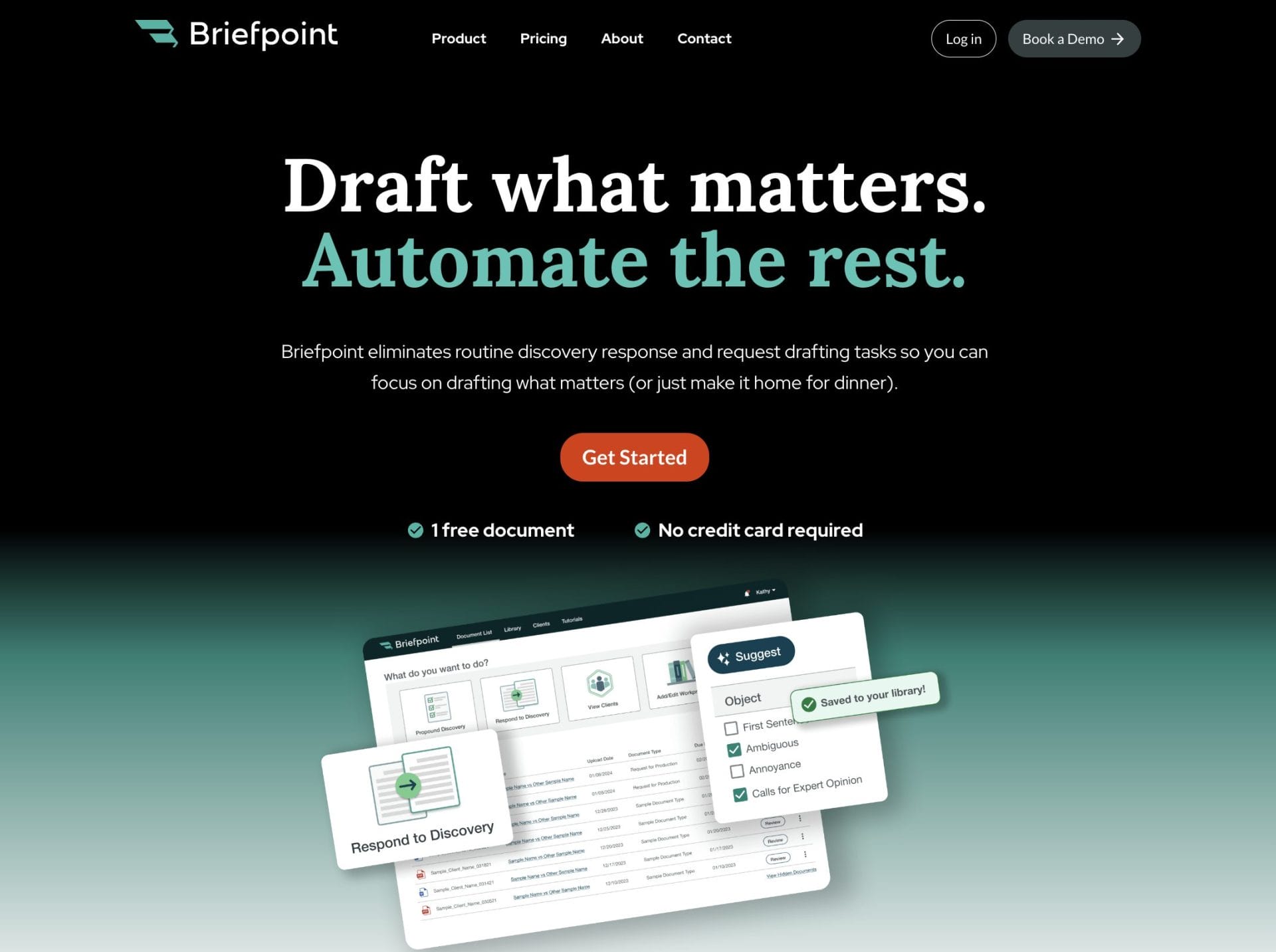
Briefpoint gives you a full discovery workflow that moves far faster than traditional drafting. You can generate objection-aware RFAs, RFPs, and interrogatories, respond with AI-assisted objections and client-collected answers, and export Word-ready documents that follow state or federal rules.
Autodoc handles another major bottleneck: reviewing productions and preparing responses. Upload your complaint, RFPs, and case files, and Autodoc identifies responsive documents, applies Bates numbers, and generates a Word response with page-level citations.
If you want discovery to move faster and with far less friction, Briefpoint can help you get there.
The Complete Overview of Automated Legal Document Review
What Is Automated Legal Document Review?
Automated legal document review is the use of AI tools that apply artificial intelligence and natural language processing (NLP) to handle the kind of reading and analysis that once took lawyers countless hours.
In practice, it helps law firms and legal professionals move through piles of contracts, discovery responses, and reports in a fraction of the time it used to take.
Rather than relying on manual page-by-page checks, this technology scans documents for key terms, missing clauses, and inconsistencies to pull out the most important details for quick review. The result is faster, smarter legal document analysis with far fewer oversights.
Modern systems also do more than simple review; they can create legal documents, organize matter files, and manage entire projects from upload to completion.
For busy teams, that means less time buried in paperwork and more time spent on strategic work that really moves cases forward. It’s a practical upgrade that blends legal experience with automation to make the document review process more efficient and reliable.
How Automated Legal Document Review Works
Curious how automated legal document review turns stacks of files into organized insights? The process follows a few clear steps that show how legal tech takes on the heavy lifting while keeping legal accuracy intact:
1. Upload and Preparation
The process starts with uploading materials into a secure review platform. These could include contracts, corporate policies, or discovery documents tied to litigation workflows. The system automatically categorizes, indexes, and prepares files for analysis.
Some platforms can even scan multiple formats at once, so it’s easier for legal teams to manage large volumes of information without juggling file types or naming conventions.
For example, a litigation team might upload thousands of emails and attachments to locate relevant documents related to a specific legal precedent or topic. Once uploaded, the platform sets the stage for deep AI analysis.
2. AI-Powered Legal Document Analysis
Once your documents are uploaded, the platform starts its AI legal document review using advanced generative AI tools and machine learning models trained on thousands of real legal examples.
These systems don’t just scan text, though. They understand legal language and context to spot patterns that could reveal risks or inconsistencies.
At this stage, AI can:
- Identify relevant case laws or cited legal precedents
- Flag missing clauses or unclear terms
- Detect repeated sections or formatting errors
- Group similar files to make human review easier
This smart automation cuts the review time dramatically. What used to take days of manual review can now be wrapped up in just a few hours, with the added bonus of consistent, reliable results.
3. Extraction and Tagging
After the legal AI finishes its analysis, it moves on to pulling out the key details and tagging them automatically. This step turns unstructured text into something organized and easy to scan, so reviewers can find the relevant information they need quickly.
Many AI tools let you customize how tagging works. That means you can tailor the system to match your legal context. For instance, a due diligence team might focus on financial clauses, while a compliance team highlights reporting obligations or jurisdictional details.
4. Comparison and Validation
The system then reviews your documents side by side with templates, past agreements, or even a firm’s preferred clause library.
It points out anything unusual (missing language, inconsistent terms, or sections that don’t match standard practice) so you can fix issues before they cause trouble.
Some AI legal document review tools take it a step further, checking clauses against relevant case law or new regulations.
For instance, they can flag a confidentiality clause that no longer fits updated privacy rules. That kind of insight keeps your work accurate and compliant without extra research.
Why it matters:
- Spot inconsistencies before they spread
- Find gaps that could weaken enforceability
- Cut down on revisions and back-and-forth between parties
5. Review Summary and Output
After the review wraps up, the platform compiles everything into a clear summary that highlights key sections, flagged terms, and potential risks. The overview shows where attention is needed without requiring another deep read through pages of text.
Many tools let teams export these summaries into reports or dashboards, making collaboration smoother across departments. Some generative AI tools can even refine sections or create draft responses for attorneys to adjust as needed.
Benefits of Automated Document Review
Automated document review takes some of the most time-consuming parts of legal work and makes them easier to manage. With legal AI technology, teams can go through long documents faster, catch small details more reliably, and spend less time buried in repetitive tasks.
Here’s what that looks like in practice:
- Faster reviews: AI can analyze legal documents in bulk, cutting down review time from days to hours.
- Fewer slip-ups: Law firm automation helps reduce human error by flagging inconsistencies or missing clauses early.
- Smarter organization: The system can recognize patterns and group similar materials, which makes it simpler to find what matters.
- Better teamwork: Attorneys can review AI outputs together, keeping human oversight where judgment is needed.
- Less busywork: Routine administrative tasks like sorting, tagging, or comparing versions are handled automatically.
All of this adds up to a more organized, reliable approach to reviewing documents.
Common Use Cases
Automated review tools have become widely accepted in the legal industry as they help firms, departments, and solo practitioners cut down on repetitive work. Across many legal applications, AI makes reviewing, drafting, and organizing documents faster and more reliable.
Here are a few common examples:
- Contract review and management: AI scans legal contracts for risky clauses, missing terms, or inconsistencies. It can also compare similar documents to keep language consistent across clients or projects.
- Litigation and case preparation: Legal teams use it to organize case files, pull key legal texts, and produce concise summaries that simplify collaboration.
- Due diligence and compliance: The system checks obligations, reporting terms, and deadlines to help teams stay compliant without hours of manual review.
- Legal document creation: Some platforms assist with drafting or updating agreements. They often pull from existing templates and clause libraries to save time.
What Is Automated Document Review Software?
Automated document review software acts as the engine that powers modern AI-powered review. Also known as technology-assisted review, it uses artificial intelligence to process Word documents, PDFs, and other legal files with speed and consistency that manual review can’t match.
Instead of reading every line one by one, the software scans and interprets text to pinpoint crucial details, spot errors, and ensure accuracy throughout entire document sets.
Over time, the best AI tools adapt to a firm’s preferences. It can start recognizing tone, clause patterns, and formatting choices to match the team’s typical workflow.
Key Features to Look For
When choosing document review software, it’s worth paying attention to features that balance automation with precision. The right setup helps teams handle lengthy documents efficiently while keeping information organized and secure.
Look for tools that offer:
- Access control: Manage who can view or edit sensitive files.
- Advanced AI: Use smart legal automation that learns from context to highlight key points and provide legal insights.
- Document management: Keep contracts and case materials searchable and easy to retrieve.
- Document drafting: Let AI assist with document creation or updating agreements to improve consistency and style.
- Improved accuracy: Produce clean, polished documents that align with firm standards and reduce the risk of overlooked errors.
Bring Speed and Confidence to Discovery With Briefpoint
Automating legal review is one thing; completing discovery in minutes is another. Briefpoint helps law firms handle the entire discovery process from start to finish using AI that understands legal structure, context, and objections.
From generating requests for admission, interrogatories, and requests for production to responding with objection-aware drafts and Bates-numbered productions, it replaces weeks of back-and-forth with a single upload.
Trusted by more than 4,500 attorneys, Briefpoint’s AI delivers the same accuracy lawyers expect, only faster and with complete transparency. Every document follows your firm’s standards to keep results defensible and client-ready.
Skip the busywork and get back to practicing law. Book a demo with Briefpoint and see how discovery can move from hours to minutes.
Automation in Law: Where It Helps Most and How to Start
The Current State of Legal Automation
Walk into almost any law firm today and you’ll notice a shift. Filing cabinets are thinner, inboxes are a little less overwhelming, and many of the repetitive administrative tasks that once kept paralegals and junior associates busy are being handled differently.
The change comes from legal automation software, a category of automation tools designed to take over routine manual processes.
This isn’t a quiet trend; it’s reshaping daily practice. According to the 2024 ABA Legal Tech Survey, the number of law firms using AI-based tools rose from 11% in 2023 to 30% in 2024.
Meanwhile, Clio’s Legal Trends Report shows adoption among legal professionals skyrocketed from 19% to 79% over the same period. As you can see, it’s a profession-wide shift.
For attorneys and staff, the impact is tangible. Tedious tasks like drafting standard contracts, sending reminders, or tracking compliance deadlines no longer require the same level of human input. The work still gets done, but faster, more consistently, and with fewer mistakes.
The legal field has always balanced tradition with change, but the rise of automation signals a profession ready to rethink how its time and talent are spent.
How Does Automation Work?
If the numbers from the last section have you wondering how to try automation for yourself, here’s a closer look at how it actually works.
Law firm automation uses a mix of technologies to automate legal processes, taking on time-consuming tasks that once required constant human intervention.
At the simplest level, legal automation follows a pattern: input data, apply rules or models, and produce an output. What’s different now is the role of artificial intelligence, which allows tools to learn, adapt, and cut down on human error.
Here are the main types of technology driving this change:
- Natural language processing (NLP): Reads and interprets contracts, clauses, or case law, making it easier to search and analyze text.
- Machine learning (ML): Spots patterns in past cases, billing data, or compliance reports, then predicts outcomes or highlights risks.
- Robotic process automation (RPA): Handles repetitive clicks, filings, or form submissions across systems without needing a person to do them.
- Generative AI: Drafts contract clauses, summaries, or responses to client questions in plain language for faster review.
Together, these tools allow legal teams to save time and focus on the work that really needs a human’s judgment.
Key Areas of Automation in Law
Automation touches almost every corner of legal work, but some areas see the biggest payoff. Let’s take a look at some of them:
Document Automation
Essentially, legal document automation makes drafting paperwork a whole lot easier. Instead of typing the same details over and over, you can use document templates to quickly generate contracts, pleadings, or letters.
This approach speeds up document drafting, keeps things consistent, and reduces mistakes that often happen when drafting contracts by hand. Some platforms come with built-in document management that keeps everything organized, so you don’t waste time hunting down the latest version.
Platforms like Briefpoint take it further by automating litigation documents from start to finish. Want to see how it works in practice? Book a demo with Briefpoint today.
Client Intake and Communication
Bringing in new clients and keeping existing clients happy often comes down to clear communication. Automated processes can help here by handling the repetitive back-and-forth that takes up so much time.
For example, instead of manually sending follow-up emails, an intake form on your website can feed directly into your system. The client gets an automatic confirmation, you get their details neatly organized, and nothing slips through.
The same approach works for reminders, billing notices, or status updates. Automation keeps the flow of information steady, which leads to more satisfied clients who feel informed and cared for. And for firms, it means spending less time on admin and more time on providing actual legal services.
E-Discovery
E-discovery, or electronic discovery, refers to the search and review of digital records for litigation or investigations. In any modern legal practice, that often means combing through emails, chat logs, documents, or even cloud storage.
Traditionally, this work involved endless clicking and manual data entry; a perfect example of the kind of time-consuming processes lawyers have long struggled with.
These days, automation changes the equation by connecting to your existing systems and cutting down the volume of repetitive review. This way, you can rely on technology to narrow the field and surface what really matters.
Here’s what happens when you automate legal discovery:
- Smart filtering reduces massive datasets to a manageable pool in minutes.
- Pattern recognition highlights suspicious activity or hidden relationships.
- Sensitive data tagging keeps privileged or confidential information protected.
- Integrated review tools keep everything synced across platforms.
For firms, the benefits go beyond efficiency. With automation, teams can redirect effort toward analysis (where judgment matters) and generate more billable hours doing substantive legal tasks.
And for clients, faster turnaround and accurate results translate into a clear competitive advantage in litigation.
Case Management
Managing several matters at once can get overwhelming. One client needs an update, another has a deadline coming up, and documents for a third are still waiting for review.
The real challenge comes from the pile of routine tasks that eat away at valuable time when you’re handling multiple clients.
With legal workflow automation, many of these background details can run on their own. In turn, you can clear operational efficiencies across the team.
Plus, rather than constantly checking calendars or sending reminders, the system takes care of the mechanics while you focus on strategy.
Examples of tasks that can be automated include:
- Scheduling hearings, filings, and reminders on shared calendars
- Assigning tasks to the right team member as a case progresses
- Sending automatic updates when a case status changes
- Tracking deadlines so nothing falls through the cracks
When you minimize repetitive admin work with case management automation, your lawyers and staff have more space to concentrate on meaningful legal work.
Legal Research Support
Research is a big part of legal work, but it’s also one of the biggest drains on time. Every hour spent digging through case law or statutes adds to the pile of non-billable hours that firms struggle to control.
Automation helps by taking repetitive searches and turning them into faster, smarter processes.
For example, a legal team creates a knowledge base where past research, briefs, and case notes are stored. With automation, that information is searchable and tied to new matters, so lawyers don’t have to start from scratch each time.
Automation can also connect research tools with document assembly, so findings flow directly into memos or motions. The end result is a way to streamline manual processes while improving accuracy and consistency across the board.
How to Apply Automation to Your Legal Workflows
There isn’t a perfect formula for rolling out automation in a law practice. Every firm has its own priorities, budget, and way of working. But the common thread is simple: start where automation can make the biggest impact on repetitive tasks and build from there.
Try these steps:
1. Spot the Repetitive Work
The first step in applying automation is figuring out where your time really goes. In most firms, the biggest drain comes from repetitive tasks like data entry, scheduling, or generating standard documents.
These jobs rarely require deep analysis, yet they eat up hours of manual effort every week. That’s why identifying them early makes such a difference.
For example, entering client details into multiple systems, sending reminders for court dates, or formatting routine contracts are all areas where an automated workflow can help.
By mapping out which steps repeat day after day, you’ll see where law office automation can take the load off.
The idea isn’t to change everything at once but to shine a light on the tasks that keep staff busy without adding much real value to clients.
2. Pick One Workflow to Improve
Of course, trying to automate every process at once can overwhelm a team. A better approach is to start with a single workflow; something that’s repetitive and easy to measure.
For example, client intake is a strong candidate. It often involves duplicate data entry, long email threads, and plenty of back-and-forth. Automating that process not only saves time but also improves the overall client experience.
Here are a few ways automation can reshape intake:
- Use online forms that feed directly into your system, reducing human error
- Offer clients the option to upload documents themselves, offering self-service options
- Set up automatic confirmations and reminders so no one is left waiting
- Connect intake data to document assembly tools
Starting small gives your team a clear win without the disruption of changing everything at once. Once the first workflow is running smoothly, it’s easier to expand automation to other areas like contract review or billing.
3. Choose the Right Tool
Once you’ve picked a workflow to automate, the next step is finding legal tech software that fits the job. Not every tool is designed for the same purpose, so it’s important to match the solution to the task at hand.
For example, if your biggest pain point is drafting pleadings or motions, you’ll want software built for document generation rather than a general project tracker. On the other hand, if your firm struggles to keep track of deadlines, then workflow-focused platforms are a better match.
Specialized tools like Briefpoint are built specifically for discovery documents, taking the heavy lifting out of document creation and helping legal teams save hours on repetitive drafting. See how it works today!
4. Test and Adjust
Once a process is automated, it’s important to monitor how it performs in practice. Does the new setup actually save time? Are there points where information gets stuck or overlooked? Running the process with automation in place will highlight what’s working and what still needs tweaking.
Small adjustments, like changing the way data fields are mapped or how reminders are triggered, can make the difference between a tool that feels clunky and one that truly supports the team.
5. Train Your Team
Even the smartest automation system won’t reach its potential if the people using it aren’t comfortable with it. Training should cover both the mechanics of the software and the moments when human review is still necessary.
For example, a tool might handle document automation, but the final draft still needs a lawyer’s eyes. When everyone on the team understands their role in the process, adoption goes smoothly and confidence in the new system grows.
Clear guidance also reduces resistance to change, which can make automation a natural part of daily work rather than an added burden.
6. Expand Gradually
The first successful automation is a proof of concept. When your team sees that it works, the question becomes: what’s next? The answer isn’t “everything at once.”
Rolling out too much too quickly usually creates confusion. A better approach is to add an automation layer by layer, using early wins to guide your decisions.
Maybe you start with intake forms, then move on to billing, and later add compliance reminders. Each step should be measured, not rushed. Treating automation as a long-term plan rather than a quick fix, you’re building a foundation for real change.
Firms that take this strategic approach not only improve efficiency but also gain a noticeable competitive advantage. And with the right legal automation tools, the practice grows more agile without overwhelming the people who make it run.
Rethink Your Legal Workflow With Briefpoint
Legal work has always involved details, deadlines, and documents. What’s shifting now is who—or rather what—handles the most repetitive parts. Automation is becoming part of the daily fabric of modern practice.
Drafts are created faster, calendars update themselves, and teams spend less time stuck in the weeds. Firms that adapt see smoother operations, fewer errors, and a stronger focus on client service.
The practices that move ahead won’t just be adding technology for the sake of it. They’ll be choosing tools that let their lawyers and staff spend more time on strategy and client relationships. That’s where automation proves its worth.
Briefpoint was built with that purpose in mind. Its document generation capabilities give litigation teams a way to handle drafting in minutes instead of hours, lifting one of the heaviest burdens in the workflow.
Want to see how it works in action? Book a demo with Briefpoint today.
7 Top Ways to Use AI For Better Law Firm Efficiency
A Crash Course to AI and Its Legal Applications
AI is basically software that can “learn” from patterns and do things that normally require human thinking, like reading, writing, or analyzing.
For law firms, it means tools that help with repetitive tasks, cut down on manual work, and give you more time for tasks that demand more brain power and human intervention.
At its core, AI looks at data and makes recommendations or takes action based on rules it’s learned. Here are a few types of AI used in legal tech today:
- Natural language processing (NLP): Understands and analyzes human language, which is great for reviewing contracts or pulling key terms from large documents.
- Machine learning (ML): Learns from past data to improve over time and is often used in tools that flag risky clauses based on previous cases.
- Generative AI: Creates text, summaries, or drafts—helpful for legal memos, emails, or even first-draft contracts.
- Predictive analytics: Looks at trends and past outcomes to help estimate risk, likely decisions, or timelines.
Used right, AI becomes a smart assistant, not a replacement. But how can you apply this tech to your law firm’s operations?
Best Ways to Use AI to Improve Law Firm Efficiency
Improving efficiency is the best first step when adding AI to your law firm’s toolkit. You don’t need to overhaul your entire practice; just start with the areas that slow you down the most. Here are some of the most practical ways to use it day to day.
1. Speed Up Paperwork With Document Automation
Drafting legal documents is one of the most tedious tasks in any law firm. Whether you’re responding to discovery or creating routine contracts, the back-and-forth, formatting, and manual edits can take hours.
That’s why document automation is one of the most practical ways to improve law firm efficiency, especially when it comes to reducing administrative tasks and cutting down the document review process.
Document automation tools use legal technology and, more recently, generative AI to help create first drafts in minutes. You upload a file or fill out a simple form, and the tool builds a complete document based on preset templates or your firm’s past work.
Here’s where legal document automation helps:
- Creating discovery requests and responses
- Filling out standard agreements like NDAs or contracts
- Reducing errors from copying and pasting
- Keeping formatting and legal language consistent
Tools like Briefpoint go a step further by handling full sets of interrogatories, requests for admission, and production, letting you propound or respond to discovery in all U.S. jurisdictions with just a few clicks.
Learn more about how it works here.
2. Automate Client-Related Tasks
Meeting client demands is a big part of running a successful law firm, but it’s also one of the most time-consuming. From answering questions to gathering paperwork, these tasks often pull staff away from billable work.
With that in mind, automating parts of client service is one of the most effective ways to improve law firm efficiency while still delivering exceptional service.
For example, AI can help with:
- Client intake: Collect basic information through AI-powered forms or chatbots to reduce back-and-forth and manual data entry.
- Appointment scheduling: Use smart scheduling tools that sync calendars and send reminders to clients automatically.
- Document collection: Let clients upload files through secure links while AI organizes and stores them properly.
- Status updates: Keep clients informed through automated messages that track key milestones and deadlines.
- Answering common questions: Use AI chat assistants to respond instantly to FAQs without tying up staff.
- Personalized follow-ups: Trigger messages based on case stage, deadlines, or client activity for a more personalized client experience.
These tools don’t just save time, but also improve client communication, reduce overhead costs, and help firms focus on improving operational efficiency while still maintaining the quality of their legal services.
3. Leverage AI-Powered Legal Research Tools
Legal research is another common time drain for attorneys. It’s tedious, slow, and often hard to bill at full value. But with AI-powered tools, legal professionals can get through research faster and sharpen their legal strategies more efficiently.
According to the Legal Industry Report 2025, 46% of frequent AI users in law already rely on it to conduct general research. This shows that AI is becoming a go-to tool across the legal industry for saving time and making data-driven decisions.
Here’s how AI can improve your research process:
- Search in plain English and get precise results without complex query strings
- Scan case summaries to find what matters faster
- Catch outdated or missing citations before you file
- Link related rulings and laws automatically for deeper context
- Reduce non-billable research time and focus more on strategy
By helping law firms adopt more streamlined processes, these tools give you more control over your time and allow you to compete with other law firms that are already using tech to improve performance and client results.
4. Add Smart Scheduling Assistants
Schedules are the backbone of any law firm. From client meetings to court deadlines, everything depends on staying organized and on time.
Smart scheduling assistants make this easier by handling meeting coordination automatically. These tools manage invites, reminders, and updates, so your team doesn’t have to do it all by hand.
For instance, platforms like Calendly and Clara, or features built into legal practice management software like Clio and PracticePanther, allow clients to book appointments based on your availability.
They sync with calendars, prevent double-bookings, and send confirmations or reminders with minimal human intervention.
Using AI like this improves time management, reduces administrative overhead, and keeps your day running smoothly. It also helps create a more professional and responsive experience for clients.
5. Let AI Draft Routine Communications
Not every message needs to be written from scratch. Simple emails, follow-ups, and routine updates don’t always require legal expertise, and many law firms are now using AI to help with these day-to-day tasks.
While AI shouldn’t send messages without review, it can save time by drafting first versions that you can quickly personalize.
This approach helps boost law firm productivity, free up billable hours, and improve how you’re keeping clients informed without constantly starting from a blank screen.
AI can help with:
- Drafting appointment confirmations and reminders
- Writing follow-up messages after meetings or filings
- Creating templates for intake, updates, or status reports
- Responding to common client questions with approved language
- Generating internal updates or summaries for staff
Using communication tools with built-in AI also supports more personalized client experiences, since messages can be tailored quickly based on case type or client needs.
When used thoughtfully, AI helps keep your communication timely, consistent, and professional without draining your team’s time. It’s one of the easiest ways to keep things moving, maintain client satisfaction, and make routine tasks far more manageable.
6. Use AI-Driven Analytics to Find Opportunities for Improvement
Data is a valuable resource that often gets overlooked in the legal process. As firms continue to explore better ways to save time and work smarter, AI-driven analytics offer a clear advantage.
By tracking metrics across your practice, like response times, billing patterns, and document turnaround, you can spot what’s working and what needs attention. These insights help you adopt strategies that actually move the needle and support your law firm’s success.
AI tools built into case management, document management, and law firm billing software often include dashboards that visualize trends across teams, clients, and matters.
Here’s what you can track and improve:
- Key performance indicators (KPIs) like time to resolution, case duration, and task completion rates
- Billing gaps where work was done but not logged
- Workflow delays in document review or client communication
- Utilization rates by attorney or team
- Client feedback trends and satisfaction scores
These insights can help you streamline workflows, balance workloads, and make more informed decisions across the firm. With the right data, you can improve how your team works and how your clients experience your services, leading to long-term results that matter.
7. Try Using Voice-to-Text Tools
Voice-to-text tools offer a simple way to turn spoken words into written content quickly, which can help reduce non-billable work and free up more time for other tasks.
You can use this kind of AI during client meetings, internal briefings, or even while you’re thinking through ideas on the go. It’s especially useful for capturing details you might otherwise forget or for organizing thoughts before a draft.
By reducing time-consuming tasks like manual transcription, these tools help improve efficiency without much effort. Some tools can even support analyzing data from multiple recordings to identify common issues or trends across cases, adding even more value to your notes.
However, because sensitive case information may be shared aloud, privacy matters. Make sure you’re using the right technology that offers encryption and data security, especially when client information is involved.
For firms focused on maximizing law firm productivity, cutting down time spent on routine documentation, and improving the firm’s efficiency, voice-to-text can be a quiet but powerful upgrade.
Briefpoint Makes Document Work Easier, And That’s Just the Beginning
It’s already 2026. Getting through all the day-to-day tasks at a law firm doesn’t have to mean long nights and crowded calendars. And with smarter tools, you can take back your time while still maintaining high-quality work.
That’s where AI fits in. Of course, not to replace your expertise, but to take the routine stuff off your plate.
Briefpoint is one of the easiest wins. It handles your discovery drafting from requests for admission to interrogatories, so you don’t have to start from scratch every time.
Modern firms using it are saving up to 87% of the time they used to spend on document prep. No wonder more than 500 law firms already rely on it to make their workflow faster and easier.
Curious how much time your team could save? Book a demo with Briefpoint and see how it fits into your day.