Clio vs. PracticePanther: A Head-to-Head Comparison
If you’re looking to simplify tasks and boost productivity, Clio and PracticePanther are two leading options you’ll want to consider. But how do you decide which one will best meet your needs?
In this article, we’ll explore the key differences between these platforms, helping you choose the right fit for your firm.
Plus, we’ll show you how Briefpoint can make your legal practice even more efficient!
What is Briefpoint?
Briefpoint is an AI-powered tool designed to automate the process of drafting discovery documents, saving legal professionals hours of manual work.
This includes requests for production, requests for admission, interrogatories, and more.
Instead of spending so many hours copying, pasting, and writing out responses, Briefpoint automates the entire process so you can prepare discovery documents in minutes.
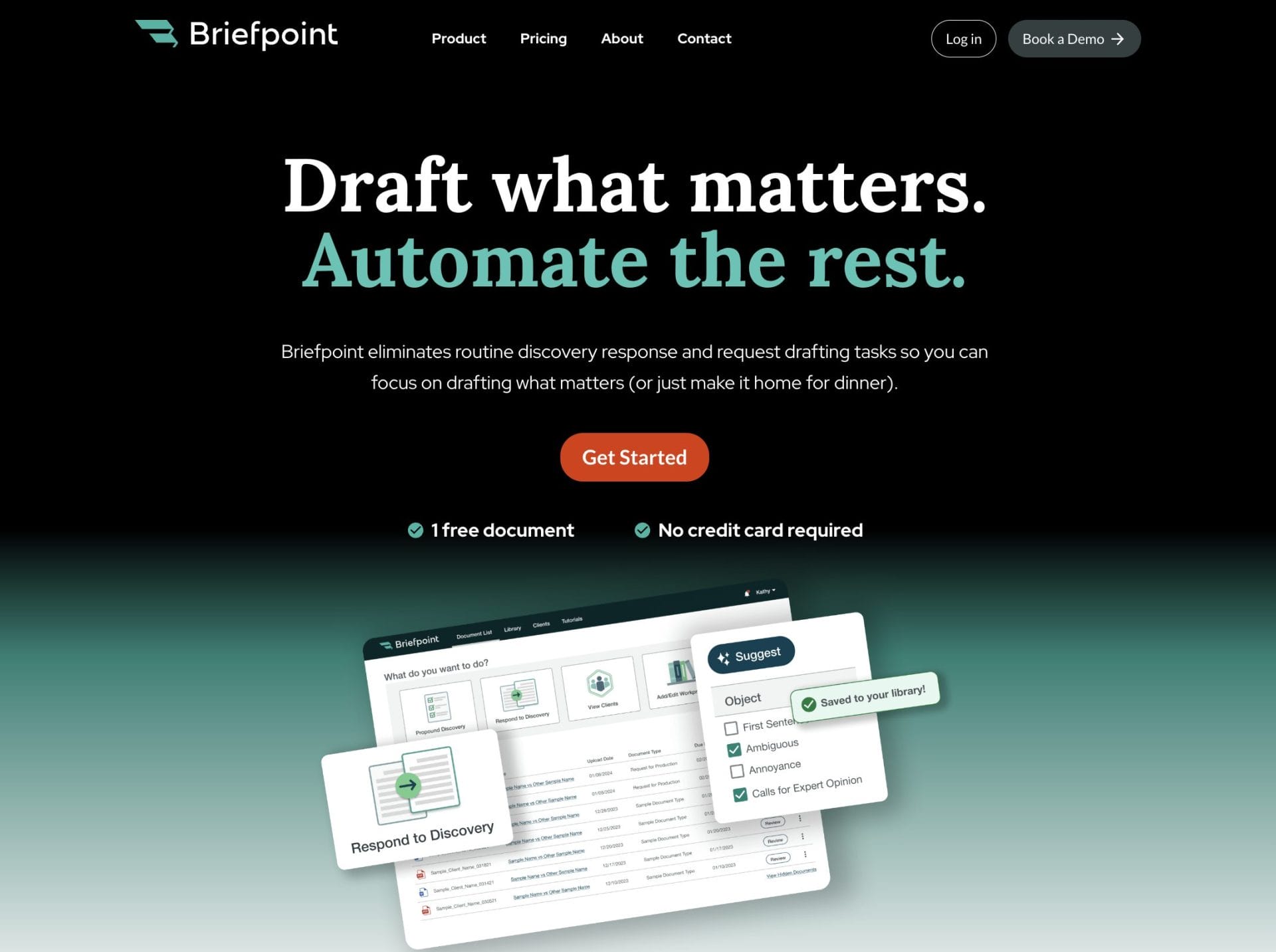
Briefpoint is easy to use. You upload your discovery request, and Briefpoint’s AI extracts key information such as case numbers, court names, and party details.
It then fills in routine sections of your document. From there, you can easily add objections by selecting the relevant interrogatories. You can download your draft at any time and make final edits in Word.
Briefpoint also features a built-in tool called Bridge, which simplifies complex legal jargon into plain English to make it easier for clients to understand.
This tool collects client input and automatically updates your documents based on their feedback—eliminating the need for back-and-forth emails.
Schedule a demo today and try Briefpoint for yourself.
What is Clio?
Clio is a cloud-based legal practice management software that helps law firms of all sizes keep their workflows organized, manage clients, and simplify admin tasks.
It packs in a variety of features, like document management, billing, calendar scheduling, and client communication, all in one place.
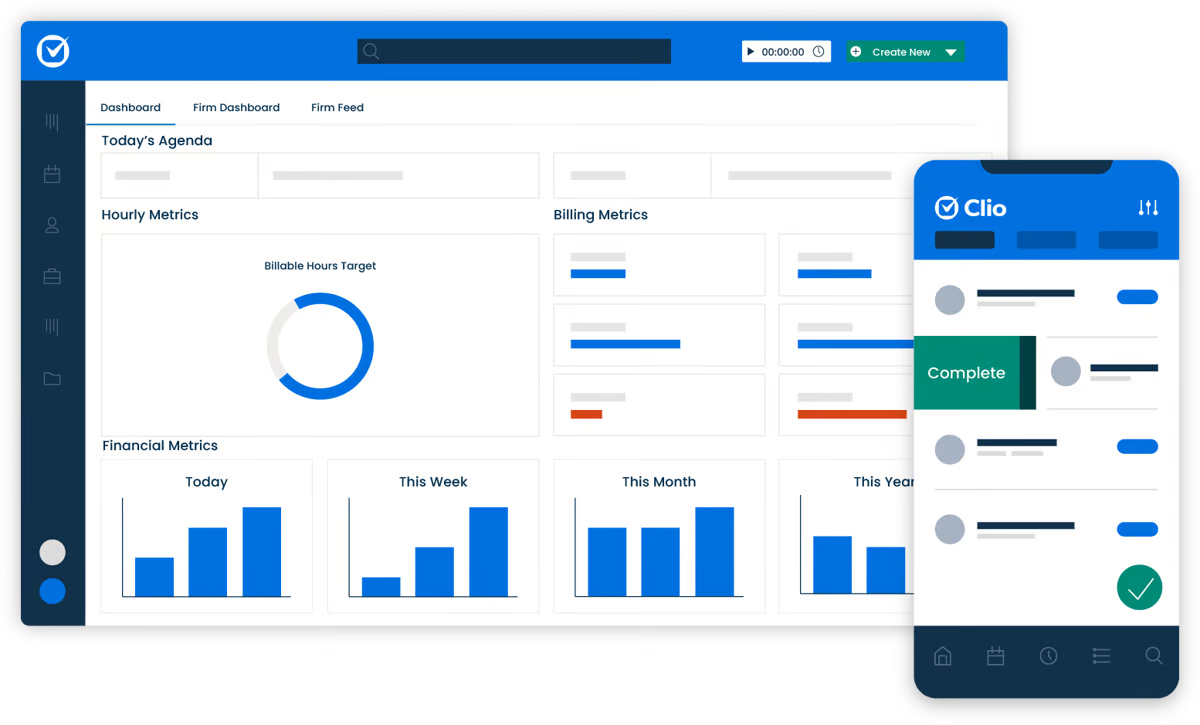
Law firms can also use Clio to track cases, record time entries, and collaborate with team members.
Since it’s cloud-based, you can access it from anywhere, making it super convenient for legal professionals who are always on the go.
Pros
- Clio integrates with many third-party tools, allowing firms to customize the platform easily.
- Its cloud-based nature ensures accessibility from anywhere, making remote work easier.
- The document management system is efficient and user-friendly.
- Customer support is responsive and helpful.
- It provides a comprehensive suite of features for law firm management.
- Offers mobile app support.
Cons
- The pricing can be expensive, especially for larger teams.
- There is a learning curve for more advanced features.
- It lacks built-in document automation, requiring third-party tools like Briefpoint.
- Billing customization options could be improved.
- Some of the app features hang at times, according to some users.
What is PracticePanther?
PracticePanther is a cloud-based legal practice management solution that helps law firms manage their daily operations with better efficiency.
It’s known for its simplicity, which makes it popular with solo practitioners and small law firms.
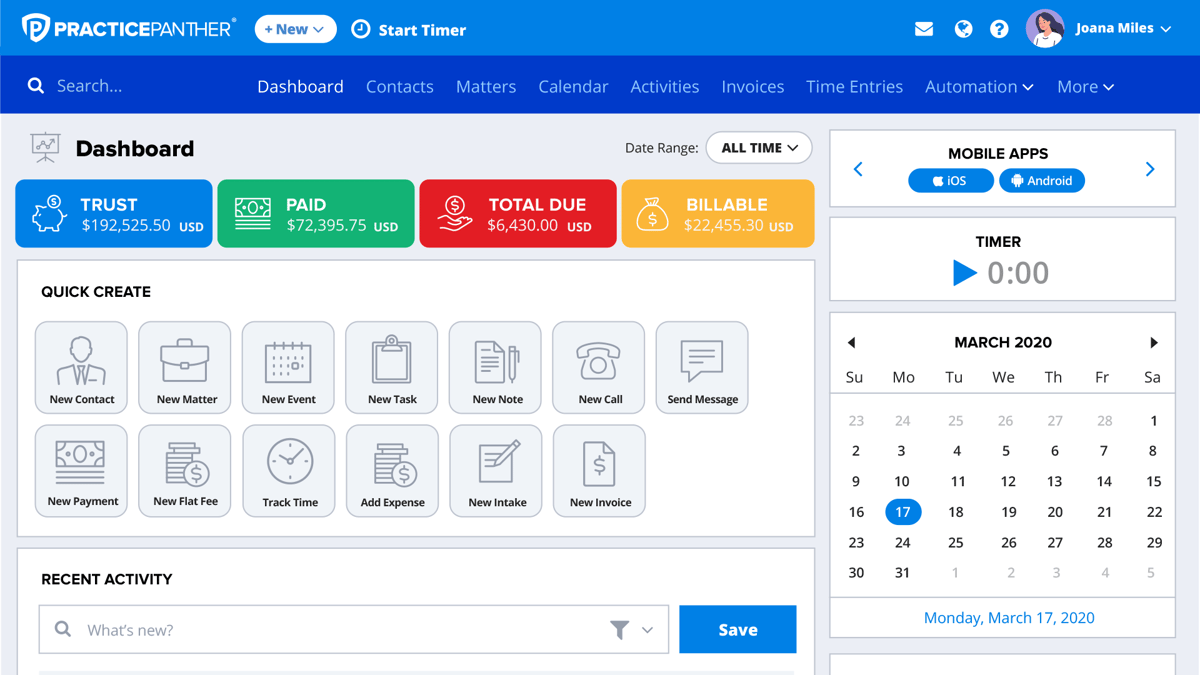
With features like document management, billing, client intake forms, and calendar management, PracticePanther provides everything you need to run your law firm from one central platform. It’s also easy to set up, with a clean interface that doesn’t require much training to get started.
Pros
- It’s simple to use, making it ideal for smaller firms or solo practitioners.
- The pricing is affordable, especially for firms on a budget.
- Built-in document automation saves time on standard legal documents.
- It offers a clean, straightforward interface that’s easy to navigate.
- Setup is quick and doesn’t require extensive training.
Cons
- It has fewer integration options compared to other legal software.
- Billing and invoicing options aren’t as customizable, which can be a major disadvantage for law firms with complex billing needs.
- Advanced features often require upgrading to higher-priced plans.
Clio vs. PracticePanther: Features Comparison
Both Clio and PracticePanther are great at managing a law firm’s daily operations, but there are a few differences in how they handle specific features.
Let’s take a closer look at how they compare in several key aspects.
Document Management
Both Clio and PracticePanther provide solid document management tools. Clio has a slight edge here due to its wider range of integrations, making it easier to connect with other systems you might already use.
PracticePanther, while effective, is more straightforward but may not offer the same flexibility for larger firms.
Billing and Invoicing
Clio offers more flexibility when it comes to customizing invoices and billing workflows. It supports various billing arrangements, which is helpful for firms with more complex needs.
PracticePanther, on the other hand, provides basic billing options that work well for simpler setups but lack some of the advanced features found in Clio.
Document Automation
PracticePanther comes with built-in document automation, which makes it easy to create standard legal documents quickly and enhance efficiency of the overall drafting process.
Clio, however, doesn’t offer this feature by default—you’ll need to use third-party tools like Briefpoint to get similar functionality.
Briefpoint lets you automate discovery document drafting thanks to artificial intelligence and machine learning. You no longer have to copy-paste formats or type in routine information manually.
Briefpoint does all the grunt work, so you can focus on adding more substantial information, such as client responses and objections.

Client Intake Forms
Both platforms allow you to create customizable client intake forms.
Clio’s forms can be more tailored to specific needs, offering more customization options, while PracticePanther provides a simpler, out-of-the-box solution that works well for smaller firms.
Calendar Management
Clio and PracticePanther both feature great calendar management systems.
You can sync them with Google Calendar or Outlook, set reminders, and track important deadlines like court dates. In terms of functionality, both platforms are very similar here.
Client Portal
The client portal feature is available on both platforms, allowing clients to log in, view case updates, and communicate with the firm securely.
This feature is quite comparable between Clio and PracticePanther, with both offering an easy-to-use interface for client interactions.

Clio vs. PracticePanther: Key Differences
Both Clio and PracticePanther are excellent legal practice management tools, but they’re built with slightly different users in mind. Let’s break down the key differences so you can see which might be the better fit for your law firm.
Target Audience
Clio tends to be a go-to for mid-sized and larger law firms that need more advanced features and flexibility. It’s also great for firms that want to integrate with a variety of other software.
On the flip side, PracticePanther is more popular with solo practitioners and small firms, thanks to its straightforward setup and user-friendly design.
Key Features
Clio is all about customization and integration—if you want a platform that can connect with other tools and give you plenty of options to tweak your workflow, Clio’s got you covered.
PracticePanther keeps things simple, with built-in features like document automation, so it’s great if you don’t want to mess around with extra integrations or complex setups.
Ease of Use
When it comes to ease of use, PracticePanther is the clear winner for those who want to get up and running fast. Its interface is clean, and there’s not much of a learning curve.
Clio, while still fairly easy to use, has more advanced features, so it might take a bit longer for the average Clio user to explore everything it offers.
Pricing Plans
Clio pricing is on the higher side, especially if you need all the bells and whistles, which might make it a bigger investment for larger teams. Plans start at $49 per user per month for EasyStart, but it only includes basic features like calendar management, time tracking, and online payment processing.
If you want to add more features like Clio Manage or Clio Grow, you’ll need to upgrade.
PracticePanther, on the other hand, offers more affordable pricing, especially for smaller firms or solo lawyers looking for a budget-friendly option.
PracticePanther pricing starts at $59 per user per month and includes contract management, client portal, unlimited data storage, internal chat, and other core features.
Which Option Is Best For Your Law Firm?
The best choice really depends on your law firm’s specific needs.
If you’re running a larger firm or need more flexibility with integrations and advanced features, Clio is probably the better option. Its robust feature set makes it a superb option handle more complex workflows. Plus, it offers a ton of customization.
On the other hand, if you’re a solo practitioner or part of a smaller firm looking for something simple, easy to use, and more affordable, PracticePanther is a great fit.
It’s quick to set up and covers all the basics without overwhelming you with too many options.
Upgrade Your Law Firm Productivity With Briefpoint
While both Clio and PracticePanther are solid options for managing your law firm, integrating a tool like Briefpoint can take your productivity to the next level.
By automating the incredibly time-consuming task of drafting legal documents, Briefpoint helps you save thousands of dollars per year, per attorney, while improving accuracy and speed.
Whether you’re using Clio or PracticePanther, Briefpoint seamlessly fits into your workflow, which allows you to focus on what really matters—serving your clients.
Schedule a demo with Briefpoint today and see how it can optimize your legal practice!
Start Saving Thousands With Discovery Automation
Discovery responses cost firms $23,240, per year, per attorney. $23,240 estimate assumes an associate attorney salary of $150,000 (including benefits – or $83 an hour), 20 cases per year/per associate, 4 discovery sets per case, 30 questions per set, 3.5 hours spent responding to each set, and 1800 hours of billable hours per year.
Book a demo and save on these costs with Briefpoint.
FAQs About Clio vs. PracticePanther
Which is better for solo practitioners, Clio or PracticePanther?
PracticePanther is often the better choice for solo practitioners due to its simplicity and affordability, but Clio also offers scalable features for smaller firms.
Can I use Clio and PracticePanther on mobile devices?
Yes, both Clio and PracticePanther offer mobile apps for iOS and Android, allowing you to manage your law practice on the go.
Is there a learning curve with Clio or PracticePanther?
Clio’s advanced features can take a little time to learn, especially for new users, while PracticePanther is generally easier to set up and use right away.
The information provided on this website does not, and is not intended to, constitute legal advice; instead, all information, content, and materials available on this site are for general informational purposes only. Information on this website may not constitute the most up-to-date legal or other information. This website contains links to other third-party websites. Such links are only for the convenience of the reader, user or browser. Readers of this website should contact their attorney to obtain advice with respect to any particular legal matter. No reader, user, or browser of this site should act or refrain from acting on the basis of information on this site without first seeking legal advice from counsel in the relevant jurisdiction. Only your individual attorney can provide assurances that the information contained herein – and your interpretation of it – is applicable or appropriate to your particular situation. Use of, and access to, this website or any of the links or resources contained within the site do not create an attorney-client relationship between the reader, user, or browser and website authors, contributors, contributing law firms, or committee members and their respective employers.
7 Types of Paralegal Software (Use Cases and Examples)
As a paralegal, you know how quickly your to-do list can spiral out of control.
Between managing case files, tracking deadlines, drafting documents, and keeping everything organized, it’s easy to feel like you’re constantly playing catch-up.
And let’s not even get started on the repetitive tasks—creating the same document over and over or hunting down files that seem to vanish just when you need them most.
If any of this sounds familiar, it’s time to find a solution (or several).
Paralegal software is designed to tackle these headaches and lighten your workload so you can spend less time on the grind and more time focusing on more value-adding work.
In this article, we’ll talk about the different types of software for paralegals, the benefits they provide, and what Briefpoint can do for you.
Types of Legal Software for Paralegals
Managing a paralegal’s workload can get overwhelming, but the right software can really lighten the load.
With the right tools, you can simplify your tasks, stay organized, and make your workday run more smoothly. Let’s explore some essential legal software options that can help you do just that.
1. Practice Management Software
Legal practice management software is your go-to tool for keeping all law firm affairs in order. It helps you manage the big picture and handle the following tasks all in one place:
- Billing
- Scheduling
- Client management
- Time tracking
- Client communication
- Reporting and analytics
For example, Clio and MyCase are popular practice management tools that help law firms stay organized.
You can track case progress, communicate with clients, manage payments, and so much more, all from a single dashboard.
2. Case Management Software
If practice management software covers everything, case management software zooms in on the details of each case.
This software is specifically designed to track the ins and outs of individual cases—think of client records, important deadlines, and specific case files.
Tools like CaseFox and Rocket Matter are great examples. These platforms not only help you manage case-related documents and timelines but also integrate with calendars and billing systems to make your workflow more seamless.
3. Document Automation Tools
Drafting legal documents over and over can be tedious. Document automation tools allow you to create templates for frequently used documents like contracts or pleadings.
Instead of typing everything out or copy-pasting from a reference document each time, you fill in case-specific information, and the software does the rest.
One such tool is Briefpoint, an AI-powered discovery document automation software that speeds up the creation of discovery documents, such as requests for production, requests for admission, interrogatories, and more.
When you upload a discovery request, for example, Briefpoint’s artificial intelligence and machine learning will extract as much information as it can from the document.
Within minutes, you’ll have a document with most of the routine information filled out. At this point, you can add objections or responses to the request from Briefpoint’s built-in menu, then add finishing touches on Word.
Briefpoint also makes collecting and integrating client responses easy, thanks to Bridge. This feature lets you select the interrogatories you want to send, translate complex legal language into plain English, and then send a page where your client can input their answers.
Once your client sends in their responses, Bridge will automatically integrate them into your document. No more back-and-forth emailing.
4. Legal Research Tools
Legal research is a huge part of any paralegal’s role, and having the right tools can make it a breeze.
Legal research software like Westlaw or LexisNexis gives you access to a massive database of case law, statutes, and regulations.

Instead of manually sifting through piles of documents, you can quickly find what you need and even pull up cases that are relevant to your work. These tools make research fast, accurate, and stress-free.
5. Document Management System
Document management systems (DMS) keep everything in one secure, easy-to-access place. With tools like NetDocuments or iManage, you can store, organize, and search for any document related to a case.
Whether you’re working remotely or in the office, you’ll always have access to the right files without worrying about losing track of things.
6. Billing Software
Keeping track of billable hours is key to running a law firm smoothly (and maximizing law firm profitability). Billing software makes that process hassle-free.
Tools like Bill4Time and TimeSolv help you track every minute you spend on a case and generate invoices without breaking a sweat. However, most legal practice management software already built-in billing and invoicing features.
It’s a simple way to make sure your time is accounted for, and it helps avoid any confusion when it’s time to bill clients.
7. Calendar and Task Management Software
All legal professionals know that missing a deadline can be disastrous. Calendar and task management tools make sure you’re always on top of things.
With software like Outlook or PracticePanther, you can track deadlines, set reminders for upcoming tasks, and schedule meetings without worrying about double-booking. These tools help you stay organized so you never miss an important date.
Of course, you can use a standalone tool like Google Calendar or Notion, but most paralegals will agree that it’s better to use an all-in-one solution to keep tasks, dates, and deadlines in one platform.
The Benefits of Legal Technology for Paralegals
Legal technology has completely transformed the way paralegals get work done.
If you’ve ever felt bogged down by repetitive tasks or struggled to keep everything organized, legal tech can be a real lifesaver and an effective solution against paralegal burnout. Here’s how:
Save Time by Automating Repetitive Tasks
One of the most noticeable benefits of legal technology is the amount of time it saves.
For one, think about how much time you spend drafting the same types of documents over and over—contracts, motions, discovery responses. This process can eat up hours that could be spent on more important tasks.
With tools like document automation, you can create templates for these repetitive documents. This means no more wasting time formatting or double-checking every little detail.
Improve Accuracy and Reduce Costly Errors
Despite law’s inherently traditional culture, manual processes leave room for mistakes—whether it’s missing a deadline, misplacing a document, or entering incorrect information into a form.
In the legal industry, even small errors can have huge consequences. Legal technology helps you avoid these mistakes by automating much of the manual work and maintaining consistency across documents.
For instance, with billing software, you don’t have to worry about entering time entries manually or missing billable hours.
The system tracks your time automatically, which helps make sure you get paid for every minute you work without having to double-check each line item.

Stay Organized and Find What You Need Fast
Without the right tools, staying organized can be a nightmare. Shuffling through piles of paperwork or scrolling through endless email threads just to find one document can be incredibly frustrating—and it wastes valuable time.
This is where document management systems come in handy. These tools keep all your files in one secure, searchable location.
Maximize Productivity by Handling More in Less Time
When you have the right tools in place, you can handle more work without feeling overwhelmed. Legal tech streamlines your workflows and allows you to manage more cases or handle complex tasks more easily.
Practice management software brings everything—client info, deadlines, billing, and tasks—into one system. You won’t need to switch between multiple tools to get the job done, meaning less time wasted and more tasks completed.
For paralegals working in busy law firms, this kind of efficiency is a must. You can handle a larger caseload without feeling like you’re constantly drowning in work.
Collaborate Better with Your Legal Team
When you’re working with a legal team, keeping everyone in sync can be tough. Tasks get missed, documents don’t get shared, and deadlines sneak up on you. But with the right collaboration tools, you can keep everything on track.
For example, many case management platforms allow you to share case updates, assign tasks, and store documents in one place so everyone knows what’s happening at all times.
How Briefpoint Can Make a Difference in Your Workflows
When it comes to paralegal work, especially handling repetitive tasks like drafting discovery responses, Briefpoint can truly be the only solution you need.
Its automation capabilities take the time-consuming process of document creation and turn it into a seamless task, saving you valuable hours and reducing the chance of human error.
Briefpoint’s Bridge feature also makes gathering client responses a minor task. Instead of constant back-and-forth emails, you can send easy-to-understand forms to clients and automatically integrate their responses into your documents.
If you’re tired of spending hours drafting the same types of documents or manually gathering client responses, Briefpoint offers a smart, efficient alternative.
You can see the benefits firsthand by scheduling a demo and discovering how much easier your workflow can be with this powerful tool in your arsenal.
Streamline Document Creation and Save Thousands
Discovery responses cost firms $23,240, per year, per attorney. $23,240 estimate assumes an associate attorney salary of $150,000 (including benefits – or $83 an hour), 20 cases per year/per associate, 4 discovery sets per case, 30 questions per set, 3.5 hours spent responding to each set, and 1800 hours of billable hours per year.
Book a demo and save on these costs with Briefpoint.
FAQs About Paralegal Software
What is paralegal software?
Paralegal software refers to various essential tools that assist with tasks like managing cases, organizing documents, tracking billable hours, automating document creation, and performing legal research. It’s designed to streamline workflows, increase productivity, and reduce errors in a legal setting.
Is legal software secure?
Yes, most legal software comes with security features like data encryption, secure access controls, and regular backups. These measures help protect sensitive client information and ensure compliance with legal regulations.
Can AI replace paralegals?
While AI has certainly improved the efficiency of many tasks paralegals handle—like document review, legal research, and drafting—it’s not likely to fully replace paralegals anytime soon. AI can automate repetitive processes and assist with routine tasks, but the nuanced, analytical, and interpersonal aspects of a paralegal’s job require human judgment and skills that AI simply can’t replicate.
What are the cost benefits of using paralegal software?
Paralegal software can save firms thousands of dollars by improving efficiency and reducing the time spent on routine tasks. For example, using document automation tools like Briefpoint can significantly lower the costs associated with drafting discovery responses, saving firms an estimated $20,477 per attorney annually.
The information provided on this website does not, and is not intended to, constitute legal advice; instead, all information, content, and materials available on this site are for general informational purposes only. Information on this website may not constitute the most up-to-date legal or other information.
This website contains links to other third-party websites. Such links are only for the convenience of the reader, user or browser. Readers of this website should contact their attorney to obtain advice with respect to any particular legal matter. No reader, user, or browser of this site should act or refrain from acting on the basis of information on this site without first seeking legal advice from counsel in the relevant jurisdiction. Only your individual attorney can provide assurances that the information contained herein – and your interpretation of it – is applicable or appropriate to your particular situation. Use of, and access to, this website or any of the links or resources contained within the site do not create an attorney-client relationship between the reader, user, or browser and website authors, contributors, contributing law firms, or committee members and their respective employers.