7 Best Ways to Use AI for Legal Discovery
What Are the Biggest Benefits of AI-Powered Legal Discovery?
The biggest benefit is that AI can give your team more time to focus on the parts of discovery that need legal judgment.
A single matter may involve tens of thousands of files, vast datasets, and media evidence. Reviewing all of that manually can slow the entire discovery lifecycle. AI technology helps organize the volume, surface useful information, and move routine work forward faster.
Some of the main benefits of automating legal discovery include:
- Saving time: AI can speed up document review, drafting, summarizing, and other repetitive work.
- Lower costs: Less time spent on manual tasks can reduce the overall cost of discovery.
- More room for strategy: Lawyers can spend more time assessing the facts, planning next steps, and making judgment calls.
- Better consistency: AI can help keep language, formatting, and workflow steps aligned.
- Greater capacity: Teams can take on larger matters without every new request disrupting the rest of the workload.
- Faster analysis: Generative models can summarize records, organize information, and highlight recurring issues for closer review.
- A smoother process: Cutting down on repetitive admin work makes discovery easier to manage under pressure.
1. Use AI to Review Large Volumes of Documents Faster
A few parts of discovery take up more time than document review. A large production can leave you with thousands of legal documents to sort through, and getting to the useful ones can take longer than it should.
AI helps cut through that first wave of volume, so you can get to the records that look most relevant sooner.
For many teams, legal AI tools and technology-assisted review (TAR) make the early review stage feel more manageable. Artificial intelligence can identify names, dates, topics, and repeated language, then group similar files together so the set starts to make more sense.
As those review decisions build, machine learning can help push likely relevant documents closer to the top. Leveraging AI can also support early case assessment by creating document summaries and helping teams take reasonable steps to identify key material.
For example, in a trade secret case, you may have years of emails, attachments, internal messages, and draft agreements sitting in one production.
AI can pull together documents tied to a product name, a former employee, or a specific date range, which gives you a cleaner place to begin. That can take repetitive tasks off your plate, help your team work smarter, and leave more time for strategic work.
2. Use AI to Draft Responses to Interrogatories
Interrogatories often follow a familiar rhythm. You read the request, sort out what it is really asking, check prior materials, and start shaping language that fits the case.
AI can help move that work along by giving you a first draft to react to, which is often much easier than building every response from scratch.
In a legal practice with a steady flow of discovery, the extra speed adds up. For instance, AI can help organize interrogatories one at a time, keep formatting clean, and suggest standard objection language when it fits the request.
It can also help legal professionals keep discovery responses consistent, especially when similar issues come up again in later sets or from opposing counsel.
The useful part is not that AI writes the final answer for you. Instead, it gives you something to work with. You can refine the wording, add the facts that matter, and adjust the response so it matches your strategy and your client’s position.
That makes the manual process feel less draining and gives you more room to focus on the parts of the response that call for your judgment.
3. Use AI to Prepare Responses to Requests for Production
After interrogatories, requests for production call for a slightly different use of AI. The job here is not only to draft a written response. You also need a clear read on:
- What is being requested
- How the requests relate to each other
- What follow-up needs to happen behind the scenes
AI can help sort that out early. It can pull out the subject of each request, group overlapping requests, and draft response language that fits your existing processes. That function makes the set easier to work through and gives your team a more organized starting point.
For example, if several requests all relate to one vendor dispute, AI can connect the ones dealing with emails, contract drafts, invoices, and internal communications. That helps you prepare responses with more consistency and makes it easier to track what still needs review or collection.
A lot of the value comes from structure. When the team spends less time manually untangling similar requests, the work moves more cleanly. For legal teams handling active discovery, those AI capabilities can take a time-consuming part of the process and make it feel lighter.
4. Use AI to Help With Requests for Admission
Requests for admission usually call for a tighter drafting approach than requests for production.
You are not sorting through categories of documents in the same way. Rather, you are dealing with short statements that need a clear response, and the wording can carry significant weight in the discovery process.
Again, AI can help make that stage easier to manage. It can separate each request, keep the responses aligned in tone and structure, and help draft admits, denials, or qualified answers based on the information available. That is especially helpful when the set is long, and the requests start to blend together.
In a personal injury case, for example, one side may serve requests tied to medical treatment or the authenticity of records. AI can help organize those requests and match them with the relevant data already gathered, which gives you a faster starting point for drafting.
Plus, it can help keep the response set consistent from one request to the next. That makes it easier to review the whole set as one piece of work rather than a series of disconnected answers.
5. Use AI to Summarize Case Materials and Evidence
Another practical use of AI during the discovery process is summarizing the material your team already has. Once documents start piling up, it helps to get a faster read on what is in the record before you dig into every page line by line.
But when you use AI, it can help pull key evidence from electronic discovery files, deposition transcripts, emails, reports, and other electronically stored information.
It can surface dates, names, and other details that may not stand out through simple keyword searches alone. Some large language models can also give you a quick summary of a long document set, while machine learning algorithms can identify patterns in the background as more material comes in.
Those features can be useful for data collection and early case analysis, particularly when you need to get up to speed without losing sight of the bigger picture.
Common practical applications include:
- Deposition transcripts
- Email threads
- Medical records
- Contracts and amendments
- Internal reports
- Chat logs
- Chronologies
- Witness statements
Used carefully, AI can make large sets of client data easier to review and easier to organize before the deeper legal analysis starts.
6. Use AI to Flag Privileged or Sensitive Information
Privilege review asks you to slow down and look more carefully at what is in the file. Before anything is produced, you need to spot documents that may call for extra protection.
AI can help with that first sweep. It can surface relevant information tied to legal privilege, confidential business records, sensitive client data, or even drafting documents that may contain protected legal analysis.
If you are dealing with a large production, that can save your litigation team a lot of backtracking later. AI can pick up law firm email domains, common legal terms, confidentiality labels, or names tied to counsel.
The process is still largely labor-intensive, and AI may return false positives, so every flagged document needs human review. Data security should also stay front and center when sensitive files are uploaded, stored, or analyzed.
Sensitive information may include:
- Attorney-client communications
- Work product
- Internal legal notes
- Settlement discussions
- Trade secrets
- Financial account details
- Medical records
- Social Security numbers
- Personnel files
- Private customer information
7. Use AI to Keep Discovery Workflows More Consistent
After a while, the value of AI starts to show up in the workflow itself. You see it in how discovery requests get drafted, how review moves from one step to the next, and how much less cleanup is needed at the end.
When the process is more consistent, your team spends less time fixing avoidable gaps and more time on the strategic aspects of the case.
That can be greatly helpful when different people touch the same matter. AI systems can keep wording, formatting, and response structure more aligned, while still leaving room for manual review and case-specific judgment. They can also detect inconsistencies that are easy to miss when work moves quickly.
More specifically, a more consistent workflow can help you with:
- Standard language: Keep discovery objections, definitions, and common response language closer to firm preferences.
- Inconsistency checks: Detect inconsistencies in wording, position, or formatting before they create problems later.
- Administrative tasks: Cut down on repetitive admin work tied to organizing, editing, and updating discovery requests.
- Defensible audit trail: Create a clearer record of edits, review steps, and drafting history in relevant cases.
Common Risks and Limitations of Using AI Tools in the Discovery Process
Like any tool used for legal work, AI needs careful handling. It can speed up routine tasks and create significant time savings, but the output still has to hold up under review.
Many generative AI tools produce polished language quickly, which can make weak analysis look more reliable than it is. AI’s role should be to support the process and never to replace legal judgment.
Some of the most common risks include:
- Inaccurate output: AI-powered tools can misread facts, miss context, or draft language that does not fit the record.
- Human oversight: Natural language processing can help organize and draft, but legal professionals still need to review the substance, research, and final wording.
- Sensitive digital data: Teams need to understand where client information goes, how an eDiscovery platform stores it, and who can access it.
- Biased or incomplete training data: AI output may reflect gaps or errors in the material used to train or guide the system.
- Learning curve: New tools take time to learn and fit into existing workflows.
- Human error: Rushed review and overreliance can still create problems.
Why Briefpoint Makes AI Discovery Genuinely Useful
Implementing AI only helps when the tool fits the work your team already does. If the platform is too broad or adds extra steps, it can create more friction than it removes.
Briefpoint is built specifically for written discovery, so the workflow stays focused. Legal teams can draft and respond to interrogatories, RFAs, and RFPs, collect client input, and prepare production packages in one place.
In other words, Briefpoint makes it easier to move through discovery responses while keeping attorney review and case strategy firmly in your hands.
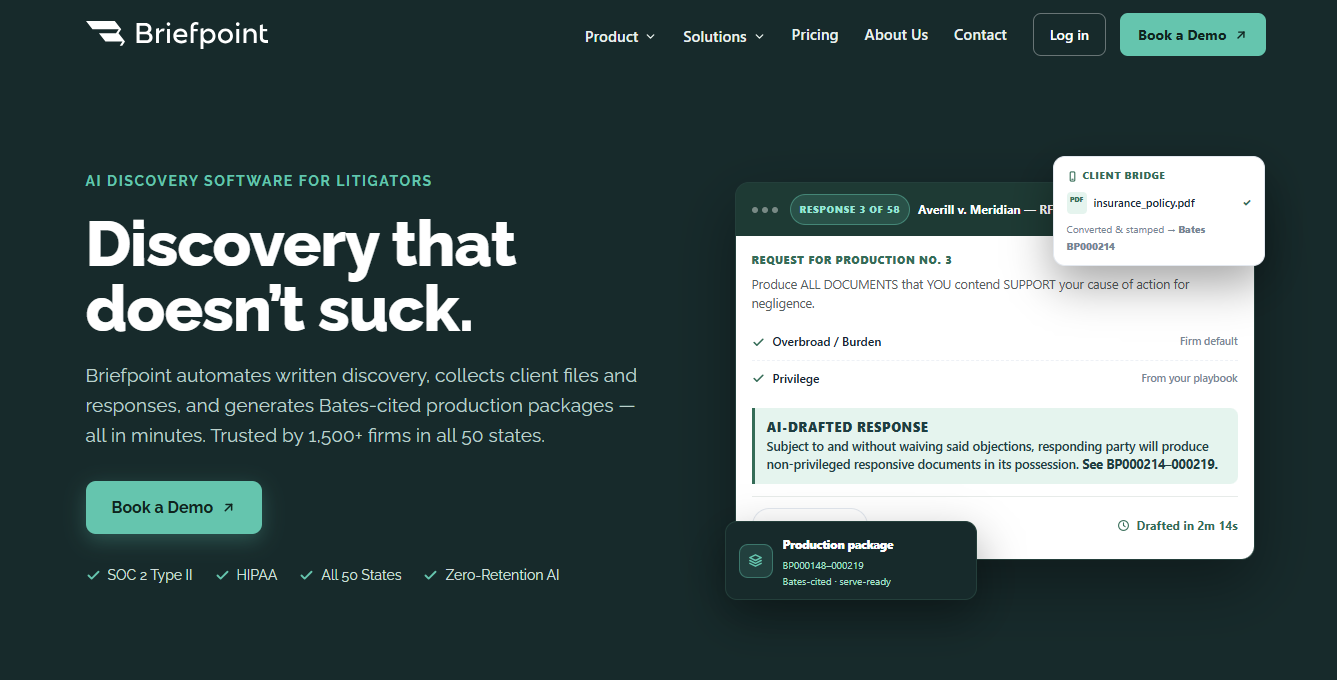
Autodoc handles one of the most time-consuming parts of the process. You can upload the requests and case files, identify responsive documents, and generate a Word-formatted response with Bates citations and a Bates-numbered production package.
Firms can save 30 or more hours per case, which can help reduce costs and free up time for more strategic aspects of the matter.
Plus, supplemental responses make ongoing discovery easier to manage, too. Prior answers stay intact while updated responses are generated as new facts or documents come in.
The process stays straightforward: upload the discovery documents, review and revise the draft, then download the finished file.
