The Definitive Guide to Legal Document Assistant Software

What is Legal Document Assistant Software?
Legal document automation software is an advanced technology solution designed to automate and improve the creation, management, and storage of legal documents. In essence, this type of software is meant to replace traditional, tedious methods of document handling with a digital approach.
Picture it as a virtual assistant for lawyers and law firms, programmed with knowledge of legal processes and terminology, streamlining the documentation process tenfold.
More specifically, legal document automation software simplifies tasks such as compiling, formatting, and customizing legal documents based on specific client information and needs through automation and artificial intelligence (AI).
Why Should You Use Legal Document Automation Software?
As automation technology becomes more and more common in the legal industry, legal document automation software has become a necessity rather than a need. Law firms that want to gain a competitive edge and improve their overall legal workflows adopt this type of tech for:
Increased Efficiency
One of the most immediate benefits of legal document automation software is the dramatic improvement in operational efficiency. By automating routine tasks, such as drafting standard legal documents, your firm can allocate its resources and time more effectively.
Automation reduces the manual effort involved in creating and managing documents, allowing your team to handle a larger volume of work without increasing headcount or hours worked.
Plus, less time spent on tedious work means more time to work on higher-value, profit-producing tasks.
Healthier Work-Life Balance
Better work efficiency goes hand in hand with a more positive work-life balance.
Reducing the time needed to create documents saves lawyers and paralegals hours of time that they can spend outside the office instead of being buried under paperwork.
Greater work-life balance leads to a whole other slew of benefits in any workplace. For one, lawyers with less workload than necessary tend to be more productive, collaborative, and satisfied with their jobs.
Faster Turnaround Time for Legal Documents
Clients expect prompt service, and the ability to quickly turn around accurate and professionally prepared documents can set your firm apart from the competition.
Legal document automation software streamlines the document creation process, from drafting to approval and signing. In turn, a sped-up process allows you to make new documents and meet tight deadlines with ease, which improves client satisfaction and potentially increases client retention and referrals.
Improved Document Accuracy and Consistency
Accuracy in legal documents is non-negotiable. Errors, inconsistencies, or omissions can lead to serious legal and financial consequences for your clients and your firm.
Automation software minimizes the risk of human error by using pre-set templates and conditional logic to ensure that documents are correctly formatted and contain all the necessary information.
By standardizing the document creation process, the software ensures that every document reflects the firm’s highest standards of accuracy and professionalism, regardless of who in the law office creates it.
Increased Law Firm Profitability
All of these benefits culminate into the ultimate end goal: better law firm profitability.
First, by streamlining document-related processes, your firm can handle more cases without a proportional increase in costs, thereby improving your profit margins.
Second, the time saved on document management can be redirected towards billable hours or developing new business, further increasing revenue.
Additionally, the enhanced client satisfaction resulting from faster turnaround times and error-free documents can lead to repeat business and referrals, contributing to long-term profitability.

What Legal Documents Can You Create with Automation Software?
Legal document assembly software can automate the assembly of many different documents. However, you need to find a document automation platform that covers the specific types of documents you want to automate.
So far, the software available today covers the following document types:
- Requests for Production
- Requests for Admission
- Interrogatories
- Contract agreements
- Incorporation documents
- Wills, trusts, and powers of attorney
- Employee contracts and non-disclosure agreements (NDAs)
- Demand letters
- Eviction notices
Features to Look For in the Best Document Automation Software
While document automation software sounds like a dream for legal professionals, keep in mind that not all platforms are made equal. If you want to reap all the potential benefits of this type of tech, be on the lookout for key features:
Legal Document Templates
Look for a platform with a comprehensive library of customizable legal document templates that cover a wide range of your needs, ensuring you can quickly start drafting without building from scratch.
If you use a specific set of templates, good legal software will let you upload them and learn from your templates to generate future documents.
Library and Storage
Most document automation platforms have built-in document storage, but you will want those documents to be accessible from anywhere.
Opt for cloud-based platforms that allow easy access to documents from any device at any time and have robust search functionalities for efficient document retrieval.
Extended File Types
Legal professionals will have to produce documents in various formats other than Word Docs, so it’s crucial to choose a document automation software that supports all common file types, such as Microsoft Word and PDF.

Conditional Logic and Auto-Population
The mantra of conditional logic is simple: “If this, then that.” This powerful feature allows for the development of custom workflows tailored to the specific needs of the documents you’re generating.
For instance, if you’re creating discovery phase documents, the software can automatically cue up a discovery request or response template for use.
Closely tied to conditional logic, auto-population is a feature that further enhances the efficiency of document assembly.
Using the litigation scenario as an example, once the software selects the appropriate discovery request template based on the conditional logic, it doesn’t stop there. It also fills in the client’s information across the necessary fields within the document.
This capability extends beyond just the data inputted for the current document; it can pull and populate information from across your document assembly or practice management software.
The result? A significant reduction in redundant data entry and a boost in the accuracy of the information within your documents.
Collaborative Features
Collaborative tools allow multiple team members to work on the same document at the same time, so they can track changes, provide feedback, and make real-time updates.
This feature enhances the efficiency of document generation and also ensures that all contributions are harmonized, maintaining document integrity.
These collaborative features are particularly beneficial in remote work settings. They ensure that geographical distance does not hinder teamwork and productivity.
Electronic Signatures
Getting clients and other legal professionals to sign documents in person just isn’t practical all the time. And frankly, it can be a huge waste of resources getting those documents back and forth.
Luckily, electronic signatures eliminate the need for physical documents, reducing turnaround times and enhancing the security of sensitive information.
This feature facilitates a smoother transaction process, enabling legal agreements to be executed promptly and efficiently, thus accelerating the completion of legal procedures.
Software Integration
Choose a document automation tool with the ability to integrate seamlessly with other software systems that your firm already uses. This includes case management systems, CRM (Customer Relationship Management) platforms, email services, and more.
Such integrations create a unified workflow, allowing for smooth data transfer across different applications and reducing manual data entry. By connecting various aspects of a law firm’s operations, software integration ensures that information is consistently up-to-date and accessible, streamlining processes and enhancing overall efficiency.
Plus, you can get the tool up and running in no time and with almost no learning curve.
How Much Does Legal Document Assembly Software Cost?
The pricing models for legal document automation software vary widely, depending on the features, capabilities, and scalability of the platform.
Some platforms may offer a subscription-based billing model, where law firms pay a monthly or annual fee based on the number of users or the scope of features required. Others may offer a one-time purchase price coupled with ongoing support or update fees.
Plus, it’s important to consider the broader cost implications, including the potential cost of switching to new software, the time and effort involved in setup, how the system fits with existing legal workflows, and security considerations.
The right legal practice management software should simplify automating and managing documents, ideally integrating seamlessly with your firm’s existing tools and workflows to avoid time lost in switching between applications.
How Briefpoint Can Upgrade Your Legal Document Workflow
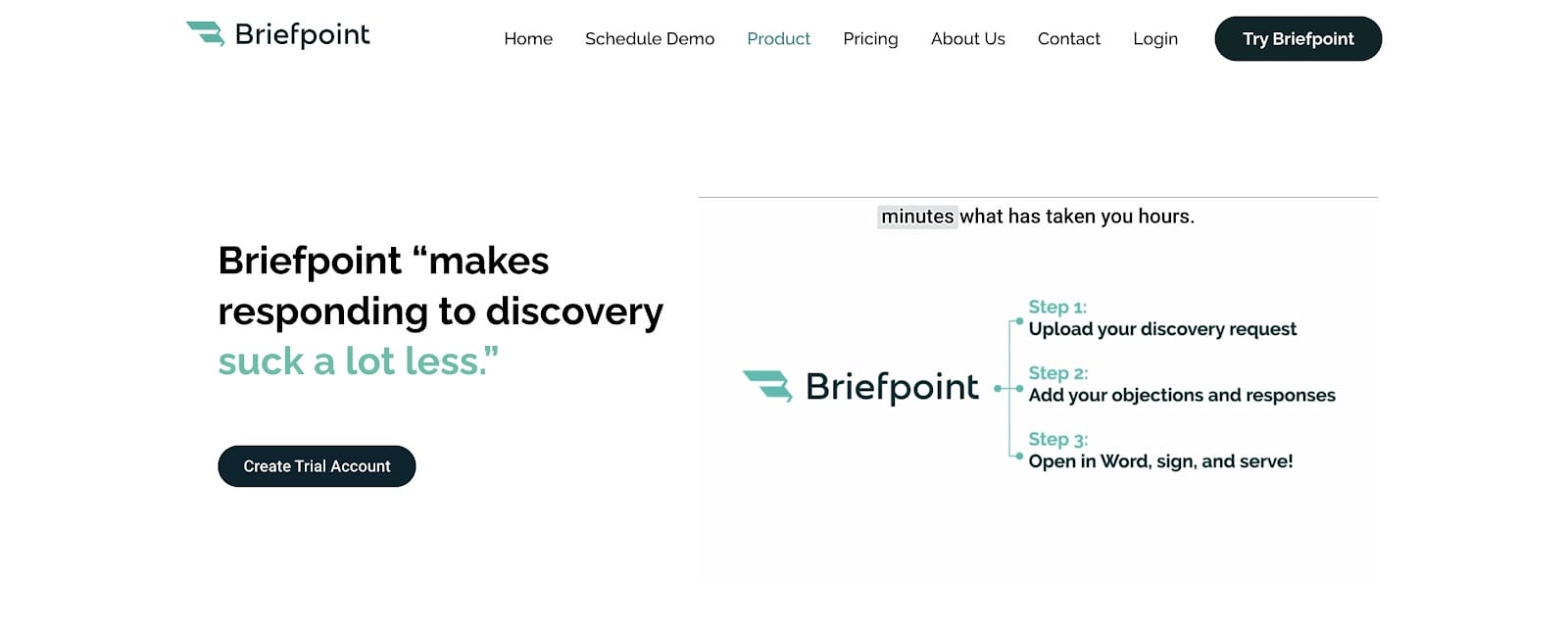
There are a lot of document assistant tools out there, but if you want to focus on discovery document automation, Briefpoint is the software you need.
Briefpoint works by automating the preparation of discovery request and discovery response documents, including but not limited to:
- Requests for Production
- Requests for Admission
- Interrogatories
The process is simple. Briefpoint automates the creation of discovery documents through a few key steps:
- Upload Discovery Request: Begin by uploading the discovery request document into Briefpoint.
- AI Analysis: The software uses AI to analyze the document and extract relevant information.
- Add Objections and Responses: You can then easily add any objections and responses within the platform.
- Download and Finalize: Once you’ve added your input, download the document and make any final adjustments in Microsoft Word.
Don’t let the discovery phase drag on longer than it has to. Use Briefpoint to generate documents in minutes instead of hours and use the extra time for more important tasks.
Generate Legal Documents in Minutes
Discovery responses cost firms $23,240, per year, per attorney. $23,240 estimate assumes an associate attorney salary of $150,000 (including benefits – or $83 an hour), 20 cases per year/per associate, 4 discovery sets per case, 30 questions per set, 3.5 hours spent responding to each set, and 1800 hours of billable hours per year.
Book a demo and save on these costs with Briefpoint.
7 Best Productivity Tools for Lawyers In 2024

What Can Productivity Tools Do For Law Firms?
From the name itself, productivity apps aim to improve productivity in your law firm. However, this is too broad of an observation to take at face value.
Let’s examine how these tech tools are helping revolutionize the legal industry.
Streamlining Workflows and Improving Efficiency
The main goal of legal productivity apps is to simplify workflows and make them more efficient. In turn, lawyers and legal assistants spend less time on repetitive tasks and can instead devote more hours to high-value work.
When you look at the bigger picture, better efficiency cascades into more advantages, such as a healthier work culture, better career development, improved client satisfaction, and a more positive bottom line.
Promoting Better Time Management
Time management is crucial in the legal profession, where billable hours determine profitability. Productivity tools come equipped with time-tracking features and task management systems that help lawyers prioritize their workload and keep track of deadlines.
These tools help lawyers allocate their time more effectively by providing a clear overview of where time is spent, ensuring that every minute counts. Consequently, they have a better idea of how to maximize their billable tasks.
Plus, better time management helps lawyers achieve a better work-life balance and, ultimately, a more positive outlook towards work.
Upgrading Accuracy and Consistency
In the legal industry, accuracy is non-negotiable. A single mistake can have significant ramifications and hurt your bottom line–not to mention the impact on your law firm’s reputation.
Productivity tools improve accuracy and consistency across all documents and communications. From automated spell-checkers to document templates that follow firm-specific guidelines, these tools ensure that every piece of work meets the highest standards of precision.
Improving Client Satisfaction
In today’s digital age, clients expect quick responses and transparent communication. Productivity tools make this possible by offering platforms for secure messaging, document sharing, and real-time updates on case progress.
Aside from keeping clients on the same page, these tools also foster a sense of trust and reliability, improving overall satisfaction and potentially leading to more referrals.
Maximizing Law Firm Profitability
Ultimately, the adoption of productivity tools can have a direct impact on a law firm’s profitability. By automating administrative tasks, lawyers can dedicate more time to billable work and client acquisition.
On the other hand, improved accuracy and client satisfaction can lead to repeat business and referrals, further increasing revenue. Additionally, streamlining operations and reducing the need for manual labor can help lower operational costs, which is another crucial factor in maximizing profitability.

7 Best Productivity Apps for Law Firms
The legal market is brimming with tools promising to revolutionize law firm operations. Yet only a handful truly deliver on their promises and benefits.
Here’s a curated list of tools that stand out, ensuring your firm can do more with less.
1. Best Document Automation Tool: Briefpoint.ai
Briefpoint is an AI-powered app that speeds up the discovery phase of litigation by generating discovery responses and request documents for you. Unlike manual document preparation, you can generate discovery documents in minutes instead of hours, saving you both time and money in the process.
The legal documents Briefpoint AI can auto-generate include but are not limited to:
- Requests for Production
- Requests for Admission
- Interrogatories
Aside from drafting your documents, Briefpoint will allow you to add objections or responses that are pre-drafted or customized by you. Then, you can download the document and finish it on Microsoft Word. Alternatively, you can upload your draft on Google Docs to work with other collaborators.
2. Best Legal Practice Management Software: Clio
Clio stands out as a comprehensive legal practice management platform, offering features that cover nearly every aspect of running a law firm.
From case management to time tracking, billing, and client communication, this project management software provides a centralized system that helps law firms manage their operations more efficiently. Plus, its easy-to-use interface makes the learning curve as minimal as possible, which is a must for busy lawyers.
Its cloud-based nature also allows for easy access to information from anywhere, making it an excellent tool for firms with remote or hybrid work arrangements.
3. Best Note-Taking App: Evernote
Evernote is a versatile note-taking app that allows legal professionals to capture, organize, and share notes in various formats, including text, images, and voice memos. Its powerful search capabilities make it easy to retrieve information when needed, and its syncing feature ensures that notes are accessible across all devices.
Overall, Evernote’s ability to create, categorize, and manage notes makes it a valuable tool for keeping track of case details, research, and to-do lists.
4. Best Cloud Storage Solution: OneDrive
OneDrive offers excellent cloud storage solutions that are particularly beneficial for law firms, providing secure and scalable storage options for documents and files. Plus, it’s a safe document management software that will keep sensitive law firm data secure through its multiple high-tech encryption and two-factor authentication abilities.
With features like file sharing, collaboration, and remote access, OneDrive clears the way for seamless teamwork among legal professionals and attorneys practicing law outside the office, allowing them to work on documents simultaneously and access files from anywhere.
Its integration with Microsoft Office Suite further upgrades productivity within a law firm. It lets you store and access various Microsoft file formats, such as Word, PowerPoint, and Excel.
An honorable mention is Google Drive, which is the best option for law firms that use Google Suite instead of Microsoft Office. Both platforms are well-functioning and intuitive.
5. Best Law Library: Fastcase
A good law library is an indispensable app for any law firm. Fastcase provides comprehensive access to a vast database of legal resources, including case law, statutes, regulations, court rules, and constitutions.
Its advanced search tools and intuitive interface enable lawyers to conduct efficient legal research, find relevant precedents, and stay updated on legal developments. This legal technology can help any law firm save hours–if not days–of time spent on due diligence.
6. Best Legal Billing Software: Bilr
Last but not least, we have Blir. This software is designed to streamline the billing process in law firms, offering features like time tracking, invoice generation, and payment processing.
It helps reduce the administrative burden associated with billing, ensuring that firms can accurately and efficiently manage client accounts and finances. Bilr’s focus on legal billing makes it a tailored solution that addresses the specific needs of law firms, contributing to smoother financial operations.
7. Best Secure Communication App: Slack
Slack is a popular messaging app designed for team communication and collaboration. It provides a centralized platform for messaging, file sharing, and integration with other productivity tools, making it easier for teams to stay connected and work together efficiently.
Slack also has a built-in calling feature, so you can make phone calls from your desktop or mobile device, but take note that you can only make voice calls with one person on the free version.
Plus, you can create multiple channels with each dedicated to a separate legal department or team. The app also lets you share and access documents directly in the conversation for effortless collaboration. Better yet, this app integrates with other tools commonly used by law firms, such as Clio, OneDrive, and Evernote.

Stay Up to Date with the Best Productivity Tools
The rising demand for faster, better legal services pushes law firms to adapt to modern solutions that can maximize their efficiency tenfold. If your law firm struggles to maintain productivity, it might be time to integrate these tools into your current workflows.
However, how do you know where to start? A good rule of thumb is to begin with the most time-consuming tasks you have. For many law firms, this includes discovery document preparation.
Make the discovery phase faster, more accurate, and more efficient with Briefpoint AI. While Briefpoint auto-generates your legal documents, you can focus on tasks that require more brain power–which are also often the tasks that help you win the case.
Maximize Your Productivity With Document Automation
Discovery responses cost firms $23,240, per year, per attorney. $23,240 estimate assumes an associate attorney salary of $150,000 (including benefits – or $83 an hour), 20 cases per year/per associate, 4 discovery sets per case, 30 questions per set, 3.5 hours spent responding to each set, and 1800 hours of billable hours per year.
Book a demo and save on these costs with Briefpoint.
Top 6 Legal Industry Trends to Keep an Eye On in 2024

6 Latest Legal Trends to Watch Out For
The legal sector is highly competitive and fast-paced by nature, which calls for constant improvement through strategies that align with current innovations available. There are too many legal trends to talk about, so we’ve narrowed it down to the six most relevant ones:
1. Increased Adoption of Artificial Intelligence Technology
Lawyers are turning to artificial intelligence to simplify legal processes and make them more efficient, made noticeable with the popularization of legal AI tools like Briefpoint, PatentPal, and Casetext. Most legal pros are no longer skeptical of this “new” tech but are instead embracing it as a nifty and cost-efficient legal assistant.
A LexisNexis survey involving nearly 8,000 participants across US, Canada, France, and UK law firms revealed that almost half expect AI to significantly change practices, especially in improving productivity and efficiency in everyday tasks.
Meanwhile, Thomson Reuters highlighted 2023’s milestones in AI development, including a focus on safe and trustworthy AI applications in various legal functions.
2. The Rise of Cloud-Based Technology for Cybersecurity
Private cloud tech is a type of cloud-based computing and storage where the data belongs to the law firm that uses it, inaccessible to the public. The legal field handles sensitive and private client information daily, making private clouds a necessity as more and more firms go fully digital.
But why has cloud tech become so crucial?
The 2022 IBM Cost of Data Breach report showed that a staggering 83% of the organizations it surveyed had encountered more than one data breach, facing an unprecedented average total cost of $4.35 million—a peak for the year and marking a 2.6% increase from the year before.
Cloud security encompasses a wide array of protocols, tools, and strategies aimed at safeguarding data, applications, and infrastructure in the cloud, addressing key concerns such as data privacy, compliance, and protection against breaches and malware.
3. More Acceptance of Alternative Legal Service Providers and Fees
Simply put, Alternative Legal Service Providers (ALSPs) are services that take the grunt work from in-house legal teams. These might include document review, due diligence, research, compliance, and much more.
According to several reports, ALSPs now constitute a $20.6 billion market segment, having experienced a compounded annual growth rate (CAGR) of 20% from 2019 to 2021. This growth indicates a rapidly evolving market where the lines between ALSPs merged firms, law firms, and corporate law departments are increasingly blurring.
The report highlights that both law firms and in-house counsel are recognizing the value that ALSPs bring to the table, including specialized services, improved cost efficiency, and greater flexibility in headcount and talent management.
Independent ALSPs represent the largest market segment, but law firm-owned captive ALSPs are emerging as the fastest-growing segment, indicating a strategic shift within law firms towards embracing alternative service models.
4. Shortening Lockup Periods with Technology
Most firms rely on billable hours to make a profit, but these hours don’t necessarily get paid right away. A “lockup period” refers to the time between completing work and getting paid. For larger firms, longer lockups may not make a significant change to cash flow, but it can be a huge problem for small firms with limited resources.
The 2023 Legal Trends Report by Clio emphasized the importance of reducing lockups for maintaining a healthy cash flow. It introduced the concept of “lockup” as a mix of “realization lockup” (work yet to be billed) and “collection lockup” (billed work yet to be collected), suggesting that technology, particularly electronic billing solutions, can significantly lower these durations.
Freshfields Bruckhaus Deringer, for example, has been focusing on reducing lockup by implementing internal strategies to decrease the waiting time for client payments. This effort is a response to the increase in lockup days, indicating a broader industry trend toward prioritizing faster billing and collection processes to improve financial health.
5. Rising Numbers of Freelance Lawyers
Some people might think that the legal profession is something you have to do on-site, inside an office where you can meet colleagues and clients face-to-face. That’s not the reality nowadays, especially with current technological advancements and shifting work preferences brought about by the pandemic.
Today, the legal world is adopting alternative work setups, as we can see by the increasing number of freelance lawyers. These attorneys come from diverse backgrounds, including law professors, lawyers caring for families, and retired or semi-retired legal professionals. There’s even a buzz about UK firms expanding their services to the US through remote work.
Overall, the appeal of remote work lies in the flexibility, work-life balance, and variety of projects, which contrasts with the traditional set-up.
Additionally, the increasing number of firms outsourcing work supports the rising trend of freelance lawyering. Nearly half of law firms reported using contract lawyers, indicating a significant shift towards integrating freelancers into traditional legal practice.
This change is partly driven by the legal outsourcing market’s rapid growth, which is projected to reach significant figures by 2027.
6. More Law Firms Focusing on Combating Recession
Many industries are still reeling from the economic impacts of the pandemic, and the legal sector is no different. Today, legal professionals are more wary of economic uncertainty and finding ways to be more recession-proof.
The resilience and growth strategies that were emerging in 2023 have further evolved this year, with firms focusing even more on diversifying their various business practice areas and enhancing operational efficiencies to maintain competitiveness and profitability.
Midsize law firms, in particular, have continued to thrive by capitalizing on counter-cyclical practices such as litigation, labor & employment, and bankruptcy. This focus allows these firms to leverage the demand brought about by economic shifts, providing services that become more sought-after in challenging times, such as the cost of living crisis.
Additionally, law firms are increasingly adopting strategic measures to maximize efficiency and profitability. These measures include optimizing leverage, further reducing office space in response to hybrid work models, investing in technology and skilled staff like pricing specialists, and outsourcing non-core functions.

The Future of the Legal Industry is Brighter Than Ever
The legal industry, while inherently orthodox in some ways, is not immune to change. Goals may remain the same, but the ways we go about it are always open for improvement.
As you can see, these key trends revolve around upgrading legal services and, essentially, the bottom line. With more efficient workflows and maximized potential, firms can stay competitive in a cutthroat legal market.
One way to embrace efficiency in your firm is to implement high-tech tools that minimize your tedious tasks, starting with the most time-consuming legal process of all: discovery. Briefpoint is a generative artificial intelligence tool that drafts discovery response and request documents for you, which would take the average lawyer hours–if not days.
With Briefpoint’s generative AI, you can focus on more value-adding work, produce consistent documents, and, ultimately, make your legal services a notch above the others.
Stay Ahead of the Competition with Briefpoint AI
Discovery responses cost firms $23,240, per year, per attorney. $23,240 estimate assumes an associate attorney salary of $150,000 (including benefits – or $83 an hour), 20 cases per year/per associate, 4 discovery sets per case, 30 questions per set, 3.5 hours spent responding to each set, and 1800 hours of billable hours per year.
Book a demo and save on these costs with Briefpoint.
Time Management for Attorneys (9 Management Tips + Tools)

How Does Time Management Affect Your Practice?
Efficient time management does more than just help you meet deadlines. It affects client satisfaction, impacts your firm’s bottom line, and plays a crucial role in your well-being.
A lawyer who’s on top of their schedule can deliver prompt, high-quality work, leading to happier clients and more referrals. Conversely, poor time management can lead to rushed jobs, missed opportunities, and burnout.

4 Most Common Hindrances to Effective Time Management
For many people working in the legal industry, almost every case or task requires a lot of time commitment. Most attorneys put in 50, 40, or sometimes even 80 hours into their workweeks.
Of course, it’s a natural aspect of the trade, but even if you’re putting in a lot of time, that doesn’t always mean you’re working efficiently. Additionally, bad time management often leads to poor work-life balance, which comes with its unique downsides.
Before we get into how you can improve your time management, let’s discuss the possible reasons why it might be lacking:
Poor Delegation of Tasks
Many attorneys struggle with delegation, often feeling that they need to handle everything personally to ensure it’s done correctly. However, lack of delegation can quickly lead to burnout and poor use of tools available, including staff that are hired to handle routine tasks.
Outdated Processes
The legal industry is notorious for clinging to traditional methods, but adherence to outdated processes can be a significant time drain. Whether it’s manual document filing, reliance on paper-based systems, or avoiding new legal tech solutions, these outdated practices can slow you down considerably.
Procrastination
Procrastination is a common challenge that affects many people, not just attorneys. If you wait until the last minute to start on tasks, you may be setting yourself up for missed deadlines and even more stress.
There are a lot of possible reasons why this happens, but procrastination often stems from feeling overwhelmed by a task or fearing failure.
Inaccurate Time Estimates
Effective time management requires accurate estimates of how long tasks will take. Underestimating the time needed for tasks can disrupt your entire schedule, leading to work piling up and deadlines being missed.
Maximizing Efficiency With Discovery Document Automation
Drafting discovery response and request documents can take hours, if not days. It depends on the matter you’re responding to and how much paperwork you would have to go through to draft the entire document. Whatever the case may be, manual discovery drafting takes too much time to be efficient.
Automation is the solution to this long-standing problem and a great way to manage time more effectively. With AI automation tools, legal professionals can upload documents and let the machine learning system extract information, add objections or responses, and then prepare the document in the proper format. So, instead of hours, you can have your response or request documents ready in minutes.

9 Best Time Management Tips for Lawyers for Better Work-Life Balance
Achieving an optimal work-life balance is a never-ending challenge for attorneys. However, by employing strategic time management techniques, lawyers can enhance their productivity while ensuring they have time for personal pursuits.
Here are some of the best time management tips to help manage your time more effectively:
1. Prioritize tasks based on importance
Understanding that not all tasks have equal importance is crucial in time management. Start by identifying which tasks require your immediate attention and which can be postponed or even delegated.
In doing so, you can focus on what truly matters instead of spending valuable time on less critical activities.
2. Keep your goals realistic
Setting achievable goals helps keep your workload manageable and prevents you from feeling overwhelmed. Break down larger projects into smaller, more manageable tasks with specific deadlines. Adopting this strategy can help you avoid procrastination and set up a workflow you can follow more easily.
3. Use digital calendars
Make your digital calendar your go-to for organizing your schedule. Regularly update it with all your deadlines, appointments, and personal commitments, and consider sharing it with support staff. This habit helps ensure that nothing falls through the cracks and allows you to visually assess your availability for taking on new tasks.
4. Embrace the Pomodoro technique
This time management technique involves working in focused intervals (typically 25 minutes or longer), followed by a short break. These intervals, known as “Pomodoros”, encourage deep focus and productivity by creating a sense of urgency and minimizing distractions. After four Pomodoros, take a longer break to recharge.
5. Learn when to say “no”
Recognizing your capacity and refusing additional tasks when your plate is already full is vital to preventing burnout and optimizing your schedule. Politely decline requests that you don’t have the bandwidth for to maintain a high quality of work for your current commitments.
6. Master the art of delegation
Evaluate your team’s skills and delegate tasks accordingly. Delegation is not about offloading work you don’t want to do; it’s about efficiently managing resources to ensure all tasks are completed most effectively.
For example, you can let your assistant handle non-urgent client communications so that you don’t have to spend the whole day answering queries.
7. Set boundaries to limit interruptions
Interruptions, while sometimes unavoidable in busy law firms, can severely disrupt your workflow. Designate specific times for checking emails and taking calls to minimize these disruptions. Inform colleagues and clients of these windows to help manage their expectations and reduce the frequency of interruptions.
8. Utilize time-blocking
Time-blocking involves dedicating specific blocks of time to different tasks or activities throughout your day. This technique forces you to make intentional decisions about how you spend your time. Allocate time blocks for deep work, administrative tasks, billable hours, and even breaks.
This way, Time you can ensure that you dedicate sufficient time to high-priority work while also preserving time for rest and personal activities. It encourages a disciplined approach to your day, where you’re less likely to get sidetracked by less important tasks or procrastination.
9. Incorporate technology into your workflow
Adopt tech solutions that can help you reduce time spent on tedious tasks or improve your overall efficiency. There are plenty of legal AI tools that take over certain tasks, such as document automation, contract drafting, and client management.

Automating Document Preparation
One of the most tedious aspects of litigation is the discovery phase, and if you do it the traditional way, you might spend hours preparing documents instead of tackling more challenging tasks.
Briefpoint recognized this challenge and created a way to streamline document preparation. With this AI-powered tool, you can automate the preparation of discovery response and request documents. Lawyers who use Briefpoint save an average of three hours per document, allowing them more time for other tasks–or just life in general.
Improve Your Discovery Process with Briefpoint
Discovery responses cost firms $23,240, per year, per attorney. $23,240 estimate assumes an associate attorney salary of $150,000 (including benefits – or $83 an hour), 20 cases per year/per associate, 4 discovery sets per case, 30 questions per set, 3.5 hours spent responding to each set, and 1800 hours of billable hours per year.
Book a demo and save on these costs with Briefpoint.
Best 5 Gavel Software Alternatives in 2024
Best 5 Gavel Software Alternatives in 2024
The best document automation software tools are easy to use and effective, and help law firms save significant amounts of time, which they can then spend on value-adding tasks.
In this post, we’ll review some of the best Gavel alternatives available to litigators and law firms.

Briefpoint
There are plenty of Gavel alternatives, but none can match Briefpoint for discovery document automation. Briefpoint makes it as easy as possible for law firms to automate the key discovery response and request processes, resulting in hours of saved time that lawyers can spend drafting what really matters.
Briefpoint has been built specifically with the legal industry in mind, making it intuitive for law firms to use. The powerful AI integrations ensure that it’s highly effective and makes working straightforward.
Thanks to Briefpoint’s intuitive design, while sophisticated, Briefpoint can nevertheless be used by professionals of all technical abilities.
The result? Hours saved on each document. You can get started with Briefpoint by scheduling a demo.
Rally
Rally is a law-focused automation tool that focuses on many legal tasks, not just document creation.
With Rally, you have control over many aspects of the client experience, and you can also use it to customize branding, organize documents, and accept payments.
While Rally is a powerful tool, it does have a couple of disadvantages. The main one is that it offers many different features that may not be required by the law firm, resulting in paying for a product that is not fully needed.
In addition, its document creation capabilities are not as advanced as other Gavel alternatives, such as Briefpoint. It also has a high price point.
However, it may be suitable for individual lawyers who want an all-encompassing tool with which they can complete a variety of tasks.
Hotdocs
HotDocs has been around for a long time, which is both a positive and a negative. On the plus side, they have experience in putting together forward-thinking document generation software.
However, because it’s been around for a while, it’s lacking some of the innovation that you’ll find in other tools. It also is not specifically designed for use in the legal field, which makes it a little more difficult for legal professionals to use.
It’s generally more complicated to use than other Gavel alternatives, with many of the tool’s features requiring coding experience. If you have coding experience along with the time to get to grips with HotDocs, then you’ll find it to be powerful. It’s also recommended if you serve a variety of different sectors, not just the legal field.
Woodpecker
Woodpecker is a software tool that’s easy to use and offers a wide variety of features, including legal document automation. It’s suitable for both large and small law firms and is adept at creating both complex and straightforward documents.
The software puts a greater emphasis on the client experience than other tools, and could well be regarded as a client onboarding tool rather than a document automation tool.
Still, it’s possible to create discovery responses and requests documents once you know how, and it also integrates with a number of tools widely used within the legal field.
PandaDoc
PandaDoc is a popular document automation software tool that claims to help professionals save up to 40% of time per document. It wasn’t specifically designed for use in the legal industry, but it includes a number of tools that legal professionals will appreciate.
It comes packed with features that help with various tasks beyond document creation, such as streamlining the customer experience. While powerful, it is more complex than other tools, and may not be suitable for firms looking to get up and running with their software quickly.
How Briefpoint Can Help You
Discovery responses cost firms $23,240, per year, per attorney. $23,240 estimate assumes an associate attorney salary of $150,000 (including benefits – or $83 an hour), 20 cases per year/per associate, 4 discovery sets per case, 30 questions per set, 3.5 hours spent responding to each set, and 1800 hours of billable hours per year.
Under these assumptions, you save $20,477 using Briefpoint, per year, per attorney.
Test Briefpoint yourself by scheduling a demo here.
The Work Product Doctrine in California (2024 Guide for Litigation Attorneys)
Discovery Responses: Federal Rules and Workflow
Discovery Responses: Federal Rules and Workflow
Legal content overseen by Nathan Walter, Esq., attorney licensed in California (State Bar No. 313299).
A defense team is served with interrogatories, requests for production and requests for admission, and the records needed to answer them sit with several people at the client. Discovery responses are the written answers, objections and admissions a party serves after receiving written discovery requests.
This article covers federal civil litigation in U.S. district courts under the Federal Rules of Civil Procedure (FRCP).
The article sets out what each type of response must contain, the federal base response periods, a five-step workflow, how to write specific objections and how teams automate the work. The guidance supports discovery workflows for defense firms and in-house counsel who coordinate company records.
What are discovery responses?
Discovery responses are a party’s written replies to written discovery requests served by another party: answers to interrogatories, responses to requests for production, and answers or objections to requests for admission. A request, its written response and any documents produced in reply are three separate things.
This hub does not cover deposition testimony, criminal discovery or procurement proposals. It also does not cover initial disclosures under FRCP 26(a)(1), which a party makes “without awaiting a discovery request.” Responses, by contrast, are triggered by a request.
Three types of written discovery and their response requirements
Each federal device has its own response rule.
Interrogatories: written answers under oath
Under FRCP 33(b)(3), each interrogatory must, to the extent it is not objected to, be answered separately and fully in writing under oath. Under FRCP 33(b)(5), the person who makes the answers signs them, and the attorney who objects signs any objections. For an organization, FRCP 33(b)(1)(B) directs the answers to come from an officer or agent who furnishes the information available to the party.
The interrogatory questions and answers guide has a longer sample library.
Requests for production: a response and a production plan
A request for production (RFP) asks a party to produce documents, electronically stored information (ESI) or tangible things in its possession, custody, or control (FRCP 34(a)(1)). The written response and the production are separate. Under FRCP 34(b)(2)(B), for each item or category the response must either state that inspection will be permitted as requested or state with specificity the grounds for objecting, including the reasons. A party may state that it will produce copies instead, and must then complete production by the time specified in the request or another reasonable time stated in the response.
An objection must also say whether responsive materials are being withheld on that basis, and an objection to part of a request must specify the part and permit inspection of the rest (FRCP 34(b)(2)(C)). The requests for production hub covers Rule 34 in detail.
Requests for admission: admit, deny or qualify
A request for admission (RFA) asks a party to admit the truth of a matter or the genuineness of a document, and its function is to narrow the issues rather than gather narrative information. Under FRCP 36(a)(4), a response that is not an admission must specifically deny the matter or state in detail why the party cannot truthfully admit or deny it. A denial must fairly respond to the substance, and a party that qualifies an answer or denies in part must specify the part admitted.
Lack of knowledge is a permitted reason only if the party states it made reasonable inquiry and that the information it knows or can readily obtain is insufficient. Under FRCP 36(a)(5), the grounds for an objection must be stated.
For the full workflow, see responding to requests for admission.
Federal deadlines for discovery responses
These are base periods, not a deadline calculator. They apply in federal court, and a court order or stipulation may change them.
| Request type | Federal base response period | Important qualification |
|---|---|---|
| Interrogatories | 30 days after service (FRCP 33(b)(2)) | A shorter or longer time may be stipulated under Rule 29 or ordered by the court |
| Requests for production | 30 days after service, or for early requests delivered under Rule 26(d)(2), 30 days after the parties’ first Rule 26(f) conference (FRCP 34(b)(2)(A)) | The written response is due then; production must be completed by the time in the request or another reasonable time stated in the response |
| Requests for admission | 30 days after service (FRCP 36(a)(3)) | A matter is admitted unless a signed written answer or objection is served in time; stipulation or court order may change the period |
Rules 6 and 29 address time computation, additional time after certain service methods, and discovery stipulations.
Under FRCP 6(a)(1), you exclude the day of the triggering event, count every day including weekends and legal holidays, and include the last day, unless it falls on a Saturday, Sunday or legal holiday, in which case the period runs to the next day that is not one. Under FRCP 6(d), when a period runs from service, 3 days are added after the period otherwise expires under Rule 6(a) only for service under Rule 5(b)(2)(C), (D) or (F). These cover mail, leaving with the clerk and other means consented to; electronic service does not receive the added 3 days.
Under FRCP 29(b), unless the court orders otherwise, parties may stipulate to modify discovery procedures, but a stipulation extending the time for any form of discovery needs court approval if it would interfere with the time set for completing discovery, for hearing a motion, or for trial.
How to prepare a complete response set
The steps below are suggested firm practice. They are not legal mandates or a description of any software screen.
1. Review the requests and assign responsibility
Record how and when each set was served, the request numbers, the confirmed response date and the internal review dates. Name a responsible attorney and a factual owner at the client for each request or group of requests. Confirm the response date against the rules above and any order or stipulation instead of relying on a default.
2. Gather facts and responsive documents
In-house teams identify the business contacts and systems that hold the information. Defense counsel decides how response issues are handled.
Keep responsive facts and documents separate from counsel’s analysis, which may qualify for trial-preparation protection under FRCP 26(b)(3). Whether a particular record is within the party’s possession, custody, or control (FRCP 34(a)(1)) depends on the facts, and an insurer’s or affiliate’s records should not be assumed to be inside or outside it.
3. Draft one response for each request
Match the request numbering and answer the question that was asked. Tie each factual statement to a source in the client’s information.
Where information is missing, mark the gap for follow-up and do not treat the placeholder as a finished answer. The device-specific rules above govern what each response must say.
4. Reconcile the draft with the production
Compare what the responses promise, the materials collected, any statements about withheld material and the pages cited. Bates numbers are sequential identifiers stamped on produced pages.
They help you cite and check a production. FRCP 34(b)(2)(E) requires specified organization and production forms, not Bates numbering as a universal method.
5. Obtain the required signatures and serve
Interrogatory answers are made under oath and signed by the person answering, with the attorney signing objections (FRCP 33(b)(3), FRCP 33(b)(5)). A response to a request for admission must be signed by the party or its attorney (FRCP 36(a)(3)).
Before service, the attorney reviews the facts, the legal grounds for each objection, the signatures and the production. Method of service and court-filing details depend on other rules and any local rules and are outside this article.
Specific objections, privilege and response examples
Tie each objection to the request
The scope of discovery under FRCP 26(b)(1) covers nonprivileged matter that is relevant to a party’s claim or defense and proportional to the needs of the case, considering factors the rule lists. For interrogatories, FRCP 33(b)(4) requires the grounds to be stated with specificity, and a ground not stated in a timely objection is waived unless the court excuses the failure for good cause.
For production requests, FRCP 34(b)(2)(B) and FRCP 34(b)(2)(C) require the reasons and a statement about withholding. An objection on a standard list still has to fit the request it answers. The discovery objections cheat sheet is the reference for objection language.
Explain privilege claims without revealing protected content
When a party withholds otherwise discoverable information as privileged or protected trial-preparation material, FRCP 26(b)(5)(A) requires it to make the claim expressly and describe the nature of what is withheld in a way that, without revealing the protected information, lets other parties assess the claim. A privilege log can document these claims; Rule 26(b)(5)(A) itself does not prescribe a table format or a numerical log deadline. Confidentiality alone does not make information privileged; FRCP 26(c)(1)(G) separately addresses protective orders for specified confidential information.
Two short response illustrations
These examples are invented, incomplete illustrations in a defense-side employment matter, not service-ready templates. Bracketed items are placeholders.
A narrow response to a production request:
Request for Production No. 4: Produce Plaintiff’s personnel file for the period January 1, 2022 through the date of termination.
Response: Defendant will produce copies of Plaintiff’s personnel file for that period, including the offer letter, performance reviews and termination notice, and will complete production by [date]. Defendant is not withholding responsive documents on the basis of any objection.
The response tracks the request, names the material, states when production will be complete and addresses withholding, as FRCP 34(b)(2)(B) and FRCP 34(b)(2)(C) call for.
A response to a request for admission:
Request for Admission No. 2: Admit that Defendant received Plaintiff’s written leave request dated March 3, 2024.
Response: Admitted.
Request for Admission No. 3: Admit that Defendant denied the leave request because Plaintiff complained about her supervisor.
Response: Denied.
Each proposition gets its own answer: receipt is admitted and the disputed reason is denied. FRCP 36(a)(4) calls for a denial that fairly responds to the substance of the matter.
Correcting incomplete responses and handling disputes
Supplement material gaps when the rule requires it
Under FRCP 26(e)(1), a party that has responded to an interrogatory, request for production or request for admission must timely supplement or correct a materially incomplete or incorrect response if the additional or corrective information has not otherwise been made known to the other parties during discovery or in writing. The party must also supplement or correct as ordered by the court. Supplementing does not itself withdraw an admission; that is addressed in FRCP 36(b).
Because new facts and documents can arrive after service, a follow-up list with a named owner for each open item is a practical safeguard; the rule itself does not require one.
Distinguish deficient answers from missed responses
A party seeking a complete interrogatory answer or a response, production or inspection under Rule 34 may move to compel under FRCP 37(a)(3)(B). Challenges to the sufficiency of an admission answer or objection instead proceed under FRCP 36(a)(6).
A Rule 37(a) motion to compel must include a certification that the movant conferred or tried in good faith to confer to obtain the response without court action (FRCP 37(a)(1)). For purposes of that subdivision, an evasive or incomplete answer or response is treated as a failure to answer or respond (FRCP 37(a)(4)).
If the motion is granted, or the discovery is provided after filing, the court must generally, after giving an opportunity to be heard, require payment of the movant’s reasonable expenses incurred in making the motion, including attorney’s fees, but not where the motion was filed before a good-faith attempt, the response or objection was substantially justified, or other circumstances make an award unjust (FRCP 37(a)(5)(A)).
Total failure to respond can support Rule 37(d) sanctions without a prior order compelling a response. Under FRCP 37(d)(1)(A)(ii), the court may, on motion, order sanctions when a party properly served with interrogatories or a request for inspection fails to serve its answers, objections or written response, and the motion needs its own good-faith certification (FRCP 37(d)(1)(B)).
Requests for admission have a separate consequence: under FRCP 36(a)(3), an unanswered matter is admitted. None of this makes sanctions automatic, and ignoring a request is not a lawful way to manage it.
State rules
The discussion above is federal. It does not supply state-court deadlines, limits or forms, and state rules differ. For a state-specific guide, see California interrogatory responses.
How do firms automate discovery responses with Briefpoint?
Firms can combine response drafting, client information collection and document-production preparation, with attorneys reviewing the result before it goes out.
Briefpoint drafts responses and objections to interrogatories, requests for production and requests for admission, and the output is editable in Microsoft Word. Client Bridge client collection sends clients plain-language questions through a secure link so they can answer and upload documents for attorney review. Autodoc document production finds responsive documents, adds page-level Bates citations and builds a Bates-numbered production package.
For a longer walkthrough of the production side, see how to automate responses to requests for production. The attorney retains final review of every response, objection and production.
See how Briefpoint fits your team’s response workflow: Book a demo.
Watch the Briefpoint demo:
FAQs About Discovery Responses
Can I answer an interrogatory by referring to business records?
Sometimes. Under FRCP 33(d), a responding party may do so only if the answer can be found by examining or summarizing its business records, including ESI, and the burden of deriving it is substantially the same for either party. The response must specify the records in enough detail for the other side to locate them as readily as the responding party could, and allow a reasonable opportunity to examine and copy them.
Who answers interrogatories for a corporation?
An officer or agent answers. Under FRCP 33(b)(1)(B), when the party is a public or private corporation, partnership, association or governmental agency, interrogatories are answered by any officer or agent, who must furnish the information available to the party. The answer therefore reflects what the organization knows, not only what the signer personally knows, and the signer must sign under FRCP 33(b)(5).
Can a party withdraw or change an admission?
Only with the court’s permission. Under FRCP 36(b), a matter admitted is conclusively established unless the court, on motion, permits withdrawal or amendment.
Subject to Rule 16(e), the court may permit it if doing so would promote the presentation of the merits and the court is not persuaded that it would prejudice the requesting party in maintaining or defending the action on the merits. Relief is not guaranteed, and a supplemental response alone does not undo an admission.
Can an admission be used against a party in another lawsuit?
Not under Rule 36. FRCP 36(b) states that an admission under that rule is not an admission for any other purpose and cannot be used against the party in any other proceeding. FRCP 36(a)(1) likewise frames requests as being for “the pending action only.” The limit applies to the admission itself; the underlying facts, and evidence about them, are a separate matter governed by other rules.
The information provided on this website does not, and is not intended to, constitute legal advice; instead, all information, content, and materials available on this site are for general informational purposes only. Information on this website may not constitute the most up-to-date legal or other information. This website contains links to other third-party websites. Such links are only for the convenience of the reader, user or browser. Readers of this website should contact their attorney to obtain advice with respect to any particular legal matter. No reader, user, or browser of this site should act or refrain from acting on the basis of information on this site without first seeking legal advice from counsel in the relevant jurisdiction. Only your individual attorney can provide assurances that the information contained herein – and your interpretation of it – is applicable or appropriate to your particular situation. Use of, and access to, this website or any of the links or resources contained within the site do not create an attorney-client relationship between the reader, user, or browser and website authors, contributors, contributing law firms, or committee members and their respective employers.
READ MORERequests for Production: Rules, Responses, and Examples
Requests for Production: Rules, Responses, and Examples
Legal content overseen by Nathan Walter, Esq., attorney licensed in California (State Bar No. 313299).
A document demand creates two separate jobs: serving the written response, and getting the documents or the inspection to the other side. Requests for production are the Rule 34 device behind both. Under Federal Rule of Civil Procedure 34(a), a party may serve on any other party a request to produce documents, electronically stored information or tangible things, or to permit entry onto land or other property.
This guide explains requests for production in federal civil litigation, then separates the rules for California state-court cases; it does not cover other states.
Written for litigators at plaintiff firms and their paralegals, it covers the governing rules, what a response must say and two examples.
What are requests for production?
A request for production is a written demand that one party serves on another party. Rule 34(a)(1)(A) reaches designated documents and electronically stored information (ESI) stored in any medium. Rule 34(a)(1)(B) reaches designated tangible things, and Rule 34(a)(2) covers entry onto designated land or other property so the requester can inspect, measure, survey, photograph, test or sample it. The items must be in the responding party’s “possession, custody, or control” under Rule 34(a)(1). The rule does not define “control,” and this guide does not state a test for it.
Three things happen in sequence: the demand, the written response, and the production or inspection itself. Rule 34(b)(2)(B) treats the last two separately, because a response may say that copies will be produced and set the completion time.
For the software-assisted workflow, see how to automate responses to requests for production.
Requests for Production: Quick Reference
| Issue | Federal | California |
|---|---|---|
| Written response | Ordinarily 30 days after service (Rule 34(b)(2)(A)) | Ordinarily 30 days after service (CCP 2031.260(a)) |
| Time added after service | 3 days only for Rule 5(b)(2)(C), (D) or (F) service; Rule 5(b)(2)(E) is not listed (Rule 6(d)) | Generally 2 court days after electronic service made before January 1, 2027 (CCP 1010.6(a)(3)(B)–(C)); none for electronic service made on or after that date (AB 540) |
| Organizing production | Usual course of business, or organized and labeled by request category; unless stipulated or ordered otherwise (Rule 34(b)(2)(E)(i)) | Identify with the specific request number (CCP 2031.280(a)) |
This is a reference, not a deadline calculator. The California column covers ordinary unlimited civil cases. The sections below address the federal early-delivery exception, extensions, service details and California special proceedings.
Federal rules for requesting documents
Scope and reasonable particularity
Rule 34(a) allows requests “within the scope of Rule 26(b).” Rule 26(b)(1) permits discovery of any nonprivileged matter that is relevant to any party’s claim or defense and proportional to the needs of the case. The proportionality factors are:
- the importance of the issues at stake in the action;
- the amount in controversy;
- the parties’ relative access to relevant information;
- the parties’ resources;
- the importance of the discovery in resolving the issues; and
- whether the burden or expense of the proposed discovery outweighs its likely benefit.
Under Rule 26(b)(1), information within that scope need not be admissible in evidence to be discoverable.
Rule 34(b)(1)(A) requires a request to describe “with reasonable particularity” each item or category of items. A category is allowed, so the requester does not have to know every exact document in advance. The rule’s text does not require a request to explain why an item is relevant.
Inspection details and electronic format
Rule 34(b)(1)(B) requires a request to specify a reasonable time, place and manner for the inspection and any related acts. Rule 34(b)(1)(C) says a request may specify the form or forms in which ESI is to be produced. Specifying a form is optional.
Identifying the source, date range and topic of what you want is drafting practice, not a universal checklist in the rule. It helps the responding party see what the category covers.
Federal response deadlines and production
Calculate the written-response deadline
Rule 34(b)(2)(A) requires a written response within 30 days after service. If the request was delivered early under Rule 26(d)(2), the 30 days run from the parties’ first Rule 26(f) conference. More than 21 days after a party is served with the summons and complaint, Rule 26(d)(2)(A) permits delivery to that party by any other party, or by that party to any plaintiff or another served party, and Rule 26(d)(2)(B) treats the request as served at the first Rule 26(f) conference. The parties may stipulate to a shorter or longer time under Rule 29, or the court may order one (Rule 34(b)(2)(A)).
Rule 6(a)(1) governs counting: exclude the day of the triggering event, count every day including intermediate Saturdays, Sundays and legal holidays, and include the last day. If the last day is a Saturday, Sunday or legal holiday, the period runs to the next day that is not one (Rule 6(a)(1)(A)–(C)).
Rule 6(d) adds 3 days only after service under Rule 5(b)(2)(C) (mail), (D) (leaving with the clerk) or (F) (other means consented to); Rule 5(b)(2)(E) is not on that list. Under Rule 6(b)(1), good cause is required for an extension. Before expiration, the court may act with or without motion or notice if it acts or a request is made before the deadline; after expiration, a motion and excusable neglect are also required.
Respond to each item and complete production
For each item or category, Rule 34(b)(2)(B) requires the response either to state that inspection and related activities will be permitted as requested, or to state with specificity the grounds for objecting, including the reasons. The responding party may say it will produce copies instead of permitting inspection, and must then complete production by the inspection time in the request or another reasonable time specified in the response.
Unless the parties stipulate or the court orders otherwise, Rule 34(b)(2)(E) sets these defaults:
- Organization: produce documents as they are kept in the usual course of business, or organize and label them to correspond to the categories in the request (Rule 34(b)(2)(E)(i)).
- ESI form: if the request specifies no form, produce ESI in a form in which it is ordinarily maintained or in a reasonably usable form (Rule 34(b)(2)(E)(ii)).
- One form: a party need not produce the same ESI in more than one form (Rule 34(b)(2)(E)(iii)).
If the responding party objects to a requested form, or no form was specified, Rule 34(b)(2)(D) requires the response to state the form or forms it intends to use.
Rule 34 does not mention Bates numbers; Bates numbering is a practical identification aid, not a mandated format.
Federal objections and missing documents
Rule 34(b)(2)(C) sets two requirements for objections. An objection must state whether any responsive materials are being withheld on the basis of that objection. An objection to part of a request must specify the part and permit inspection of the rest. For objection grounds and sample language across written discovery, see the discovery objections cheat sheet.
Privilege, work product and confidentiality are different mechanisms:
- Privilege and trial-preparation protection: when information is withheld on that basis, Rule 26(b)(5)(A) requires the party to make the claim expressly and to describe the nature of what is withheld in a way that lets other parties assess the claim without revealing protected information. Rule 26(b)(3)(A) ordinarily protects documents and tangible things prepared in anticipation of litigation or for trial by or for another party or its representative. Subject to Rule 26(b)(4), they may be discovered if otherwise discoverable under Rule 26(b)(1) and the requesting party shows substantial need to prepare its case and cannot, without undue hardship, obtain their substantial equivalent by other means. Rule 26(b)(3)(B) requires protection of attorney or representative mental impressions, conclusions, opinions and legal theories if discovery is ordered.
- Confidentiality: a party may move for a protective order under Rule 26(c)(1) for good cause. Rule 26(c)(1)(G) lists an order that a trade secret or other confidential research, development or commercial information not be revealed or be revealed only in a specified way.
If responsive records cannot be found, the written response is still required, because Rule 34(b)(2)(B) calls for a response to each item or category. Rule 34 has no inability-to-comply statement like California’s. Recording where and how you searched is a recommended firm practice, not a federal requirement.
Rule 37(d)(1)(A)(ii) allows the court, on motion, to order sanctions if a party properly served with a Rule 34 request fails to serve its written response. The motion must certify that the movant conferred or attempted to confer in good faith to obtain the response without court action (Rule 37(d)(1)(B)). Under Rule 37(d)(2), the failure is not excused because the discovery was objectionable unless a protective-order motion is pending.
California state-court rules are different
This section covers ordinary unlimited civil cases under the California Code of Civil Procedure (CCP). Limited civil cases and unlawful detainer actions have exceptions, noted below but not developed here.
Demand contents and separate deadlines
Unless limited by court order, California discovery reaches nonprivileged matters relevant to the pending action’s subject matter or a motion in that action, if admissible in evidence or apparently reasonably calculated to lead to discovery of admissible evidence (CCP 2017.010). A party may demand inspection of documents, tangible things, land or other property, and ESI in another party’s possession, custody or control (CCP 2031.010(a)–(e)).
Under CCP 2031.030, each set is numbered consecutively and identifies the demanding party, set number and responding party (2031.030(a)(1), (b)). Each demand is separately set out by number or letter, designates items by describing each one or reasonably particularizing each category, and specifies a reasonable place, the activity and its manner, including whether it will permanently alter or destroy the item (2031.030(c)(1), (3), (4)). The inspection time must ordinarily be at least 30 days after service (2031.030(c)(2)). A demand may specify ESI forms (2031.030(a)(2)).
The written response is due within 30 days after service unless the court has changed the time (CCP 2031.260(a)). Parties may agree to extend the inspection date, the response date, or both, if confirmed in a writing (CCP 2031.270(a)–(b)). These are separate clocks.
Service adds time differently from the federal rules. Ordinary mail generally adds five calendar days when both mailing and address are within California, subject to statutory exceptions; interstate, international and address-confidentiality-program mail have different periods (CCP 1013(a)). Electronic service made before January 1, 2027 generally adds two court days (CCP 1010.6(a)(3)(B)–(C)); under Assembly Bill 540 (Stats. 2026, ch. 263), electronic service made on or after that date adds none. Either way, electronic service sent on a noncourt day is deemed made the next court day (CCP 1010.6(a)(4)). The California discovery deadlines guide works through both rules with dated examples. Counting follows CCP 12 and 12a(a), not Rule 6.
In unlawful detainer actions and other proceedings under Chapter 4 of Title 3 of Part 3, special provisions apply (CCP 2031.030(c)(2); CCP 2031.260(b)).
Compliance, inability to comply and objections
Under CCP 2031.210(a)(1)–(3), (c), the response addresses each item separately with a statement of compliance, a representation of inability to comply, or an objection, numbered and sequenced to match the demand. A statement of compliance must say production will be allowed in whole or in part and that all responsive, non-objected-to documents in the party’s possession, custody or control will be included (CCP 2031.220).
A representation of inability under CCP 2031.230 must affirm that a diligent search and reasonable inquiry were made, specify whether the item never existed, was destroyed, lost, misplaced or stolen, or has never been or is no longer in the party’s possession, custody or control, and give the name and address of anyone known or believed to have it.
An objection must identify with particularity what is withheld, state the extent of and specific ground for the objection, and name the privilege or assert work product expressly (CCP 2031.240(b)(1)–(2)). If part is objectionable, the response must address the remainder (2031.240(a)). A privilege or work-product objection must provide enough factual information to evaluate it, including a privilege log if necessary (2031.240(c)(1)).
Verification and document identification
The responding party signs the response under oath unless it contains only objections (CCP 2031.250(a)). The attorney signs any response that contains an objection (2031.250(c)). The attorney’s signature does not replace the party’s oath where (a) applies.
Produced documents must be identified with the specific request number they respond to (CCP 2031.280(a)), and produced on the demanded date unless that date is objected to, or on the date agreed under CCP 2031.270 if extended (2031.280(b)). The ESI form rules appear in 2031.280(c)–(d).
A party that fails to serve a timely response waives objections, including privilege and work product. The court may relieve the party on motion if it later served a substantially compliant response and the failure resulted from mistake, inadvertence or excusable neglect (CCP 2031.300(a)(1)–(2)).
Examples of focused requests and responses
The following examples are invented to illustrate drafting choices, not forms for use without case-specific review.
Federal request for termination communications
Naming custodians, a period and a subject is one way to describe a category with reasonable particularity (Rule 34(b)(1)(A)). The request also uses the optional ESI form specification (Rule 34(b)(1)(C)). The response says what will be produced and when (Rule 34(b)(2)(B)) and that no responsive materials are withheld on the basis of an objection (Rule 34(b)(2)(C)). Enforceability depends on the case.
California response when the plaintiff has never held the photographs
The response covers each element of CCP 2031.230: diligent search and reasonable inquiry, the specific reason, and holder information (none known or believed here). It bears the demand’s number (CCP 2031.210(c)). Because it is not only objections, the party signs under oath (CCP 2031.250(a)).
Draft responses and prepare production with Briefpoint
Briefpoint drafts responses and objections to requests for production. The output is editable in Microsoft Word, and attorneys keep final review. For a broader overview, see software for drafting discovery responses.
Autodoc finds responsive documents, adds page-level Bates citations and builds a Bates-numbered production package. Client Bridge sends clients plain-language questions through a secure link so they can answer and upload documents for attorney review. For plaintiff firms responding with client-held records, Client Bridge supports collection for attorney review.
Software output is a draft for attorney review. It does not determine whether a response is legally sufficient or guarantee that collection is complete.
Book a demo to see Briefpoint.
See Briefpoint in the video below:
FAQs About Requests for Production
Can you serve a request for production on a nonparty?
Rule 34 describes requests that one party serves on another party. For nonparties, Rule 34(c) provides that, as provided in Rule 45, a nonparty may be compelled to produce documents and tangible things or to permit an inspection. Rule 45’s procedure is outside this guide.
Is there a limit on requests for production in California?
In ordinary unlimited civil cases, these production statutes set no fixed demand limit; protective orders remain available for good cause under CCP 2031.060(b). In limited civil cases governed by CCP 91, subject to its exceptions, CCP 94(a) permits a combined 35 interrogatories, production demands and requests for admission per adverse party, with no subparts for interrogatories or admissions. CCP 95 addresses additional discovery.
Can a request for production require entry onto land?
Yes, in federal practice. Rule 34(a)(2) permits a request to enter designated land or other property possessed or controlled by the responding party, to inspect, measure, survey, photograph, test or sample the property or any designated object or operation on it. Rule 34(b)(1)(B) requires the request to specify a reasonable time, place and manner.
Do California responses containing only objections need verification?
No. Under CCP 2031.250(a), the responding party signs under oath unless the response contains only objections. Under 2031.250(c), the attorney signs any response that contains an objection. A response that adds a statement of compliance or a representation of inability to comply goes beyond objections, so the party’s oath under subdivision (a) is not excused.
Must electronically stored information be produced in more than one format?
Generally no. Unless otherwise stipulated or ordered, Rule 34(b)(2)(E)(iii) says a party need not produce the same ESI in more than one form. If the request specifies no form, Rule 34(b)(2)(E)(ii) calls for a form in which it is ordinarily maintained or a reasonably usable form, and Rule 34(b)(2)(D) requires the response to state the intended form.
The information provided on this website does not, and is not intended to, constitute legal advice; instead, all information, content, and materials available on this site are for general informational purposes only. Information on this website may not constitute the most up-to-date legal or other information. This website contains links to other third-party websites. Such links are only for the convenience of the reader, user or browser. Readers of this website should contact their attorney to obtain advice with respect to any particular legal matter. No reader, user, or browser of this site should act or refrain from acting on the basis of information on this site without first seeking legal advice from counsel in the relevant jurisdiction. Only your individual attorney can provide assurances that the information contained herein – and your interpretation of it – is applicable or appropriate to your particular situation. Use of, and access to, this website or any of the links or resources contained within the site do not create an attorney-client relationship between the reader, user, or browser and website authors, contributors, contributing law firms, or committee members and their respective employers.
READ MORE