Top 7 RFP Response Automation Software in 2026
What Is RFP Response Automation Software?
RFP response automation software helps you manage incoming questions, find relevant source material, and prepare answers with less manual drafting.
Most platforms focus on requests for proposal, where sales and proposal teams need to respond to detailed requirements from potential customers.
This is still a fairly specialized corner of business software. The market has fewer well-known platforms than broader categories like CRM or project management, though there are now several established RFP response tools built for specifics like proposal teams, enterprise bids, and security reviews.
The term can cover another use case too. In litigation, an RFP usually means a request for production. Legal teams use purpose-built software to review requests, locate responsive documents, draft objections and answers, and prepare production materials.
Because those workflows are so different, there is no single type of RFP software that fits every organization. The best option depends on what the abbreviation means in your work and which parts of the RFP response process take the most time.
What Types of RFPs Can Be Automated?
RFP automation covers a few different workflows, and the right software depends on what you are responding to. Some tools are built for sales proposals, while others support legal discovery or risk reviews:
Requests for Proposal
Requests for proposal are common in sales, procurement, and vendor selection. If your team handles these regularly, automation can help you review requirements, assign questions, pull approved content, and draft answers from an existing knowledge base.
It can also track progress through the RFP process and flag sections that still need input. This is useful when several people contribute to one bid or the submission has strict formatting rules.
Requests for Production
In the litigation process, RFP usually means a request for production. These requests ask a party to identify and produce documents relevant to a case.
Legal RFP automation can read the requests, locate responsive files, and draft objections or substantive responses.
In some cases, the software can connect written answers to supporting documents and prepare Bates-numbered production materials. Since the workflow involves procedural rules, privilege, and case evidence, you need software built specifically for legal discovery.
Security Questionnaires
Security questionnaires ask vendors to explain how they protect data and respond to risk. You will often see the same questions appear in slightly different forms from one customer to the next.
RFP response tools can match new questions with approved language from earlier submissions, internal policies, and security documentation. Your team can then review the suggested answers and update anything that has changed.
This can save a great deal of time on long questionnaires, though technical and legal reviewers should confirm every claim before the entire response goes out.
Due Diligence Questionnaires
Due diligence questionnaires (DDQs) help organizations evaluate a company before a transaction or business relationship moves forward. The questions may cover company records and compliance practices, along with financial or operational information.
Automation can organize due diligence inquiries, send them to the right contributors, and reuse approved answers from previous reviews. It can also keep supporting RFP documents linked to each response, which makes later follow-up easier.
7 Best RFP Response Automation Software
The best RFP response automation software depends on the type of request your team handles and how much of the response process you want to automate.
We’ve compiled the tools below to cover legal discovery, sales proposals, security reviews, and other common RFP workflows:
1. Briefpoint for Legal Requests for Production
Briefpoint is built for litigation teams responding to requests for production, so its version of RFP automation looks very different from proposal software.
You upload the requests along with the complaint and case files, then Autodoc identifies responsive documents and prepares a Word response with objections, substantive answers, and page-level Bates citations. It also assembles a Bates-numbered production package for review and service.
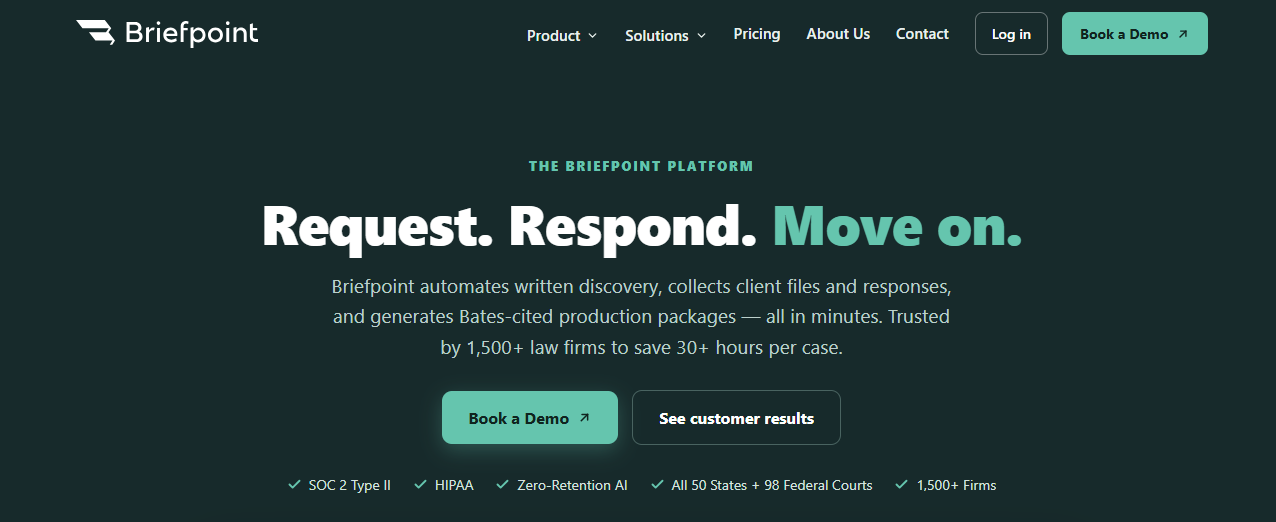
These capabilities make Briefpoint a strong choice if document review, response drafting, and production assembly are slowing your team down. You can confirm responsive files, remove irrelevant documents, flag privileged material, and edit the final language in Word.
All this keeps attorneys in control while reducing manual data entry and improving response accuracy. Typical drafting takes around 3 to 10 seconds per request.
Briefpoint can also collect files from clients through a secure, mobile-friendly link, then convert uploads to PDF, apply Bates numbers, and cite them in the response.
For later updates, supplemental responses preserve the original answers so your team can maintain consistency throughout the case.
Best Features
- Autodoc: Finds responsive documents for each RFP and drafts Bates-cited answers.
- Production assembly: Creates a Bates-numbered package that is ready for attorney review.
- Trust-and-verify controls: Lets you approve files, exclude irrelevant material, and flag privileged documents.
- Client Bridge: Collects client files through a secure link that works in English or Spanish.
- Supplemental responses: Builds updated responses from the original set while preserving earlier answers.
- Jurisdiction-ready formatting: Supports written discovery in all 50 states and 98 federal district courts.
Pros
- Built specifically for legal requests for production
- Cuts response time for document-heavy discovery
- Produces editable Word drafts with page-level citations
- Reduces repetitive review and production work
- Gives attorneys control over what gets produced
- Includes SOC 2 Type II security and zero-retention AI protections
2. Loopio for Sales and Proposal Teams
Loopio is an AI-powered RFP software platform built for proposal professionals, sales teams, and security teams handling recurring questionnaires and competitive bids.
It brings proposal creation into one workspace, where your team can import an RFP, assign questions, track progress, and prepare a first draft using approved company content.

Source: G2
Its centralized content library is a major part of the platform. Teams can organize vetted answers, product information, and supporting material, then use automated matching to find relevant content for new questions.
Loopio can generate tailored responses from trusted sources and show citations, which gives reviewers more context when checking AI-generated responses.
Plus, Loopio supports several response formats, including traditional RFPs, security questionnaires, and due diligence questionnaires. It’s a practical fit for established teams that want proposal generation, content governance, and contributor workflows in the same system.
Best Features
- Centralized content library: Stores approved answers in a searchable, structured knowledge base.
- Automated Answers: Matches incoming questions with relevant content and prepares draft responses.
- Response Intelligence: Generates answers from connected sources and provides citations for review.
- Project workflows: Assigns questions, tracks progress, and coordinates input from internal contributors.
- Content connectors: Pulls current information from sources like Google Drive, SharePoint, and company websites.
- Copilot Agent: Surfaces approved Loopio content inside supported Microsoft 365 workflows.
Pros
- Supports several sales and risk response formats
- Keeps reusable proposal content organized
- Helps teams maintain consistency between submissions
- Gives reviewers visibility into answer sources
- Combines proposal drafting with workflow management
- Works well for mature, collaborative response teams
3. Responsive for Enterprise RFP Management
Responsive is designed for companies where RFP work involves large teams, formal review steps, and a steady flow of complex requests.
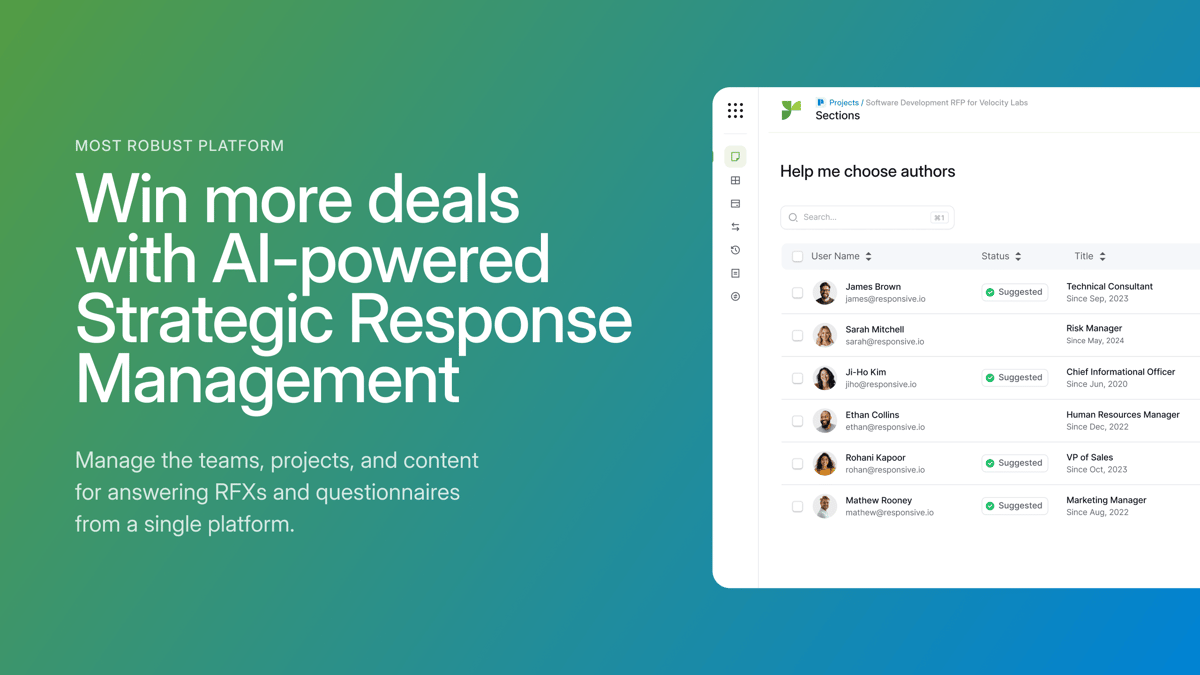
Rather than centering the experience on proposal creation alone, the platform gives response leaders a clearer view of workloads, deadlines, ownership, and project status.
Source: G2
You can break an RFP into sections, route questions to the right contributors, and monitor the full project from a shared dashboard. Built-in controls support version control, approvals, and permission settings, which can be useful when legal, security, finance, and product teams all need to contribute.
Responsive also uses generative AI to produce draft answers and recommend relevant material from approved content libraries. Teams can review the source behind each suggestion and measure performance over time.
This makes the platform a good fit for enterprise organizations that want stronger oversight of the response process while still improving proposal quality.
Best Features
- Project dashboards: Show deadlines, assignments, completion rates, and outstanding work.
- Automated workflows: Route questions and approvals based on team roles.
- Responsive AI: Generates drafts from approved company information.
- Reporting tools: Track turnaround times, contributor activity, and project performance.
- Governance controls: Manage permissions, reviews, and content ownership.
- Integrations: Connect RFP projects with common CRM, storage, and collaboration tools.
Pros
- Built for high-volume enterprise response programs
- Gives managers clear visibility into active projects
- Supports detailed permissions and approval processes
- Helps reduce version control problems
- Makes cross-department contributions easier to manage
- Provides reporting beyond basic proposal writing
4. Conveyor for Security Questionnaires
Conveyor is an RFP response automation platform built around security questionnaires and customer compliance reviews. It fits companies whose sales process regularly includes detailed questions about security controls, data handling, and internal policies.
Source: G2
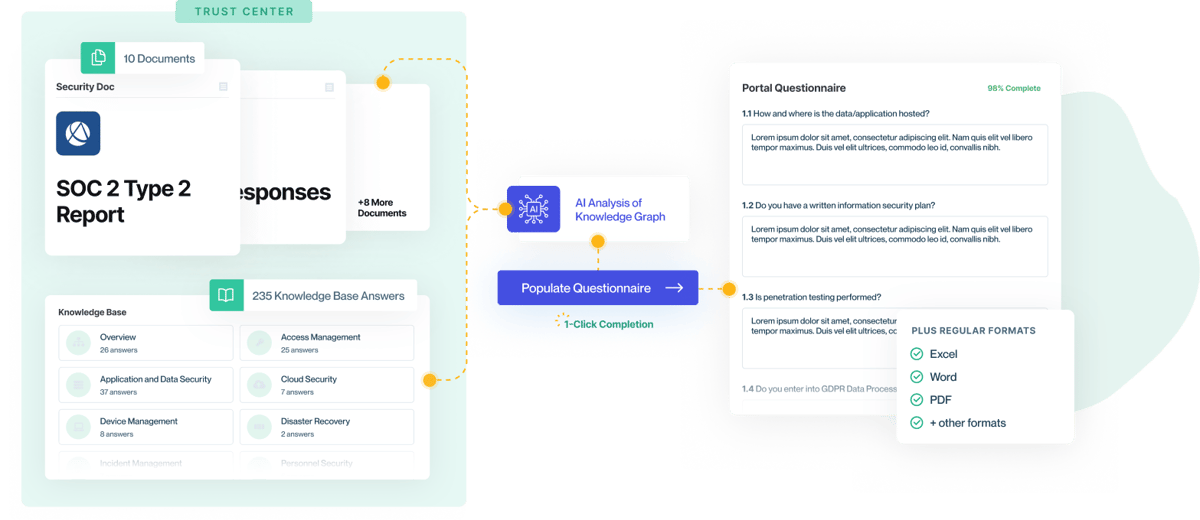
The platform reads incoming questionnaires, drafts answers from approved company sources, and returns the completed file in its original format. Each proposed response includes a citation, which helps reviewers check response accuracy before anything is sent to a prospective customer.
Conveyor also uses AI agents to manage parts of the response workflow, such as sorting incoming requests and routing questions to the right expert. This makes it a strong option when security questionnaires form a major part of your broader RFP process.
Best Features
- Questionnaire automation: Reads incoming files and drafts answers from approved sources.
- Source citations: Shows the policy or document supporting each answer.
- AI agents: Help manage intake, assignments, and review steps.
- Original-format export: Returns completed questionnaires in the submitted file format.
- Review workflows: Routes uncertain questions to internal experts.
- Trust Center: Shares approved security information with potential customers.
Pros
- Designed specifically for security questionnaires
- Connects security reviews to the wider RFP response process
- Gives reviewers traceable answer sources
- Supports detailed compliance requirements
- Reduces repetitive copying between questionnaires
- Creates a clearer audit trail for completed responses
5. AutogenAI for Narrative Proposal Drafting
AutogenAI is built for proposal teams that need to turn detailed RFP requirements into a structured, persuasive response.
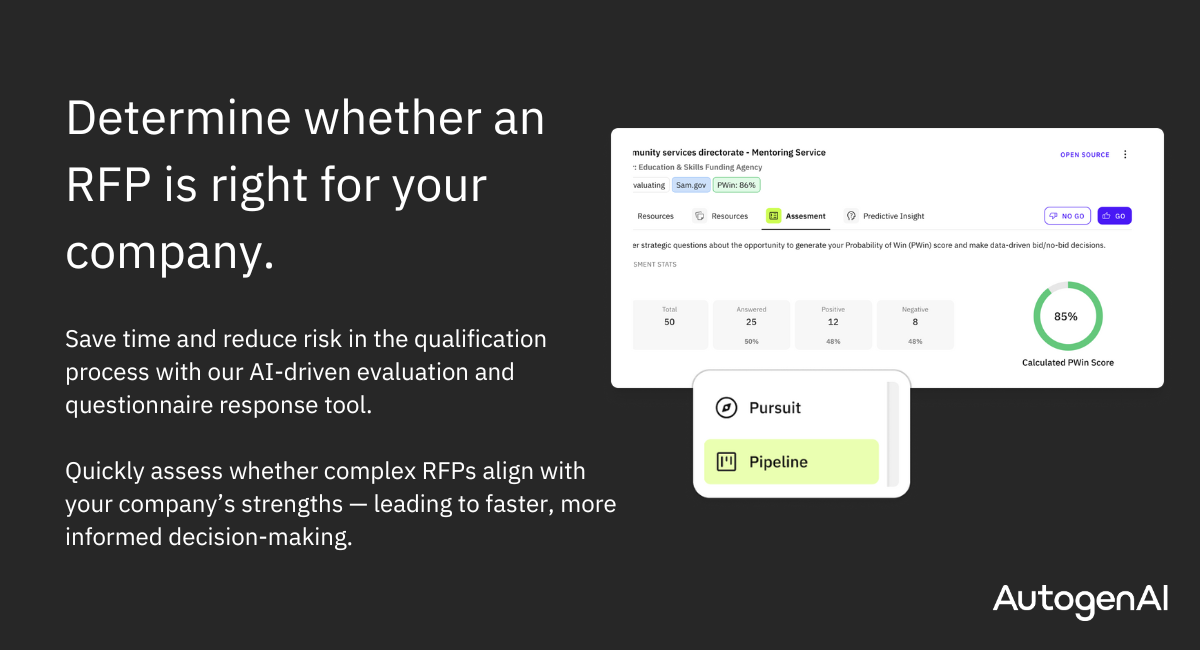
Its strongest use case is narrative-heavy work, where the team needs more than short answers pulled from a library. The platform can analyze an RFP, extract deadlines and evaluation criteria, build an outline, and generate a review-ready first draft from approved company content.
Source: G2
This makes it a practical fit for complex bids and government contracts, where the writing has to follow a clear story while still addressing every requirement.
AutogenAI can create compliance matrices, track the proposal lifecycle, and help teams see how well each section maps to the buyer’s scoring criteria. Its federal platform is designed for regulated proposal work and operates in a FedRAMP High-authorized environment.
If your team wants to scale bid volume, the platform can reduce the time spent building outlines and drafting long sections. However, writers must still refine the language, strengthen the argument, and confirm that each approved response reflects the current offer.
Best Features
- RFP extraction: Pulls requirements, deadlines, and evaluation criteria from uploaded solicitations.
- Narrative drafting: Creates tailored proposal sections from your company’s trusted sources.
- Compliance matrices: Maps requirements to the relevant response sections.
- Project Hub: Tracks milestones, document status, and time remaining before submission.
- Collaborative workflows: Keeps writers and reviewers working within the same proposal project.
- AutogenAI Federal: Supports government contractors with secure tools for compliant proposal development.
Pros
- Strong fit for long, narrative-based proposals
- Helps teams move from RFP analysis to first draft faster
- Supports regulated and government contracting workflows
- Keeps proposal content aligned with evaluation criteria
- Gives writers a structured starting point for complex bids
- Can help teams pursue more opportunities with the same staffing level
6. Thalamus AI for Agent-Based RFP Automation
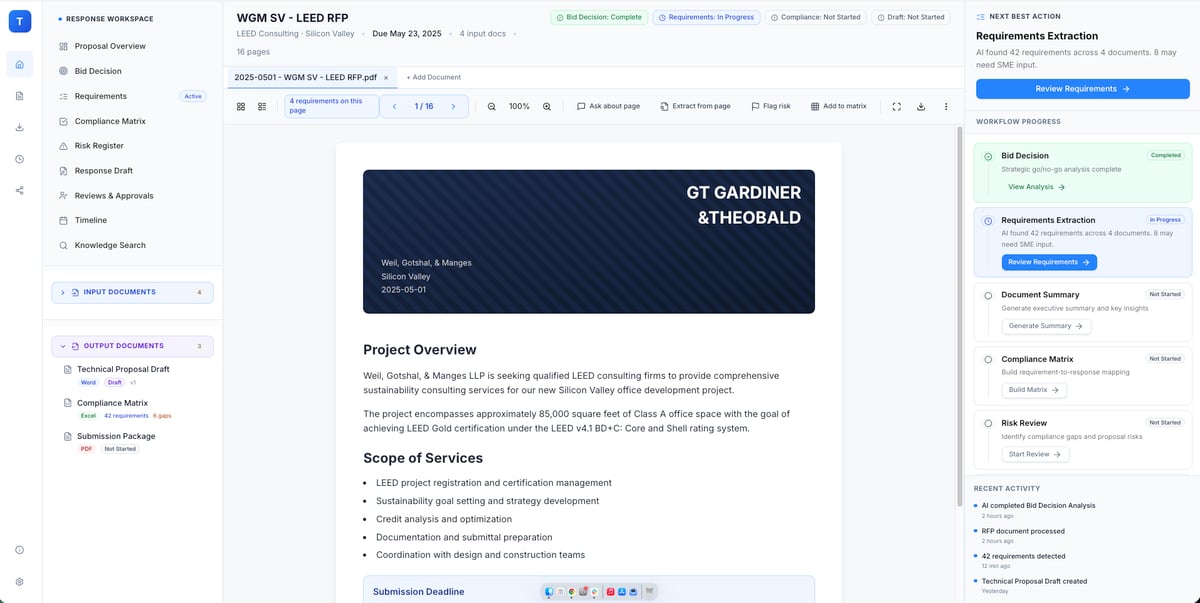
Thalamus AI is an AI-native platform for proposal teams that want support throughout the full bid lifecycle.
Its agent-based approach separates the RFP process into focused tasks, such as bid qualification, requirement extraction, SME coordination, compliance checks, and response drafting. This gives teams a broader form of AI automation than a basic answer-retrieval tool.
Source: G2
The platform can work with past responses, reviewer feedback, win themes, and approved company knowledge to create more relevant drafts over time.
It also tracks changes, roles, deadlines, and compliance requirements in one workspace. As each bid progresses, proposal leaders can see who owns each section and which responses still need attention.
Thalamus AI may suit enterprise teams handling complex RFPs, RFIs, due diligence questionnaires, or long-form proposals. Its AI-powered response engine helps produce compliant responses while keeping source material and reviewer decisions connected to the project.
Best Features
- Specialized AI agents: Handle focused stages of the response process, from qualification through compliance review.
- Requirement mapping: Extracts RFP requirements and connects them to response sections.
- Institutional memory: Learns from past responses, reviewer edits, and bid outcomes.
- SME coordination: Assigns authors and reviewers at the section or subsection level.
- Version tracking: Records edits and lets teams accept, reject, or restore changes.
- Lifecycle management: Supports planning, drafting, review, submission, and post-bid learning.
Pros
- Covers more of the RFP lifecycle than drafting alone
- Gives proposal teams clear ownership and review roles
- Uses prior bid knowledge to improve future responses
- Supports detailed compliance tracking
- Works with several RFx formats
- Includes enterprise access controls and secure audit trails
7. 1Up for Rapid Knowledge-Based Responses
1Up is RFP response software built for teams that want quick answers from trusted internal sources.
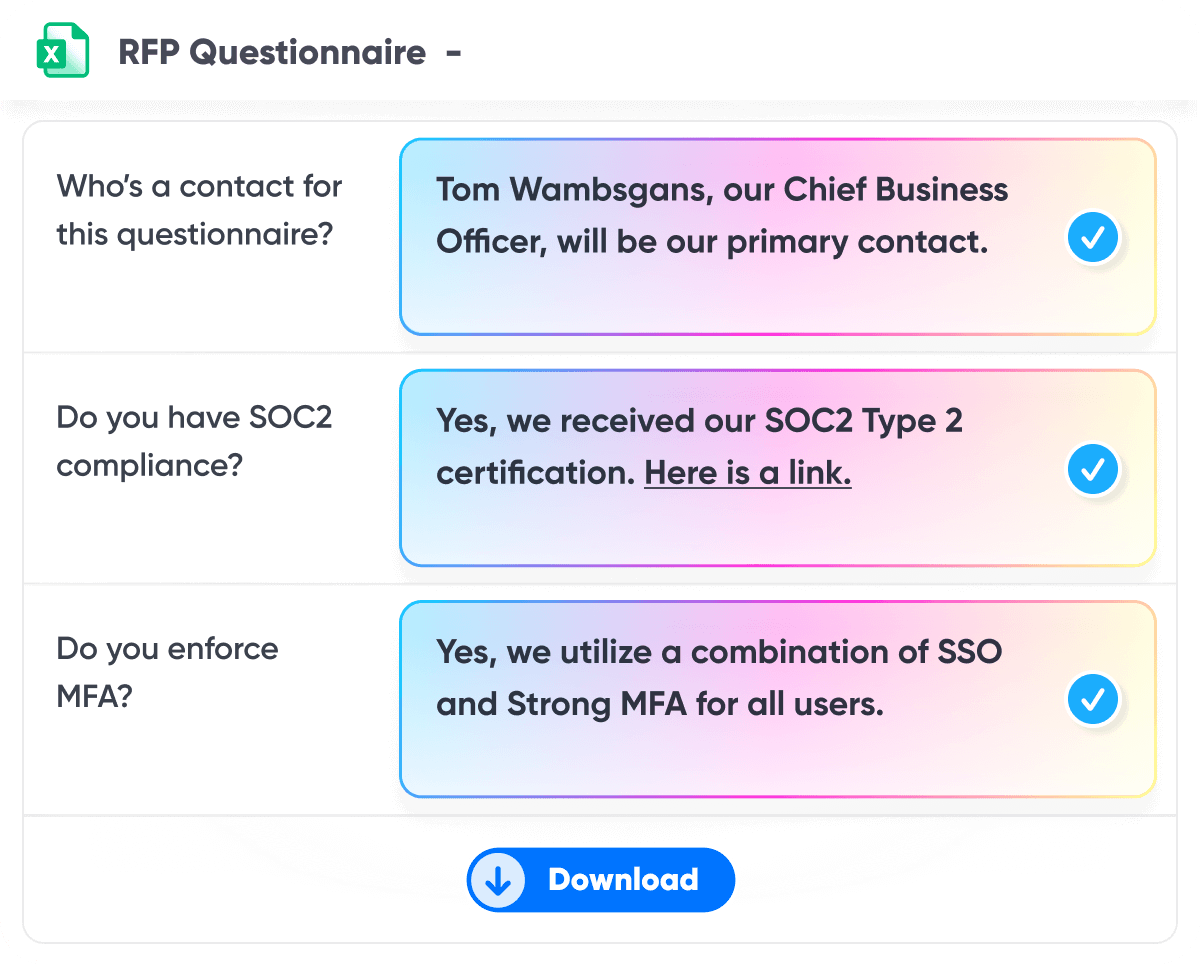
You connect the platform to company documents and knowledge systems, upload an RFP, and let the AI tool draft responses in minutes. It can handle common formats such as Word, Excel, PDF, and browser-based questionnaires.
Source: G2
The platform keeps its focus fairly narrow. It is less concerned with heavy project administration and more focused on automating responses accurately and quickly.
That can work well for lean proposal teams or sales engineering groups that already have strong source material but spend too much time searching for it.
1Up also supports real-time collaboration, task assignments, and progress tracking when a question needs extra input. Since answers come from connected company knowledge, reviewers can work from a stronger first draft rather than sorting through old document versions.
Best Features
- RFP automation: Generates large batches of responses from trusted company sources.
- Multi-format support: Works with Word, Excel, PDF, and online questionnaires.
- Browser extension: Helps teams answer questions directly inside web portals.
- Knowledge connections: Pulls current information from internal documents and business systems.
- Collaboration tools: Lets users assign questions and monitor completion.
- Answer Hub: Gives teams a central place to review and manage company knowledge.
Pros
- Quick to set up compared with heavier response management platforms
- Strong fit for lean proposal teams
- Useful for RFPs and security questionnaires
- Reduces time spent searching past responses
- Supports browser-based submissions
- Keeps generated answers tied to approved internal sources
Benefits of RFP Response Automation Software
The biggest advantage of AI RFP automation software is that it gives your team a stronger starting point and a clearer way to move each response forward.
Here are the main benefits you can expect:
- Faster first drafts: An AI-generated answer gives your team something useful to review, so writers can focus on improving the response rather than building it from scratch.
- Easier content reuse: The software can pull from approved libraries and past submissions, helping teams adapt proven material for the current opportunity.
- Better proposal management: Assignments, deadlines, reviews, and project status stay in one place, which makes it easier to see what still needs attention.
- More consistent responses: AI platforms can apply approved terminology and current company information throughout a submission, even when several people contribute.
- Quicker expert input: Questions can be routed directly to the right reviewer, reducing delays when a response needs specialized knowledge.
- Safer generative AI adoption: Purpose-built tools often ground drafts in private company sources rather than public AI models alone, giving reviewers more context and control.
How to Choose RFP Response Automation Software
Start with the type of RFPs you manage most often, then compare the features that will have the biggest impact on your day-to-day workflow:
- Match the tool to your use case: Some AI RFP software is built for proposal teams, while other platforms focus on legal discovery or security reviews. Choose one that understands your documents and review requirements.
- Check the source controls: Look for software that drafts from approved company material and shows where each answer came from. Compliance checking is easier when reviewers can trace the source.
- Review collaboration features: Subject matter experts should be able to answer questions, approve drafts, and track assignments without a steep learning curve.
- Look at workflow automation: Strong tools can route questions, trigger reviews, and flag missing responses before submission.
- Test compatibility: Confirm that the platform works with Microsoft Office and the other systems your team already uses.
- Compare security settings: Role-based AI permissions can limit who accesses sensitive content and who approves final responses.
- Ask for a realistic trial: Test the software with one of your own RFPs so you can judge response quality, setup effort, and editing time.
Choose the RFP Software That Fits the Work
Where does your RFP process lose the most time?
The answer will usually point you toward the right software. Proposal teams may care most about reusable content and collaboration, while litigation teams need help with discovery requests, case documents, and production work.

Briefpoint is specifically built for that legal workflow. It helps you review requests for production, find responsive documents, draft objections and answers, add Bates citations, and prepare the production package for attorney review.
All these features mean litigation teams can save 30 or more hours per case while keeping attorneys in control of the final response.
Book a demo to see how Briefpoint can make legal RFP responses easier to manage.
