7 Types of Legal Tech Software Every Law Firm Needs
What Is Legal Tech?
Legal tech is a broad term that covers the software and tools law firms use to manage work more efficiently.
However, it’s not one specific product or category. It’s a mix of systems that support how legal teams run day-to-day work across their entire practice, from drafting documents to managing clients and tracking matters.
Legal tech helps firms streamline operations that used to rely on manual or outdated systems. The common goals are to reduce friction and make legal work easier to manage as volume grows.
You’ll see legal tech show up in different parts of a firm, such as:
- Document automation tools for drafting and responses
- Practice and case management software
- Legal research platforms
- Contract review and contract management tools
- Billing, accounting, and payment systems
- Client intake and onboarding software
- Electronic signature tools
The Key Benefits of Implementing Legal Technology
Legal technology can take a lot of pressure off the people handling day-to-day legal work. The right software solutions support legal practitioners by simplifying routine tasks, improving access to information, and giving them more room to focus on work that requires legal expertise.
Some of the biggest benefits include:
- Better workflow efficiency: Workflow automation keeps routine tasks moving and reduces the amount of manual follow-up required.
- Fewer errors: Standardized processes, templates, and automated checks can help with reducing errors in documents and internal records.
- Stronger decision-making: Advanced technology can organize legal data and make useful information easier to review.
- More consistent processes: Legal tools can help teams follow internal policies and legal standards across matters.
- More capacity: In-house legal teams and corporate legal teams can manage heavier workloads without relying on the same level of manual effort.
- Better access to modern tools: Small law firms can use legal technology to handle work more efficiently without needing a large support team.
The Most Common Types of Legal Technology
As mentioned, legal software is an umbrella term for tech solutions that aim to make life easier in law firms and corporate legal departments.
There are far too many to dissect one by one, but we’re going to focus on the essential tools every law firm needs in their tech stack:
1. Document Automation
Document automation helps law firms create legal documents without rebuilding the same language each time. It handles repetitive work such as inserting standard provisions, applying formatting rules, and pulling client or matter details into the correct places.
Most systems rely on templates and predefined rules to generate a clean first draft from the information you provide. This can cut hours of drafting and manual review time while reducing errors caused by copying, pasting, or manual data entry.
Connections to existing systems make the process even more efficient. Names, dates, case details, and other information can flow into the document automatically, which helps maintain consistency as workloads increase.
More advanced platforms use AI tools to support tasks like document review, identify key clauses, and suggest language based on the context of the matter. The lawyer still reviews the final output, but the AI tool can make the first pass much faster.
That combination of speed, consistency, and attorney oversight makes document automation useful across the legal industry, particularly for teams that regularly produce high volumes of similar documents.
Briefpoint
Briefpoint is built specifically for discovery work, one of the most time-consuming parts of the litigation process. It helps firms move from request to response in minutes, not hours, without changing how attorneys already work.
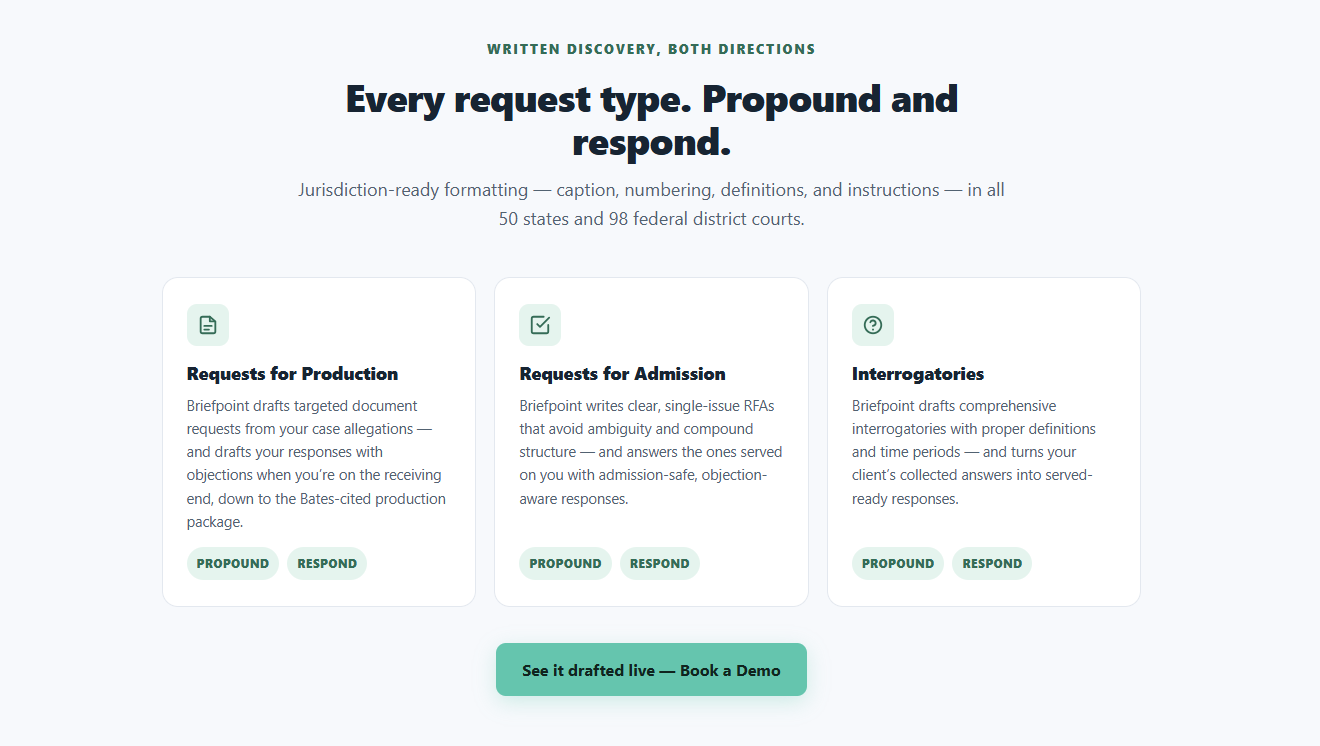
Using Briefpoint is straightforward: upload a discovery request, choose your objections and responses, and download a ready-to-serve Microsoft Word document. From there, it’s sign and serve, no manual formatting or copy-pasting required.
Briefpoint also includes Autodoc, which handles the heavy lifting behind the scenes. Autodoc structures discovery responses automatically, applies the right formatting, and keeps everything consistent across documents. That consistency alone saves a surprising amount of review time.
For client responses, Briefpoint Bridge removes even more friction. It converts discovery questions into plain English and sends them directly to clients.
Once clients submit their answers, Briefpoint places those responses into the correct sections of your document, without emails, spreadsheets, or manual cleanup.
Is discovery document drafting work eating too much into your day?
Book a demo today and see how Briefpoint can help.
2. Legal Practice Management
Once your caseload grows, keeping everything straight gets harder fast. Legal practice management software exists to keep that chaos in check.
Essentially, it pulls your firm’s daily work into one place so you always know what’s happening, what’s due, and who’s responsible.
For legal professionals, this kind of software becomes the system everyone relies on. Client details, messages, documents, and deadlines sit together, which means less time searching and fewer things falling through the cracks.
You can quickly look back at past client communications, check the status of a matter, or see what needs attention next. That context makes client service feel smoother and more intentional, even on busy days.
Most practice management tools help you:
- Keep matters, contacts, and legal documents organized
- Track deadlines, tasks, and follow-ups
- Log calls, emails, and notes as work happens
- Coordinate work when multiple people touch the same case
When everything lives in one place, it’s easier to respond quickly and handle small issues before they turn into bigger ones. It also cuts down on miscommunication as teams grow.
Security still matters, of course. Clients expect their information to be protected, and modern platforms are built with that responsibility front and center.
Clio
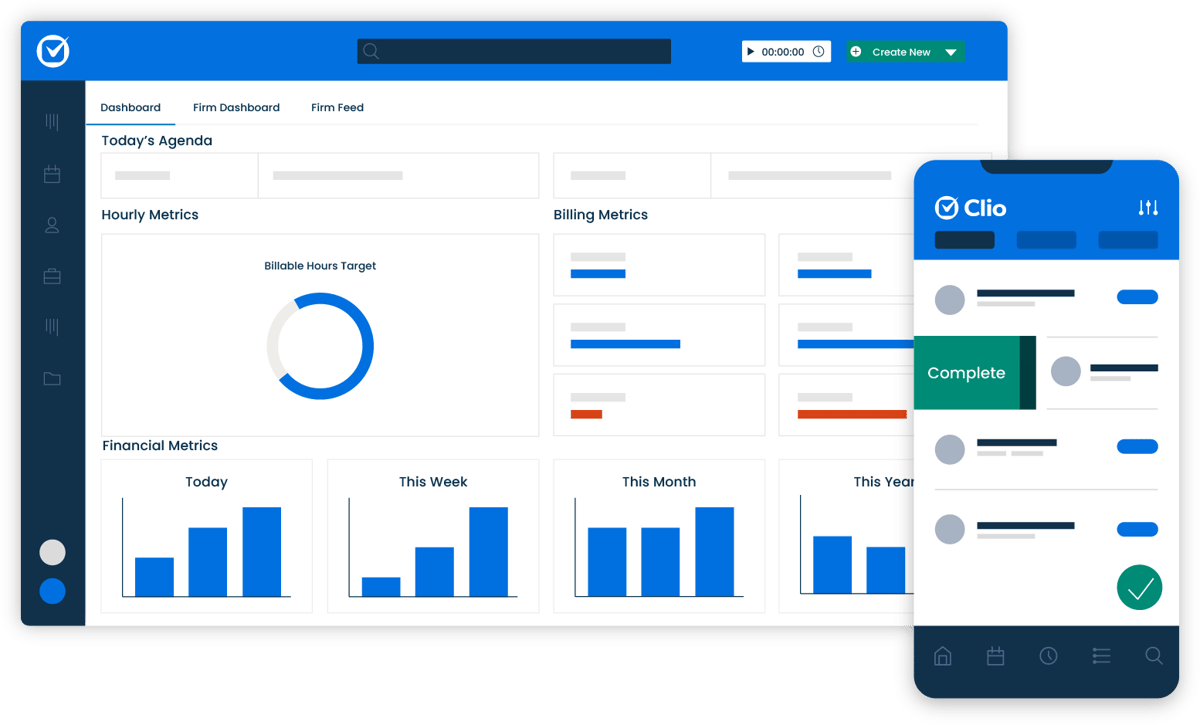
Clio is a popular choice for firms that want a clearer view of their daily work. On this platform, case details, contacts, documents, and conversations all live in one place, which makes staying organized much easier.
Source: G2
With Clio, scheduling, document storage, and communication tracking feel straightforward. It also connects with other legal tech software platforms, which helps reduce manual work across your workflow.
Whether you’re checking in with a new client or managing long-running matters, Clio keeps everything documented and easy to find, so nothing important gets missed.
3. Legal Research
Legal research is a basic part of preparing a case and advising clients. Lawyers need to review statutes, regulations, and past decisions so their arguments are grounded in current law rather than memory or assumption.
Modern legal tech solutions make that process faster and easier to manage. Many platforms use natural language processing, which lets users search in plain English and find relevant authority without working through scattered sources.
Some of the main benefits include:
- Faster access to authority: AI-powered software can search large collections of case law, statutes, and regulations in less time.
- Clearer case comparisons: Certain tools extract structured data from court decisions, making it easier to compare rulings, judges, and outcomes.
- Better risk assessments: Data-driven insights can help lawyers evaluate possible outcomes and decide where more research is needed.
- Smoother legal workflows: Research platforms can connect with e-discovery and case management tools, keeping legal authority and case facts easier to review together.
These tools reduce manual research work while still leaving the final analysis and judgment to the lawyer.
Westlaw
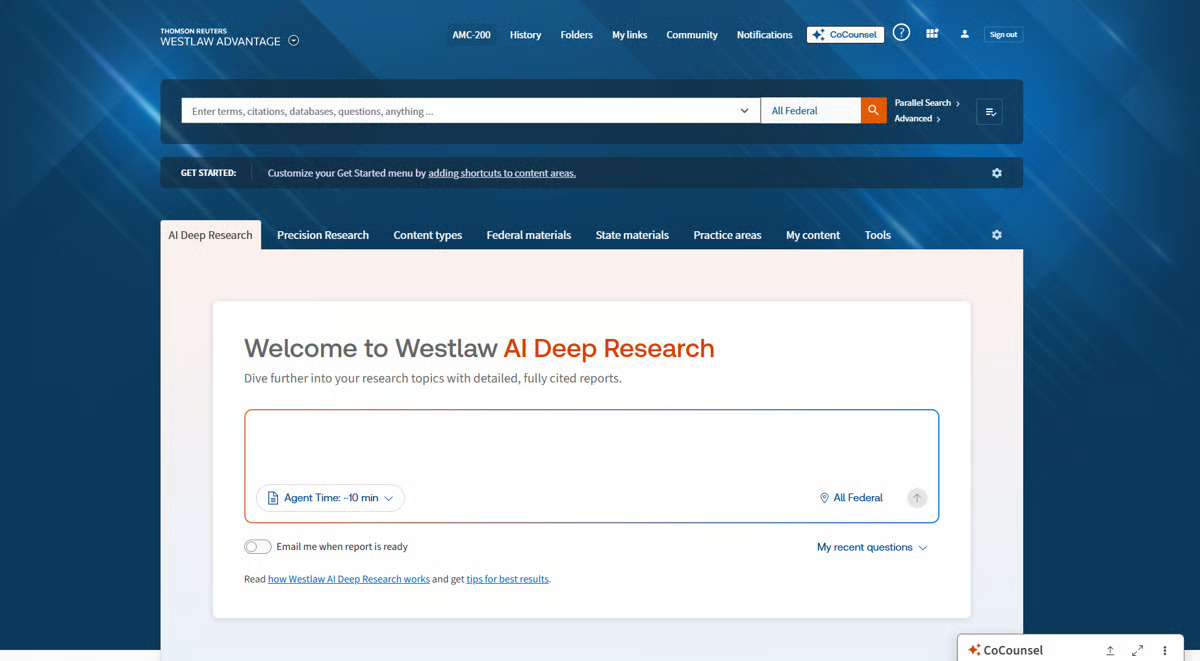
Westlaw is a well-established legal research tool that many firms use for everyday legal work. It brings case law, statutes, regulations, and secondary sources into one searchable platform, which makes it easier to find reliable authority without switching between multiple databases.
Source: G2
Its filtering tools help lawyers narrow results by jurisdiction, practice area, date, and document type. That can save a significant amount of research time, particularly when a matter involves a large body of authority.
Westlaw also supports more careful citation review through KeyCite. Lawyers can quickly see how a case has been treated by later courts, confirm whether it remains good law, and identify any negative history before relying on it. This can play an important role in minimizing errors.
The platform uses machine learning and other legal AI capabilities to improve search relevance and surface authority based on context. Some of its advanced analytics features also help users review litigation trends and compare courts, judges, or case outcomes.
For firms that need dependable access to legal sources, Westlaw remains one of the most widely used legal research tools available.
4. Contract Management
Contract management covers everything that happens from the first draft through review, approval, signing, renewal, and storage. For law firms and in-house teams, the challenge often comes down to keeping each contract organized and moving without losing track of important details.
Modern platforms simplify document handling by bringing drafts, comments, approvals, and key dates into one system.
Many also support clause extraction, which helps legal teams identify terms such as renewal dates, payment obligations, and liability provisions without reading every agreement line by line.
For example, if a company has hundreds of vendor contracts, the software can flag which agreements are approaching renewal and show where certain clauses differ from the organization’s preferred language. That gives lawyers a clearer starting point for review.
These tools can also support lifecycle management by tracking version changes, routing contracts for approval, and creating reminders for upcoming obligations. Lawyers still make the final legal calls, but the system makes the surrounding process easier to manage and more consistent.
Ironclad
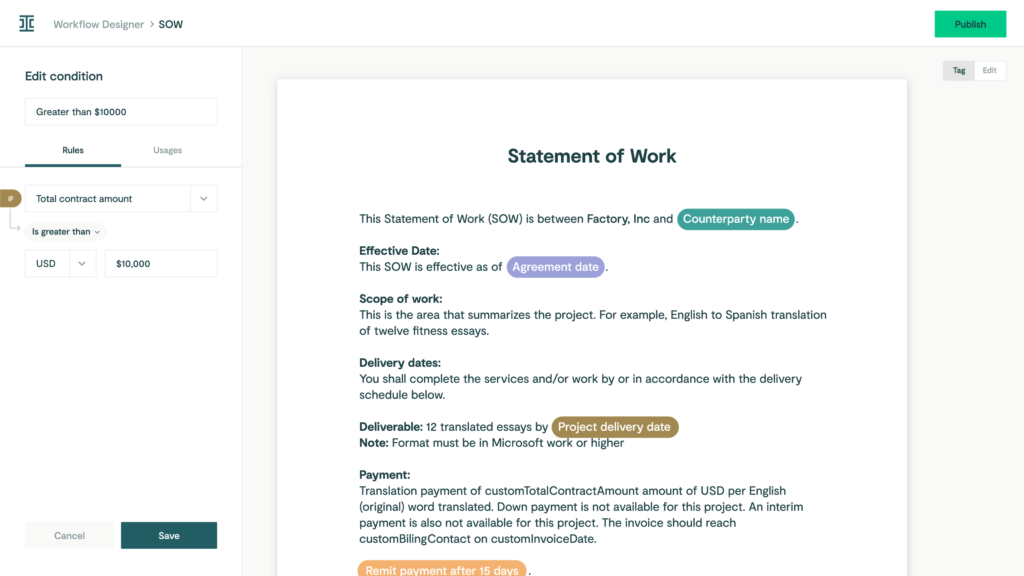
Ironclad is a contract management platform built for teams that handle a steady volume of agreements. It brings drafting, review, approvals, and post-signature tracking into one system, which helps reduce repetitive tasks and keep legal work moving.
Source: G2
Teams can create templates for common agreements and set up custom workflows based on contract type, value, or risk level. Since no two agreements are created equal, the platform allows legal teams to adjust the process when a contract needs additional review.
Ironclad also supports contract analysis by identifying important terms and clauses during review. Its artificial intelligence features can surface potential issues and give attorneys a clearer starting point, while the final legal decisions remain with the lawyer.
Strong version control keeps edits, comments, and past drafts easy to follow. Once an agreement is signed, the platform tracks key dates such as renewals and expirations and keeps related legal information in one place.
This combination of legal automation and document management makes Ironclad useful for teams that want a more consistent contract process without losing oversight. Enterprise-grade security adds another layer of protection for sensitive legal and business information.
5. Billing and Accounting
Legal billing and accounting software keeps a firm running day to day, even though it rarely gets much attention. For legal professionals, staying on top of hours, expenses, and invoices directly affects cash flow and how smoothly the practice operates.
Handled manually, these tasks take up more time than they should and make it easier for small mistakes to slip in. And when billing falls behind, it often spills into other daily operations, such as client follow-ups and internal reporting.
Modern legal billing software brings structure to this part of the firm. Time entries, expenses, and invoices stay organized and easy to review, which helps firms stay consistent and predictable with their finances.
Many billing software platforms also support e-filing and reporting to make regulatory compliance easier to manage.
Just as important, billing and accounting software tools are designed to align with regulatory standards, which helps give firms confidence that financial records are accurate and defensible.
QuickBooks
QuickBooks is a widely used accounting platform that helps law firms manage billing, expenses, and financial reporting in one place.
Firms can track billable time, create invoices, record payments, and monitor spending without relying on separate systems for each task.

Source: G2
Invoices can be sent directly to clients, which helps legal services teams keep billing accurate and follow up on unpaid balances more easily. Expense tracking also gives firms a clearer view of operating costs, including payments tied to vendor management and other legal operations.
QuickBooks reporting tools turn historical data into useful financial summaries, making it easier to review law firm profitability, compare performance, and plan ahead. These reports can help firm leaders make better decisions about staffing, spending, and future growth.
The platform supports seamless integrations with many business and legal tools, allowing billing and financial information to move between systems with less manual entry. Its straightforward interface also makes it accessible to attorneys and staff who may not have an accounting background.
6. Client Intake
Bringing in a new client doesn’t end when they say yes. The intake process is what shapes their first real impression of your firm. If it feels slow or confusing, that experience sticks.
Client intake covers how you collect client info, share forms, and explain next steps. Think of the moment after the first inquiry: someone fills out a form, makes a few phone calls, or sends documents over.
A good intake process keeps that information organized and keeps clients informed about what happens next.
For example, an intake tool might send a new client a secure form to complete before the first meeting. Once it’s submitted, the details are saved automatically, reminders go out if something’s missing, and your team sees everything in one place before the call even happens.
That kind of structure reduces back-and-forth, shortens response times, and plays a big role in improving client satisfaction.
When intake runs smoothly, clients feel supported from the very beginning, and your team starts the relationship on solid ground.
Lawmatics
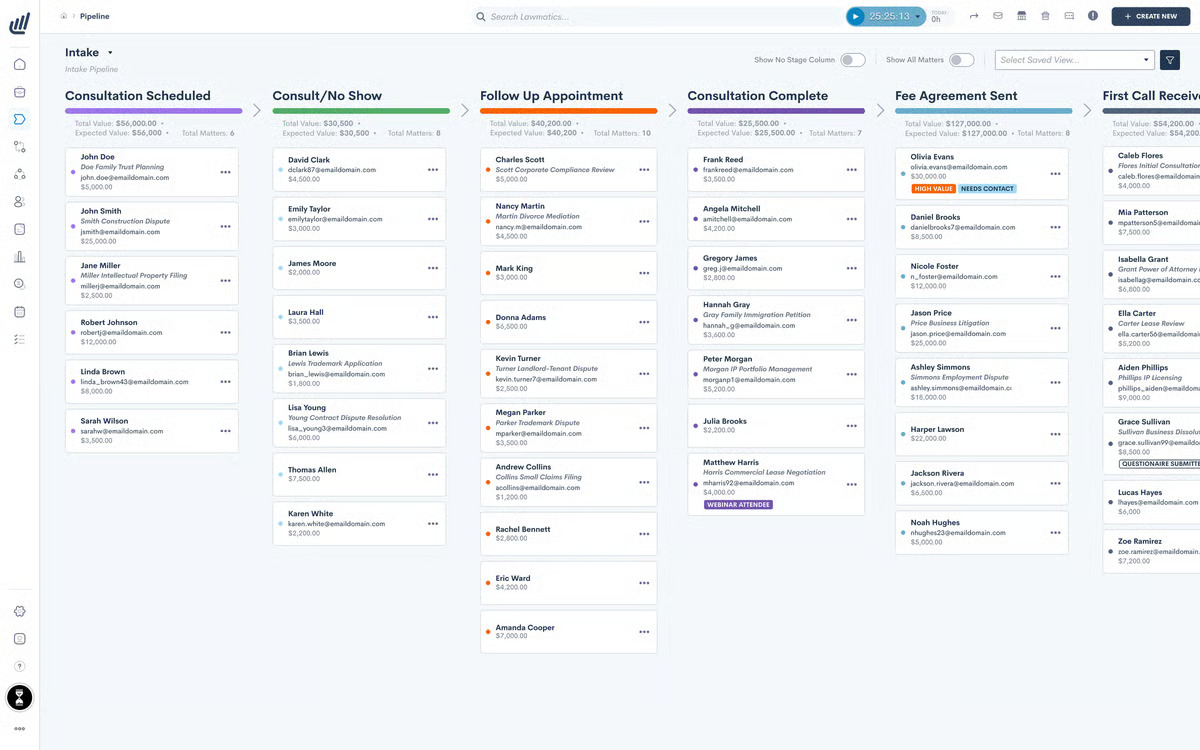
Lawmatics helps law firms manage client intake, follow-ups, and onboarding from one platform. Firms can build custom intake forms, collect documents, and guide new clients through the early stages of a matter without relying on long email chains or manual reminders.
Source: G2
The platform also tracks leads and sends automated follow-ups, helping firms stay responsive while reducing the administrative work tied to client development. Its interface is designed to be straightforward, so staff can manage intake and communication without a complicated setup.
Third-party integrations allow Lawmatics to connect with practice management systems, legal CRM platforms, and other tools already used by the firm. This keeps client information organized and reduces duplicate data entry.
Plus, Lawmatics includes controls that support data privacy, which is important when firms collect personal and case-related information during intake.
As the legal landscape becomes more technology-driven, tools like Lawmatics can help firms create a more consistent and professional experience for prospective and new clients.
7. Electronic Signatures
Electronic signatures have become a normal part of how legal documents move today. Signing no longer means printing, scanning, or dealing with physical files, which saves time and keeps things from piling up.
Many document management platforms now include e-signature tools right inside the system. That means a document can be drafted, sent out for signature, signed, and stored in the same place. Once it’s signed, it’s already filed and easy to find later.
E-signatures also help keep sensitive information protected. Built-in security features and audit trails make it clear who signed what and when, which matters for legal work.
Docusign
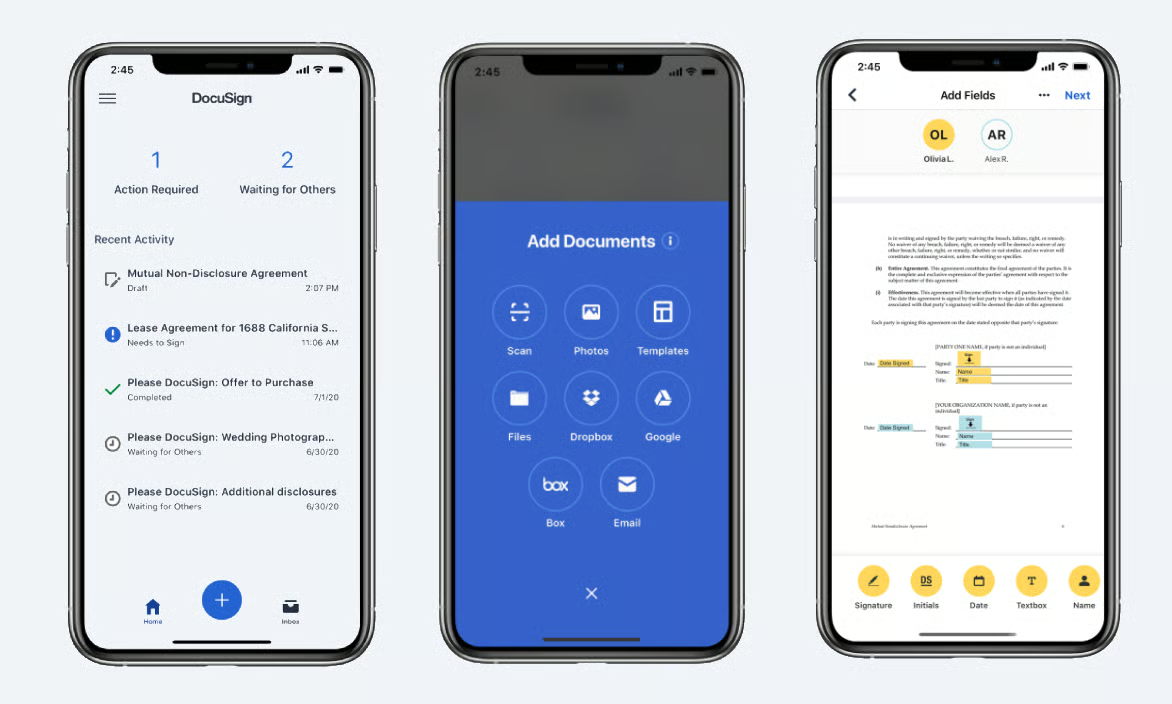
With Docusign, you can send, sign, and manage documents electronically so signatures are collected quickly and securely.
No matter what type of legal document you’re working with (contract, litigation document, or something else entirely), this platform has the versatility to handle it with ease.
Source: G2
One of the key benefits of Docusign is its ease of use. Both lawyers and clients can sign documents from any device, whether they’re in the office or on the go.
With this flexibility, delayed signatures become a thing of the past, and important documents get signed promptly.
Docusign also offers robust security features, including encryption and authentication, to protect the integrity of your documents and the confidentiality of your clients.
When Discovery Becomes the Bottleneck
Legal tech feels a lot less overwhelming once you stop looking at it as one huge change. Most firms already know they need better tools. The harder part is deciding which problem to solve first.
Discovery is often a good place to start because it touches so much of the case. Attorneys may spend hours drafting requests and responses, following up with clients, sorting through documents, and preparing production materials.
Briefpoint helps bring that work into one process. You can draft RFAs, requests for production, and interrogatories, then add objections and response language without rebuilding everything from scratch.

Client Bridge makes it easier to collect answers and documents from clients through a secure link. Their responses stay tied to the correct request, so there is less copying, pasting, and chasing down missing information.
Autodoc helps with document-heavy productions by reviewing uploaded files, finding responsive material, and creating Bates-numbered production sets with page-level citations. Briefpoint can also carry earlier answers into supplemental responses, which saves you from recreating the document later.
You still control the final work. Briefpoint simply handles more of the repetitive steps around it, so attorneys can spend less time managing discovery and more time on the case itself.
